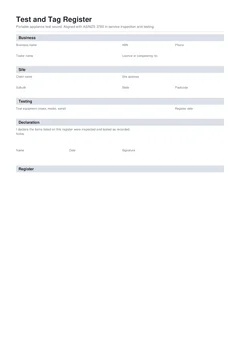
A fail is the moment the register earns its keep. Passes are routine. Fails are where people get hurt if the item wanders back into use, and where arguments start if the paperwork only says "fail" with no action. The standard and WHS framing are simple in spirit: non-compliant equipment does not stay available for use. Your job is to make the physical world and the PDF match that rule.
This guide covers what to do at the moment of failure, what to write on the register, how to talk to the client, how repairs and retests should appear, and how fails interact with RCD records and construction site pressure. For general register structure, see test and tag register and AS/NZS 3760. For day-of habits, see the test and tag register on-site guide.
If you are mid-round with fails stacking up, open the national test and tag register and close each fail action before the next item. Browse more electrical forms.
Why do fail records matter more than pass lists?
AS/NZS 3760:2022 covers in-service inspection and testing of electrical equipment and RCDs, including documentation and tagging of compliant equipment. The Safe Work Australia model code on managing electrical risks expects workplaces to manage electrical risk, including inspection and testing by competent persons and keeping records. WorkSafe Queensland testing and tagging guidance is part of that state conversation about who tests and how gear is controlled. On construction sites, NT WorkSafe and related construction guidance keep non-compliant portable gear out of the three-month cycle story by requiring testing and, by implication, removal of what does not pass.
A register that only celebrates passes is a marketing brochure. A register that shows fails with isolation actions is evidence the system works when gear is damaged.
The moment of fail: physical steps first
When the visual check or the instrument says no:
- Stop using the item. Unplug it. Do not "just finish this cut".
- Mark it. Failed tag, quarantine tape, or the site's defective equipment mark. It must be obvious to the next person who grabs a lead from the pile.
- Remove it from the work front. Quarantine bin, locked cage, or your controlled hold area agreed with the site. Shared construction piles are where fails get reused.
- Write the row immediately. Identity, fail, reason, action, note.
- Tell the site contact for that area. Especially if the item was the only lead on a task or a portable RCD protecting a circuit people still think is safe.
Physical control first, paperwork in the same minute. Paperwork alone does not stop a labourer plugging the lead back in.
What must the register row capture for a fail?
Identity. Asset ID, description, serial if available, location found. "Failed lead" without an ID is how the wrong lead gets repaired or the right one gets lost.
Result. Fail. Do not soften it to "advisory" unless your process and the client procedure genuinely use that category for non-safety findings. Electrical in-service fails that make gear unsafe are fails.
Why it failed. Visual damage, earth continuity, insulation resistance, polarity, leakage, RCD push-button, RCD trip time, or other. Specific reasons help the repairer and protect you if the client asks later.
Action taken. Examples that close the loop:
- Tagged out and removed from service
- Quarantined pending repair
- Repair required (and who holds the item)
- Disposed / destroyed
- Returned to hire company
- Client notified and item left in client quarantine
Note. Anything the next reader needs: "cracked insulation 200 mm from plug", "earth open", "site supervisor Sam advised 10:40".
Next due date. Leave blank or clearly not in service. A next due date on a fail implies the item is still part of the operational fleet.
Retest status. Where useful: repair required, awaiting parts, retest after repair. That field is a handoff to the next visit, not a substitute for isolation now.
Which actions do not count?
Client conversation without soft-soaping
Lead with the fail, not the pass count.
- Show them the item and the damage or the reading if safe to do so
- State that it is out of service
- State what happens next (repair quote, replacement, hire swap, disposal)
- Confirm who owns the quarantine area
- Point to the row on the register or the PDF once downloaded
On construction sites, also confirm whether the trade, the principal, or the hire company owns replacement. Ownership fights are common; hazard control cannot wait for the fight to end. Construction cycle context sits in construction site test and tag every three months.
Photos and supporting evidence
Photos help when:
- The client disputes damage
- Hire companies need proof before credit
- Multiple identical leads need visual matching to asset IDs
Best practice: asset ID in the frame, close-up of the defect, and a wide shot of the quarantine mark. Photos support the register. They do not replace the row.
Repair, retest, and history
When a failed item is repaired:
- Competent repair to a safe condition
- Full inspection and test again as for in-service gear under AS/NZS 3760 methods
- New pass result, readings, test date, next due date, and tag
- Clear trail that this is a retest after fail, not the original fail overwritten into silence
How you keep history depends on your system. Options that work:
- Keep the original fail row and add a new row for the retest with a note linking asset IDs
- Keep a fail register plus a current in-service register, both under the same job or client file
- On a digital register, preserve downloaded PDFs of the fail day rather than only the latest live list
What does not work is editing last month's fail into a pass without a new test date and readings. That is fiction, not a record.
Disposal and hire returns
If the item is scrap:
- Record disposed or destroyed as the action
- Make disposal real (cut the plug, render unusable) when that is the agreed method so it cannot re-enter service
- Note it on the register so stock counts make sense
If it is hire gear:
- Record returned to hire company as the action
- Get a receipt or off-hire reference where you can
- Do not leave hire fails on site "for the rep next week" without quarantine control
Failed portable RCDs and dual paperwork
Portable RCDs sit in both worlds: they are equipment on a test and tag round, and they are residual current devices with push-button and trip time results.
- On the test and tag register, capture identity, fail, action, and any RCD readings fields you use
- On an RCD test record, capture push-button, trip time, fail, and isolation when you are logging safety switch performance in detail
- Use the same job reference and asset ID on both
- Make sure both documents agree that the unit is out of service
RCD-specific fail and handover habits are in common RCD test record mistakes and RCD test record handover to clients.
Construction pressure and "we need it today"
Three-month construction cycles and live deadlines create pressure to leave borderline gear in service. That pressure is not a testing method.
- Do not pass damaged insulation because the pour is tomorrow
- Do not extend a next due date on a fail
- Offer replacement leads or hire options as the constructive path
- Escalate to the site manager if a supervisor asks you to leave a fail in use
Your name is on the register. A verbal instruction to "just leave it" will not be standing next to you when the incident report is written.
Batch fails at the end of a round
If several items fail:
- Quarantine them together in one controlled place
- List each on its own row with its own reason
- Summarise the count in declaration notes ("four leads tagged out and placed in north compound quarantine cage; site manager advised")
- Do not merge four leads into one row
One row per item is what makes repair, disposal, and retest possible later.
When the fail count is high, pause the happy path of testing long enough to re-check the quarantine pile against the register. It is easy to write four fails and only cage three while someone "borrows" the fourth for a quick job. A two-minute count against asset IDs prevents that.
Common fail-record mistakes
- Fail tick, empty action
- Action written, item still on the tools
- Next due date filled on a fail
- Identity too vague to find the item again
- Client never told
- Fail overwritten into a pass without a new test
- Tag still shows pass colours or pass dates
- Photos without asset IDs and no register row
These sit alongside the wider list in common test and tag register mistakes.
Build fail-safe registers on site
Tradie Forms requires failed items to carry an action and failure detail before download, which is the gap most paper logs leave open. You still do the physical isolation. The form stops a clean-looking PDF from hiding an unfinished fail.
Add each item as you test it, mark fail when it fails, complete the action, then move on. Preview the PDF, download, and hand over while the quarantine pile still matches the file.
Tradie Forms maps your entries onto the layout of the record. It is not a government form and is not affiliated with regulators. Competence, isolation, and honesty on pass or fail remain yours.
Start the national test and tag register, browse more electrical forms, or use the national RCD test record when the fail is a safety switch that needs its own operating time trail.
Official references
Check the Standards Australia spotlight on AS/NZS 3760:2022, the Safe Work Australia model Code of Practice: Managing electrical risks in the workplace, WorkSafe Queensland testing and tagging of electrical equipment, and the NT WorkSafe construction electrical equipment bulletin. Confirm site quarantine procedures and state duties before you leave failed gear in someone else's hands without a written action.