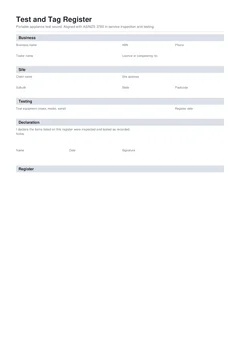
The PAT tester is the easy part for most competent people. The register is where rounds fall apart: items tested but never written down, fails without isolation notes, next due dates left blank, and a spreadsheet still open at 9 pm. An on-site register habit means the PDF is finished when the last tag is stuck on, not when you finally remember the job.
This guide is a practical fill order for a national test and tag register on the day. For the standards background and interval overview, start with test and tag register and AS/NZS 3760. This piece is about how to run the visit so the paperwork matches the gear.
If you are mid-round today, open the national test and tag register. Browse more electrical forms. When safety switches are on the same visit, use the national RCD test record as a separate document.
Before the first tag
Spend five minutes on the header so every row inherits the right rules.
Business and tester. Business name, tester name, licence or competency number where required, phone. Testing is done by a competent person under the Safe Work Australia model code framing: knowledge, training, skills, and experience to do the task safely and correctly. That name is who stands behind the results.
Client and site. Client name, job reference, site address. The job reference is the thread that ties the register to photos, invoices, and any RCD record from the same day.
Instrument. Make, model, and serial of the PAT tester, plus last verification or calibration date. Readings without a tool history are soft if challenged later.
Environment and basis. Work environment drives retest intervals under AS/NZS 3760. Testing basis is usually AS/NZS 3760:2022, and on construction, demolition, and mining sites also AS/NZS 3012. NT WorkSafe states that AS/NZS 3012 requires electrical equipment on construction sites to be tested every three months, with AS/NZS 3760 as the inspection and testing method. WorkSafe Queensland points workplaces to local regulation and, where applicable, AS/NZS 3760.
Default retest interval and tag colour. Set the months that apply to this environment so next due dates are not reinvented per row. On construction sites that colour-code tags by period, record the tag colour for this round.
Register date. Today's date for the round, not the date you hope to type it up.
A repeatable loop for each item
Run the same loop on every lead, tool, and portable outlet device.
- Identify it. Asset or tag number, description, manufacturer, model, serial where available, equipment type and class, location. Vague descriptions that fit four leads defeat the register.
- Inspect it. Visual inspection first. Damage, crushed plugs, missing covers, and heat marks are fails even before electrical tests.
- Test it. Earth continuity, insulation resistance, leakage, polarity, and any RCD checks that apply to that item, using the methods in AS/NZS 3760 for the equipment class.
- Decide pass or fail. Be honest. Borderline wishful thinking becomes your problem at the next audit.
- Tag or quarantine. Passes get a durable tag with test date and next test date. Fails come out of service immediately and are marked so they cannot be used until repaired or replaced.
- Write the row now. Readings, result, test date, next due for passes, action and note for fails.
- Move on. Do not batch writing for the end of a 40-item pile.
That loop is slow only the first time you force yourself to do it. It is faster than retesting because the register was empty.
What counts as enough asset identity?
Identity is the field that saves retests.
- Asset ID or tag number that matches the physical tag
- Description specific enough to pick the item from a rack ("15 m heavy duty extension lead" not "lead")
- Serial or manufacturer and model where the item has them
- Location that will still make sense next quarter ("Van 1", "Level 2 plant room", "Site shed north")
If two items would share the same description, they need different IDs. Construction rounds with dozens of similar leads are where this bites hardest. More on that cycle sits in construction site test and tag every three months.
Readings that defend a pass
A pass with no readings is a claim without evidence. Capture the values that support the result for that equipment class:
- Visual inspection outcome
- Earth continuity where required
- Insulation resistance where required
- Leakage current where used
- Polarity where required
- RCD push-button and trip time where the item includes an RCD
You do not need to invent readings that do not apply to the class. You do need to avoid empty columns on tests you actually ran. Standards Australia's public material on AS/NZS 3760 highlights inspection procedures, testing procedures, documentation and tagging, and competency as core parts of the standard.
How do you handle a fail mid-round?
When an item fails, stop the happy path.
- Mark fail on the row
- Record why (visual damage, failed earth, failed insulation, and so on)
- Select the action: tagged out and removed from service, repair required, disposed, client notified
- Physically remove or quarantine the item so it cannot wander back into use
- Tell the site contact before you leave that area of the job
- Only then pick up the next item
A register full of fails with empty action fields is a list of open hazards. For fail actions and quarantine habits, see test and tag failed equipment records.
Multi-area sites without losing the plot
Large sites break registers when people test in three sheds and write one vague location.
- Finish one area's items before moving, including their rows
- Put location on every row, not only in the header
- Use the same job reference across partial lists if you must split PDFs by building
- Photograph damaged fails with the asset ID in frame when the client needs visual proof
If you also test fixed or portable RCDs as safety switches rather than only as appliance accessories, keep an RCD test record separate and cross-reference the job number.
Tag and register must agree
The tag on the tool is the quick visual check. The register is the durable proof. They must tell the same story:
- Same test date
- Same next due date
- Same identity trail (tag number matches asset ID)
- Fails are not wearing a pass tag
If you change a next due date on the register, change the tag. If a tag is knocked off later, the register is what rebuilds the history, which is why Safe Work Australia style record-keeping accepts tags, logbooks, registers, or databases rather than tags alone.
End-of-round checklist before download
- Header complete: business, tester, site, instrument, environment, basis, interval, date
- Every tested item has a row
- Every pass has a next due date
- Every fail has an action and failure detail
- Tag colours match the period if the site uses them
- Notes capture anything the client must know (withdrawn items, areas not accessed)
- Declaration name, date, and signature are last

Then preview the PDF, download, and hand a copy to the site contact. Keep your own copy against the job. Common ways this checklist fails are listed in common test and tag register mistakes.
If anything was not accessible (locked room, gear on another level, tools still in use), say so in the notes rather than implying a full site sweep. Honest scope protects you when the missing gang box shows up next week with no tag.
NSW house sites and other packs
On some NSW residential construction jobs you may be asked for SafeWork NSW Housing Industry Site Safety Pack templates, including the electrical test and tag register style form. That is a specific pack document. The national register is still the right tool for general AS/NZS 3760-aligned work and for sites that are not running that pack. See NSW WHS Form 08 test and tag register when the HISSP is what the principal contractor wants.
Build the register as you tag
Tradie Forms turns the national test and tag register into sections you work through one at a time: business and site once, testing settings once, then one card per item with identity, readings, result, dates, and fail actions. Default retest interval suggests next due dates. Failed items prompt for action before download. Long lists flow onto extra PDF pages.
Tradie Forms maps your entries onto the layout of the record. It is not a government form and is not affiliated with regulators. The competent person still checks the equipment, the readings, and the downloaded PDF.
Start the national test and tag register on site, browse more electrical forms, or read test and tag register and AS/NZS 3760 for the standards overview behind the habit.
Official references
Check the Standards Australia spotlight on AS/NZS 3760:2022, the Safe Work Australia model Code of Practice: Managing electrical risks in the workplace, WorkSafe Queensland testing and tagging of electrical equipment, and the NT WorkSafe bulletin on electrical equipment on construction sites. Confirm the interval and testing basis for the site before you sign the register.