Skip to content
Tradie Forms
Features
Pricing
  • Electrical in NSW
  • Electrical in QLD
  • Electrical in NT
  • Plumbing in NSW
  • Plumbing in QLD
  • Plumbing in SA
  • Plumbing in TAS
  • Gasfitting in TAS
  • Gasfitting in NT
  • Building in NSW
  • Building in VIC
  • Building in QLD
  • Fire Safety in NSW
  • Fire Safety in QLD
  • Pest Control in VIC
  • Pest Control in WA
  • QLD CoTC
  • NSW WHS SWMS
  • NSW Fire Safety Statement
  • NSW Combined Notice
  • QLD Form 9
  • Browse all forms
  • AI assistant
  • PDF tools
  • Integrations
  • Guides
  • Documentation
Log inCreate form
Form title
Form title
Form description and authority line
Form title
Form title
Form description and authority line
Start form
Start form
Tradie Forms

Fill Australian trade forms on your phone at the job, with gaps flagged before you download clean PDFs on the official layout. Built for sparkies, plumbers, builders, and crews.

Theme

Product

  • Features
  • Pricing
  • AI assistant
  • PDF tools
  • Integrations

Trades

  • Electrical
  • Plumbing
  • Gasfitting
  • Building
  • Fire Safety
  • Pest Control

Explore

  • Forms
  • Compare
  • Guides
  • Documentation

Company

  • About
  • Contact

Account

  • Log in
  • Sign up

Legal

  • Terms of service
  • Privacy policy

© 2026 Tradie Forms Australia. All rights reserved.

Complete the TCA1 form on site

Record provider details, work completed, customer details, and certification in a guided form that downloads in the ACMA TCA1 layout.

Give the customer the advice while the cabling work is fresh, not later at the kitchen table.

Start TCA1 Attach ARead form guide
  • Customer gets the form today
  • Work description in one guided block
  • Gaps flagged before you download

Your forms

ACMA TCA1

Draft · today

Site checklist

Completed · 10 May

Site pack

Completed · 8 May

9:41

ACMA TCA1

ACMA

Draft

Import from job

ServiceM8 logoFergus logoXero logo

Customer

18 London Cct

Canberra ACT 2601

Business

Saved detail

J. Smith & Co.

Licence no.EC 18472-

Tests & results

Polarity correctPass-
Earth continuityPass-
RCD trip time28 ms-

Fix before download

1 required field incomplete

All changes saved

Download PDFAttached to job

PDF tools

Merge

Combine job PDFs

Sign

Draw or upload signature

Organise

Reorder & rotate pages

Saved details prefilled

Business and licence

AI assistant

Helps you fill the form

TCA1 is simple until the PDF gets in the way

The form is short. The friction is retyping details and squeezing work notes into a flat PDF.

  • Provider details typed again

    Registration number, provider contact, and employer details should carry over from your last cabling job.

  • Work description squeezed into a tiny box

    Room, floor, and what you actually did are easy to under-describe when you are filling a flat PDF on a laptop.

  • Signature and date at the end of a long day

    Generic PDF tools are the wrong fit when you just want to sign, date, and hand the form to the customer.

ACMA TCA1 form preview

Give the customer the advice while the cabling work is fresh, not later at the kitchen table.

From cabling job to TCA1 completion

Three steps that keep the paperwork with the job, not after it.

Demo: pick a template from the catalog, fill the form on site using shortcuts like job import and address search, then download the finished PDF.

Form templates

Pick a template or resume a draft

Pick up a draft

Resume work you already started

  • ACMA TCA1Draft · today
  • NSW CCEWDraft · yesterday
  • QLD CoTCDraft · 3 days ago

Start fresh

Browse the full template library

Resume: ACMA TCA1
NSW CCEW form preview

NSW CCEW

NSW WHS SWMS form preview

NSW WHS SWMS

ACMA TCA1 form preview

ACMA TCA1

QLD CoTC form preview

QLD CoTC

NT Gas Works Notification form preview

NT Gas Works Notification

QLD Form 21 form preview

QLD Form 21

NSW Fire Safety Statement form preview

NSW Fire Safety Statement

SA Backflow Report form preview

SA Backflow Report

VIC Asbestos Removal Notification form preview

VIC Asbestos Removal Notification

Resume a draft or pick a fresh template from the library.

Tradie Forms vs a flat PDF

Same ACMA TCA1 paperwork goal, but built to finish at the job instead of fighting a PDF editor.

Need
Tradie Forms
Flat PDF
Fill on site
Work through mobile-friendly sections while the job is fresh.
Pinch, zoom, and type into small PDF fields.
Repeat details
Reuse saved details where supported and start the next job faster.
Re-enter business, licence, customer, and site details.
Check before export
Required fields, signatures and form-specific rules are validated before export.
Gaps are easy to miss until someone reviews the PDF later.
Finished output
A completed PDF on the expected template layout, ready to review.
A manually edited PDF that can be hard to keep organised.

About this form

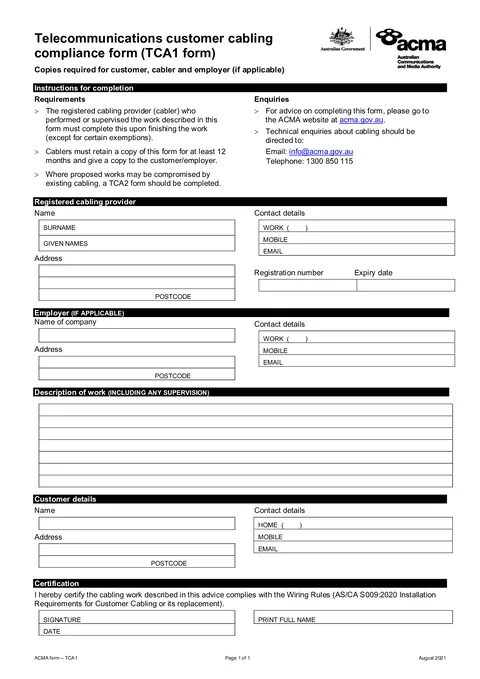
TCA1 Attach A is the ACMA telecommunications customer cabling advice form. Registered cablers use it to record completed cabling work and give the customer written advice.

Who has to complete the ACMA TCA1?
ACMA-registered cablers and electricians who complete telecommunications customer cabling work.
When is it required?
When you finish customer cabling work that needs cabling advice given to the customer under ACMA requirements.
Where does the completed form go?
Give a copy to the customer and your employer if applicable. Keep a copy for your cabling records. Tradie Forms does not lodge the form with the ACMA.
Can I fill it on my phone?
Yes. Tradie Forms guides you through each section on mobile and exports the official PDF layout when you are ready to complete.
Will this PDF be accepted?
Tradie Forms exports onto the official PDF layout where supported. Always preview and check the completed PDF before sending, lodging, or handing it over. Tradie Forms does not lodge or certify the form for you.
  • Tradie Forms is not affiliated with the ACMA.
Template version 2021.1ACMA cabling advice forms

What you fill in

Five guided groups mirror the TCA1 Attach A so you are not hunting PDF fields after hours.

  1. 1

    Cabling Provider

    Your registration, contact, and address details.

  2. 2

    Employer

    Company and contact details when you work for an employer.

  3. 3

    Work Description

    What cabling work was done and where.

  4. 4

    Customer

    Customer name and contact details.

  5. 5

    Certification

    Signature, printed name, and date.

ACMA TCA1 form preview

What gets checked before export

Tradie Forms checks these requirements against the ACMA template before the PDF is ready to complete.

Job and identity details

Customer, site, licence, contractor, and date fields.

Print full name and date are required before download.

Work and test details

The technical details that prove what was completed or checked.

Work description and customer name must be filled in.

Declaration and sign-off

Signatures, declarations, authorised people, and review steps.

Signature is required on the certification block before download.

Final export review

Anything else that should be checked before downloading the PDF.

Provider name and registration details must be filled in.

Frequently asked questions

Tradie Forms maps your entries into the TCA1 Attach A PDF. Verify all details before issuing. We are not affiliated with the ACMA.

Registered cabling providers must give customers cabling advice that complies with the Wiring Rules (AS/CA S009:2020) after completed work. Check ACMA requirements for your registration class.

Yes. Fill online at the job, with gaps flagged before you hand the form to the customer or employer.

No. You fill and download the finished PDF here, then submit or hand it over the way the job, customer, or regulator requires.

Yes after you upgrade. Save once and apply them on the next form so you are not retyping the same block every time.

Yes. Start free with guided forms and 3 PDF downloads a month. Upgrade for unlimited downloads, cloud drafts, saved details, and team workspaces.

Guides for ACMA TCA1

Compliance and workflow articles matched to this form.

Workflow

ACMA Cabling Compliance Records: Digital TCA1 and TCA2 Completion workflow

Electrical

A practical guide for Australian cablers and electricians on TCA1, TCA2, customer advice, copy keeping and job record completion.

15 June 20268 min read
Read
Compliance

ACMA TCA1 and TCA2: Cabling Record keeping and completion guide

Electrical

How registered cablers and electricians can use TCA1 and TCA2 for customer copy, record keeping, and job-system storage after cabling work.

08 June 20268 min read
Read
Compliance

ACMA TCA1 Cabling Advice: Finish Customer Completion On Site

Electrical

A practical guide for registered cablers and electricians on ACMA TCA1, customer cabling advice, TCA2 checks, and finishing the PDF on site.

30 May 20269 min read
Read
View all resources

Related forms

Nearby templates for the same state, trade, or paperwork type.

ACMA TCA2 form preview

ACMA TCA2

National · Compliance

Start form →
Emergency Lighting Register form preview

Emergency Lighting Register

National · Safety

Start form →
JSA form preview

JSA

National · Safety

Start form →

Keep exploring

Open the guide, browse the catalogue, or send a PDF we can map.

  • Read the form guideStep-by-step guidance for ACMA TCA1.
  • Browse all templatesSearch the public library by state, trade, and type.
  • Request custom templateSend a PDF and get a private guided form for your crew.

Issue your TCA1 online

Open the form, fill online at the job, and hand the customer the TCA1 before you drive away.

Start TCA1 Attach ABrowse forms
  • No credit card required
  • 3 free PDF downloads a month