Finish your trade forms in minutes
Fill forms wherever you are, on your phone at the job, tablet in the van or laptop back at the office.
Your licence and business details are already saved, the job address takes one tap, and it tells you what you've missed before you download.
13,144 trade forms finished this year
QLD CoTC
Certificate of Testing and Compliance
Import from job
Customer
Business
Saved detailTests & results
Fix before download
1 required field incomplete
All changes saved
Saved details prefilled
Business and licence
AI assistant
Helps you fill the form
Real trade forms ready to go
Australian trade templates across electrical, plumbing, building, fire safety, pest control, cabling, SWMS, and job records.
From job done to finished PDF in minutes
Pick the form, fill it in while the job is fresh, then check the PDF and download it. Same three steps on a phone, a tablet, or the office laptop.
Start a fresh one from the library or pick up a draft where you left off.
Everything that gets the form finished
Open the form, answer one section at a time, get told what you have missed, and download the PDF. No pinching and zooming around a PDF on a phone screen.
With you from the first field to the download
Section-by-section fill instead of hunting through PDF tabs. Knock over the form before you pack up the ute.
Saved details and presets
Save licence, business, and crew details once, one tap on the next CCEW, SWMS, or site record.
Know what's missing before you download
Missing fields are flagged before you hand over the PDF, so there are fewer callbacks.
Job details without the retyping
Pull customer, site, job number, and notes from ServiceM8, Fergus, or Xero into supported fields. Start filling, not re-keying on site.
Connect your job software
Pull job details into supported fields instead of re-typing on site. When connected, completed PDFs can also attach back to the job in your job software.




- Site details without the retypingCustomer, address, job number, and notes from your job software land in supported form fields so you start filling, not re-typing.
- Office sees the form on the jobWhen PDF upload is enabled, send completed PDFs back to the job card so dispatch and accounts are not chasing the file.
Every form your trade runs in one place
One place for the forms crews actually run. Compliance certs today, with safety and job records, service reports, everyday job paperwork, and your own company PDFs rolling out fast.
Compliance certs
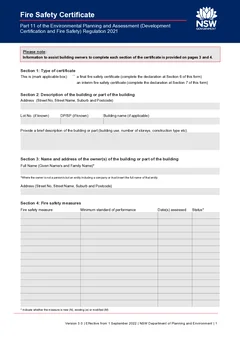
Australian trade certs mapped to the official PDF layout, with fewer typos and missing fields before you sign off at the job.
Safety and daily records
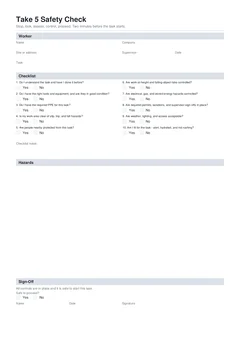
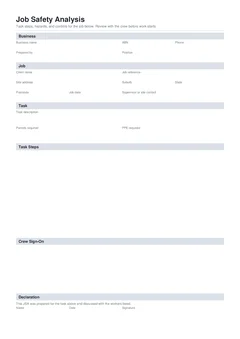
SWMS, prestarts, toolbox talks, checklists, test and tag, and service reports sized for phone fill between jobs, landing in the library as we build them out.
Custom company forms
Send your company PDF. We map it into a form your crew can fill on the job, then turn it on for your workspace.
Straight-up pricing for the way you work
Pick the plan that fits how much paperwork you run. Every plan gets the real forms and clean PDF layouts, official where the regulator requires them. Paid plans add unlimited downloads, cloud drafts, saved details, PDF tools, and job software connections.
Free
Try live templates, preview PDFs, and download a few finished forms each month.
- Fill and preview public templates
- 3 PDF downloads a month
- Local autosave on this device
- Last 3 completed forms saved
Solo
Unlimited PDF downloads, AI help for supported fields, cloud drafts, job software connections, PDF tools, and saved details.
- Unlimited PDF downloads
- Fill forms from notes and photos with AI
- Cloud drafts across all devices
- Saved details, signatures, and presets
- Full form history in your account
- Smart address and licence lookup tools
- Import from ServiceM8, Fergus, Xero
- PDF tools (organise, merge, sign)
Team
4 team members included on one workspace with shared drafts, completed forms, audit trail, and reusable business details.
- 4 team members included, extras $10 / month each
- Everyone gets Solo features in the team
- Shared drafts and completed forms
- Shared saved details, logos and presets
- Team-managed integrations and roles
- PDF audit trail with history of form completions
Secure checkout with Apple Pay & Google Pay
Payments in AUD with Australian invoices
Frequently asked questions
Guides to fill trade forms online
Practical guides for compliance certs, daily job forms, and job records across states and trades.
Why tradies stick with Tradie Forms
Compliance certs, safety records, service reports, and custom company forms in one place that fits the way crews actually work.
Compliance certs, safety forms, service reports, checklists, and custom company paperwork
Blank licence numbers, dates, and signatures flagged before you hand over the PDF
Licence and site details ready for the next job
Find half-done and issued forms without digging through email
Works on your phone at the job, tablet in the van, or desktop in the office
Free to start, and it keeps up when you go from solo to a full crew
Comparing checklist platforms? See Tradie Forms vs SafetyCulture.
Get the form done while the job is still fresh
Pick the form, fill it in wherever you are, and download the PDF when it is ready.
- No credit card required
- 3 PDF downloads a month