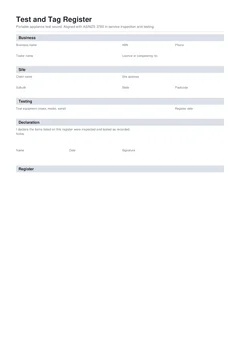
Most test and tag failures on paper are not exotic. They are ordinary skips: a description that fits every lead on the rack, a fail with no action, a construction interval applied to office gear or the reverse, and a register typed at night from a photo of tags. The testing may have been fine. The proof falls over when a safety officer asks for the file.
This guide is about appliance and lead registers under AS/NZS 3760-style practice. Safety switch trip time mistakes live in common RCD test record mistakes. Standards context: test and tag register and AS/NZS 3760. Day-of fill order: test and tag register on-site guide.
Use the national test and tag register as a pre-download check. Browse electrical forms.
Why does the register have to hold up?
AS/NZS 3760:2022 covers in-service inspection and testing of electrical equipment and RCDs, including documentation and tagging. The Safe Work Australia model code on managing electrical risks treats inspection and testing by a competent person, with records, as part of controlling electrical risk. WorkSafe Queensland explains testing and tagging against local regulation and the standard. NT WorkSafe is explicit that construction sites follow AS/NZS 3012 for three-monthly testing of electrical equipment, with AS/NZS 3760 as the method.
Tags get knocked off, hire gear moves sites, and supervisors change. The register is what is left when the visual system fails.
Shared traps (and how they show up on a lead register)
Some failures appear on both appliance and RCD paperwork. On a test and tag PDF they look like this.
Vague identity. Ten orange extension leads, all labelled "extension lead". Nobody knows which physical lead the pass applied to.
Fix on the PDF: put the asset ID or tag number on every row, match it to the physical tag, add serial or model where you have it, and a location (gang box, level, trade package).
Writing up later. You test a rack, photograph tags, type the PDF at night. Earth readings swap. A fail loses its isolation note.
Fix on the PDF: one item, one test, one row, then the next item. Photos are backup, not the primary log.
Pass with no next due date. Everything says pass. The site has no retest schedule.
Fix on the PDF: set environment and default retest interval in the header, then put a next due date on every pass before sign-off.
Fail with no action. The register shows fail. The lead is still on a saw.
Fix on the PDF: at the moment of fail, mark fail, write why, record action, and quarantine the item. Expand in test and tag failed equipment records.
Mistakes that are mostly about portable gear and tags
These are the ones that show up on appliance registers far more than on board RCD logs.
Tag and register disagree
Tag says next due October. Register says January. Or the tag number does not exist on the PDF. Auditors treat that as a broken system.
Fix on the PDF: write the row first, then write the tag from the row. If you amend a date, amend both. Fails must not wear pass tags. If the site uses colour periods, the header colour and the due dates must tell the same story.
Empty readings on a pass
Pass is ticked. Earth continuity, insulation resistance, visual, or polarity fields that applied to that class are blank.
Fix on the PDF: record the readings that support the result for the equipment class. Skip only what genuinely does not apply.
Wrong environment or testing basis
Construction gear gets a long office-style interval because you copied last week's fit-out register. Or workshop gear is forced onto a three-month cycle with no reason. Tag colours and due dates then fight the real risk profile.
Fix on the PDF: set work environment and testing basis for this site before the first item. On construction, demolition, and mining work, AS/NZS 3012 commonly drives a three-month equipment cycle; see construction site test and tag every three months. For other environments, apply AS/NZS 3760 risk-based intervals and any state regulation that takes precedence.
Hire fleet and mid-cycle arrivals
A lead arrives from another site mid-quarter. Someone retags it from today's visit date instead of checking three months from its last test. Or hire gear that lived on a demolition deck is treated like low-risk office gear because it slept in a van on Sunday.
Fix on the PDF: check the previous tag date against the environment it is used in. Record ownership clearly when hire and trade gear share a compound.
Shared subcontractor gear with no owner
Five trades dump leads in one bin. Your register lists "site lead" with no owner. It fails. Nobody knows whose problem it is, so it stays plugged in.
Fix on the PDF: client or trade package on the header, asset ownership in the description or notes, separate registers when ownership differs. A register argument is not a reason to leave damaged gear in service.
Signing before the ute produces three more tools
Signature goes on. Then another vehicle arrives with grinders that "were always part of the round". The signed PDF no longer matches the site.
Fix on the PDF: finish items, close fails, set due dates, then sign. If more gear appears, update and re-download rather than leaving a silent gap.
Missing tester or instrument details
Results exist with no named tester and no PAT verification date. Challenged readings have nothing to stand on.
Fix on the PDF: business name, tester name, contact, licence or competency where required, PAT make/model/serial, and last verification or calibration date.

Treating "competent person" as anyone free that afternoon
Labour pressure puts someone with no training on the tester and the standard behind a register full of confident passes.
Fix on the PDF: only a competent person tests and signs. If you are not competent for the test, do not fill the register as if you were.
No job reference across evidence
Photos, PDF, and invoice use different names. Six months later nobody can rebuild one site visit.
Fix on the PDF: one job reference on the register, photos, any related RCD record, and billing. Name the PDF with client, suburb, and date when you can.
Padding the list with gear you did not test
On multi-trade sites, the register claims tools still in another contractor's ute. A short honest register beats a long one that includes items nobody put a meter on.
Fix on the PDF: only claim gear you inspected and tested. Note areas or packages you could not access.
Board RCD testing buried in the appliance list
Fixed safety switch trip times end up as a note under a lead row, or portable RCD results are incomplete because the appliance template was rushed.
Fix on the PDF: keep a separate RCD test record that shares the job reference. Where an item is a portable RCD on the appliance register, still capture the results that apply, and keep fail actions consistent across related paperwork.
Short pre-download checklist
- Every item has a unique, matchable identity
- Readings support every pass
- Every pass has a next due date aligned with environment
- Every fail has action and detail, and the item is out of service
- Tag data matches register data
- Tester and instrument fields are complete
- Testing basis and environment are correct for this site
- Declaration is last
Build registers that block the usual gaps
Tradie Forms structures the national test and tag register so required results, next due dates on passes, and fail actions are hard to skip. You set environment and default interval once, add items as cards, preview the PDF layout, then download a signed copy. It is not a government form and is not affiliated with regulators. You still own competence, testing judgment, and isolation decisions.
Open the national test and tag register, browse electrical forms, or start from test and tag register and AS/NZS 3760 for the standards overview.
Official references
Check the Standards Australia spotlight on AS/NZS 3760:2022, the Safe Work Australia model Code of Practice: Managing electrical risks in the workplace, WorkSafe Queensland testing and tagging of electrical equipment, and the NT WorkSafe construction electrical equipment bulletin. Confirm how your state or territory applies inspection, testing, and record duties on the site you are working.