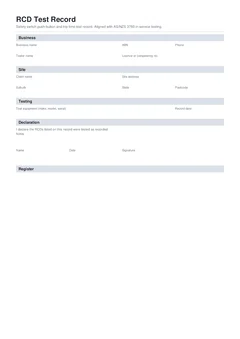
The testing is done when the last safety switch has a result. The job is done when the client has a record they can file and you have a copy you can defend. Handover is the step that gets skipped when the car park is full and the next job is calling. That is when a fail only existed as a conversation, next due dates never made it onto paper, and six months later nobody can find proof the board was tested.
This guide covers what to put in the client's hands, how to talk through passes and fails, what to keep yourself, and how to line RCD records up with test and tag and the rest of the electrical file.
If you are closing out a visit today, finish the national RCD test record on site first. Browse more electrical forms. For fill order before handover, use the RCD test record on-site guide.
What does the client actually need?
Clients and site managers are not looking for a lecture on residual current theory. They need a file entry that answers four questions later:
- Which safety switches were tested on this visit?
- Did they pass push-button and, where done, trip time checks?
- What happened to any that failed?
- When are the passes due again?
AS/NZS 3760:2022 frames in-service inspection and testing of electrical equipment and RCDs, including documentation. The Safe Work Australia model code on managing electrical risks treats inspection and testing records as part of showing electrical risks are managed. State guidance such as SafeWork NSW electrical inspection and testing and WorkSafe Queensland testing and tagging points workplaces back to standards and local rules. Your handover is how the workplace ends up with that record in its own system rather than only in your phone.
A clean register with one row per device, tester details, instrument details, testing basis, and a signature is enough for most clients. Fancy packaging does not replace those fields.
Finish on site before you talk handover
Handover fails when the content is unfinished. Complete every device, close every fail action, set every next due date, then sign. Only then download or print.
If you start the client conversation while two boards are still untested, you will either promise results you have not measured or hand over a partial PDF that looks final. Partial is fine only if you label it clearly as interim and return with a complete register the same day. Most of the time it is cleaner to finish first, then talk.
The same rule applies when you are tired and the car park is calling. Five minutes of missing rows at the board becomes an hour of callbacks later, usually after the client has already filed the incomplete PDF as "done".
The handover conversation in order
Step 1
Scope
What you actually tested
Which boards, and whether it was button-only, trip time, or both.
Step 2
Fails first
Before the good news
Device, cause, what you did, and what they must not do until it is fixed.
Step 3
Passes and next due
With the interval basis
Do not let a button check sound like an operating time test.
Step 4
Who owns the next step
Named, before you drive off
Retest window, quote, or return visit. Not a vague we will be in touch.
A fail that only exists verbally is a future dispute. It belongs on the written record too.
1. Scope of the visit. Fixed board RCDs, socket RCDs, portable units, or a mix. Which buildings or boards. Whether this was push-button only, operating time testing, or both. Clients use "safety switch test" for all of that, so plain language prevents false comfort.
2. Fails first. Which device, what failed, what you did (isolated, tagged out, replaced), and what they must not do until it is fixed. If a circuit is unprotected, say that in plain words. Put the same action on the written record. A fail that only exists verbally is a future dispute.
3. Passes and next due dates. How many passed, when they are due again, and what interval basis you used. If construction rules put gear on a three-month cycle, say so. If this visit was only a frequent push-button check, do not imply a full operating time test was completed. Interval context lives in RCD test intervals and records.
4. What they are receiving. A signed PDF or printed register for the site file, plus any supporting photos you agreed to send. Confirm the email address or the folder owner while you are still standing there.
5. What happens next. Retest booking window, quote for replacements, or a return visit to retest after repairs. Leave them with a clear owner for the next step, not a vague "we'll be in touch".
How do you explain a failed RCD to a client?
You do not need drama. You need clarity.
- Point to the device or circuit label on the board when you can do so safely
- State the measured result in ordinary language ("did not trip on the button", "trip time outside the limit that applies for this test")
- State the action already taken
- State the risk in concrete terms: that circuit should not be treated as RCD protected until a replacement is fitted and tested
- Put the action and note on the register before you leave
Avoid soft phrases that let a fail sound like a pass. "Watch this one" is not an isolation. "Failed, isolated, tagged out, replacement booked for Thursday" is an action a site manager can run with.
What to put in writing versus what to say
Say the story. Write the facts.
On the record: identity, type, rating, push-button result, trip time if measured, pass or fail, test date, next due for passes, action and failure detail for fails, tester name, instrument details, testing basis, signature.
In conversation: why it matters for that room or machine, who on their team needs to know, how booking the retest works, and any temporary workarounds they must not invent (such as bridging out a failed device).
If the client wants a short email summary, base it on the PDF, not the other way around. The register is the source of truth. The email is a cover note.
File names, job references, and photos
Use the same job reference on:
- The RCD test record
- Any related test and tag register
- Photos of boards, tags, and isolated devices
- Invoices and retest bookings
A consistent reference is what lets someone find the safety switch log six months later when the only search term they remember is the site suburb. Naming the PDF with client, suburb, and date helps too. Log book style structure for long-lived site files is covered in RCD log book and safety switch testing records.
Photos support the register. They do not replace it. A gallery of tester screens without device IDs is weak evidence on its own.
Your copy and the client's copy
Give the client their copy before you leave or send it the same day from the finished download. Keep your own copy in the job file for warranty, insurance, and the next visit. Do not rely on the client to send you their only copy if something is questioned later.
How long to keep records can depend on state regulation, contract terms, and your insurer. When in doubt, keep them at least as long as the retest cycle and any contractual defects period, and longer if your lawyer or insurer says so. This guide does not invent a single national retention number.
Multi-stakeholder sites
On construction and managed facilities, more than one person may need the file:
- Site manager or facility manager for the day-to-day file
- Principal contractor WHS representative for the project pack
- Head contractor or builder admin for document control systems
- Your own office for billing and retest scheduling
Ask once who the document controller is. Send the finished PDF to that person and copy the person who walked the boards with you. One clean register to the right inbox beats five partial chats.
Handover when test and tag was done the same day
If you also completed portable appliance testing, hand over both registers and explain the split:
- RCD record: fixed, socket, and portable residual current devices, push-button and trip time
- Test and tag register: appliances, leads, and related gear, visual and electrical readings
Walk fails on both lists. A failed portable RCD might appear in spirit on both stories if it was tested as an RCD and also tagged as an item of equipment. Make sure the action is consistent and the site knows the unit is out of service. Appliance fail handling is covered in test and tag failed equipment records.
Common handover mistakes
"I'll email it tonight" and then never finishing the rows. Download on site while the devices are still fresh in your head.
Handing over only the passes. Fails are the most important part of the story for the client.
No next due dates. The client cannot schedule the next visit from a list of green ticks alone.
No action on fails. The PDF then looks like a warning without a decision.
Wrong client contact. The PDF lands with accounts payable and never reaches the site file.
Mixing boards into one vague summary. One paragraph for three switchboards is not a register.
These map back to the record mistakes in common RCD test record mistakes. Fix the record first, then handover is mostly delivery and a clear conversation.
Build and hand over on site
Tradie Forms is built for finishing the RCD test record at the point of work: a card per device, fail actions required before download, preview of the PDF layout, then a signed file you can send or save. Business and tester details can be reused so the header is not the slow part.
Tradie Forms maps your entries onto the layout of the record. It is not a government form, does not lodge with regulators, and is not affiliated with Standards Australia or WHS agencies. You still own the testing judgment and the client conversation.
Start the national RCD test record, browse more electrical forms, or open the national test and tag register if portable gear is part of the same handover pack.
Official references
Check the Standards Australia spotlight on AS/NZS 3760:2022, the Safe Work Australia model Code of Practice: Managing electrical risks in the workplace, WorkSafe Queensland testing and tagging of electrical equipment, and SafeWork NSW electrical inspection and testing. Confirm any site document control rules and state retention expectations that apply to the workplace you are leaving.