After a near miss, the principal does not want a speech about culture. They want dated pre-task checks they can open without hunting gloveboxes. A Take 5 that never made the job file might as well not have happened when the advisor asks on Friday for Monday's checks.
This is a checklist of seven records principals and safety advisors commonly ask for once something goes wrong, or when they audit whether pre-starts were real. It is not a fill tutorial. For how to complete the card on site, use How to complete a Take 5 on site. Browse building forms.
1. The dated Take 5 PDF for the task that nearly went wrong
First ask is almost always the pre-task check for the exact step and time window. Not "your safety system". The PDF for that morning's hang-doors, board isolation, or trench dig.
Before you send, check the PDF is usable:
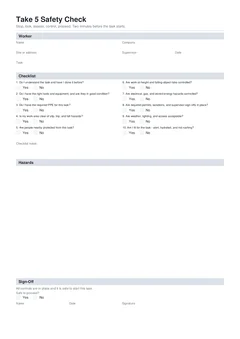
- Worker name that matches site induction where possible
- Site location a stranger can place (address, lot, project code)
- Task description for the step that was about to start
- Date of the check
- Checklist answers completed, with notes for any No answers
- Safe to proceed, name, date, and signature
A half-complete PDF creates more questions than it answers. Fix blanks before handover.
2. The same day's related checks for the crew
Advisors rarely stop at one card. They ask for the crew's Take 5s for that shift or the surrounding days. Scope the set: date range, people or trade, and document type.
Do not email the whole company history when someone asked for one morning's checks. Send the scoped set with clear filenames.
People mix labels. If they say "Take 5" but mean the high risk method document, confirm before you only send short checks. Comparison: SWMS vs JSA vs Take 5.
3. File names a stranger can search
Camera roll names and "Document (3).pdf" fail under pressure. Use a pattern your crew can repeat:
Take5-[site-or-job]-[task-short]-[YYYY-MM-DD]-[worker-initials].pdf
If your job system already has a job number, lead with that. Consistency beats cleverness. Office staff should answer "show me Thursday on Smith Street" without opening twenty PDFs.
4. Proof the file lives in the job system, not only on one phone
Principals want evidence the check is findable by the business, not locked to one worker's downloads folder.
Pick one primary home per business and stick to it:
- Job folder in your cloud drive or job management system
- Site pack folder the principal already uses for SWMS and inductions
- Employer WHS app or register if that is your company rule
Avoid only-on-one-phone, only-as-a-paper-pad-in-the-ute, and mixed personal email threads with no job tag. If the principal requires portal upload, upload the same day you sign. Late uploads look like after-the-fact paperwork even when the check was honest.
5. The SWMS or JSA that sits beside the Take 5 for high risk work
A near miss on high risk construction work often triggers a SWMS request in the same breath as Take 5 language. Keep document types separate in folders or tags:
SWMS/for high risk construction work methodsJSA/for step-by-step job analysesTake5/for pre-task checks
Take 5 records support site systems. They do not replace SWMS duties where those apply. Related forms: Take 5 Safety Check, National JSA, NSW SWMS Form 05.
A clean response lists site, date range, and document type, attaches the named PDFs, and notes if a SWMS or JSA sits alongside for the same package.
6. A stage or job handover pack, not a scatter of chats
When you leave a site or finish a package after an incident review, principals want a closed set:
- Collect Take 5 PDFs for the package dates
- Confirm high risk work still has the related SWMS records
- Hand over through the channel the site uses (email, portal, USB, site office folder)
- Keep your own copy; do not rely only on the principal's file
Step 1
Collect the dated PDFs
For the package dates
One per task per day, not a single card standing in for the week.
Step 2
Pair high risk work with its SWMS
Before anything is sent
A Take 5 does not stand in for a SWMS on high risk construction work.
Step 3
Hand over on the site's channel
Email, portal, USB or site office
Whichever one the principal actually uses.
Step 4
Keep your own copy
Plus any receipt or acknowledgement
The site office folder is not your record.
The last step is the one people skip, and it is the only one still under your control a year later.
If the principal signs a receipt or portal acknowledgement, keep that too. Your business may need the trail later even if the site office loses a folder.
Who usually needs what:
| Audience | What they usually need |
|---|---|
| Worker / employer | Full PDF for the job file and any later enquiry |
| Principal contractor | Copy or portal upload when the pack requires pre-task evidence |
| Safety advisor / auditor | Dated set for a period, trade, or task they specify |
| Client | Only if the contract or site rules say so; often via the principal |
7. How long do you keep a Take 5?
There is no single national statute that says "keep Take 5 cards for X years" as a named form. Retention follows your PCBU WHS procedures, principal or client contract clauses, insurer or prequalification rules, and any incident timeline.
When in doubt, keep digital copies longer rather than shorter. Storage is cheap compared with reconstructing a week of pre-starts from memory.
What not to invent after the advisor books a visit:
- Backfilled blank days with lookalike forms
- Edited signed PDFs that change answers after an incident with no revision note
- Photos of wet cards that cannot be read, treated as if they were the master file
If a day was missed, say so, fix the process, and keep future checks honest. If you need a corrected record, create a new dated entry that explains the correction and keep the original if your system requires an audit trail.
Privacy still applies. Take 5s include worker names and signatures. Share them with people who need them for WHS and site management, not on public channels or open group chats.
Weekly habit that survives the call
For small crews:
- Daily: complete Take 5 before tasks, download PDF, drop into the job folder
- End of day: glance that today's files are named and in the right job
- End of week: check the principal portal queue is empty for required uploads
- End of stage: hand over the Take 5 set with the SWMS and JSA pack
Multi-job weeks need the job number or lot in every filename, and files moved out of phone downloads the same day. Mixed folders are how Lot 12's Take 5 ends up in Lot 9's pack.
Multi-crew and multi-site weeks
The filing habits above hold up on a single job and break down across a busy week with several crews.
The failure is always the same: files land in one person's phone downloads, named by whatever the app chose, and nobody can tell which lot they belong to. By Friday there is a folder of PDFs and no way to attribute them without opening each one.
The fix is the job reference in every filename and a same-day move out of downloads. It is a two-second habit that saves an hour at the end of the month.
When someone asks for a week of checks
Requests for records rarely come one at a time. An advisor or principal asks for a period, usually a week or a stage.
That is the test of the filing rather than the individual record. If the checks for a stage can be pulled in a couple of minutes, the system works. If assembling them means going through three phones and a chat thread, it does not, however good the individual PDFs are.
How the form helps without overclaiming
The Take 5 Safety Check produces a signed PDF with checklist answers, hazard rows, and sign-off in a consistent layout. You can preview before download and keep drafts while the job is live. Tradie Forms does not lodge Take 5s with regulators, replace your document system, or set retention periods. You remain responsible for content accuracy, storage, and SWMS duties that apply.
Related guides: When to use a Take 5, Common Take 5 mistakes, Digital vs paper Take 5, JSA crew sign-on and handover.
Official sources
- Manage risks (Safe Work Australia)
- Identify, assess and control hazards
- Model Code of Practice: How to manage work health and safety risks
- Prepare safe work method statement (SafeWork NSW)
Keep Take 5 records with the job, hand over what the site asks for, and keep SWMS documents current when high risk construction work applies.