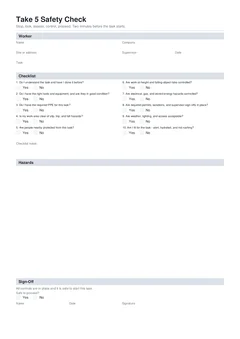
Paper Take 5 pads are familiar. They also run out, get wet, and live in the ute until someone asks for proof. Digital Take 5s help when they let you finish before the task, catch blank fields, and put a searchable PDF in the job folder the same day. The format does not make the check honest. Timing and real looking still matter.
This guide compares paper and digital workflows for Australian site crews, without claiming one brand of pad or app is required by law.
How to fill the template: How to complete a Take 5 on site. Filing habits: Take 5 record keeping and handover. Building forms: building forms hub.
What both formats must achieve
Safe Work Australia describes risk management as identify hazards, assess risks, control risks, and review. A Take 5 is a short field version of that loop. Regardless of paper or phone, a useful Take 5:
- Happens before work starts
- Matches this site and this task
- Records honest answers and any controls for No items
- Can be produced later for the principal or safety advisor
- Does not pretend to be a SWMS when high risk construction work applies
If either format is filled after the job for show, the system failed.
How paper Take 5 usually runs
Typical paper path:
- Find a pad in the glovebox or site office
- Hand-write name, site, task, and date
- Tick Yes or No on a printed checklist
- Scribble hazards if the pad has space
- Sign
- Tear off a copy for the site box if the pad is multi-part
- Hope the office scans it later
Strengths:
- Works with zero battery and zero signal
- Familiar for crews who dislike phones on the tools
- Visible physical card some supervisors like at the gate
Weaknesses:
- Pads empty on the morning you need them
- Rain, concrete dust, and dirty gloves destroy readability
- Handwriting fails audits and email scans
- Filing depends on someone scanning every card
- Nothing checks the fields: blank dates and missing signatures slip through
- Hard to search three months later for one lot number
How digital Take 5 usually runs
Typical digital path on Tradie Forms:
- Open the Take 5 Safety Check on the phone
- Prefill worker details if saved
- Enter site, task, and date
- Answer the ten checks; add notes on No
- Add hazard rows with risk rating and control when needed
- Sign safe to proceed
- Preview and download the PDF
- Drop the file into the job folder or principal portal
Strengths:
- Phone is already in the pocket
- Consistent layout every time
- Missing fields can be caught before download
- Named PDFs file and email cleanly
- Long hazard lists stay readable
- Same-day handover without a scanner
Weaknesses:
- Battery and login still matter
- Remote sites need a plan for download when coverage is poor
- Tick and flick is still possible on a screen
- Some older principal packs still expect a paper card in a box
Side-by-side comparison
| Need | Paper pad | Digital PDF |
|---|---|---|
| Complete before task | Yes if pad is on you | Yes if phone is charged |
| Survive wet weather | Often poor | Better if device is protected |
| Hand to principal same day | Scan or photo first | Email or portal upload |
| Search last month's checks | Slow | Fast if named and filed |
| Blank field checks | Manual only | Online form can block incomplete download |
| No signal on site | Still writable | Draft may work; download may wait |
| High risk SWMS duty | Unrelated to format | Unrelated to format |
Cost of the weak paper habits
The time cost is not only writing. It is rework:
- Returning to the ute for a pad that is empty
- Rewriting a card the supervisor cannot read
- Photographing a wet form that still cannot be filed
- Office staff chasing missing dates after an advisor request
- Crews filling cards at week's end so the pack "looks complete"
Those habits train people to treat Take 5 as admin theatre. Digital does not automatically fix culture, but it removes the empty-pad and unreadable-scan excuses.
When is paper Take 5 still a fair choice?
Paper still wins when a client procedure demands a carbon card, when devices are banned or unusable on site, or when you are dual-running mid-transition. Keep paper in the mix when:
- The principal's written procedure still requires a multi-part carbon card in a site box
- The crew works deep underground or in RF-restricted areas with no devices allowed
- You need a temporary fallback when phones are banned for a client security rule
- You are mid-transition and dual-running for a short period
If you stay on paper, add a same-day scan rule: photo or scan into the job folder before you leave site, with a clear filename. A box of cards nobody scans is not a record system.
When is digital Take 5 the better default?
Digital is the better default once filing is already digital, safety advisors want PDFs, or you are running parallel jobs and need identical checklist wording every time. Move primary completion to phone when:
- Multiple jobs run in parallel and filing is already digital
- Safety advisors request PDFs by email or portal
- Crews are small and already job-manage from phones
- You want the same checklist wording every time
- You are tired of pads running out mid-project
Use the Take 5 Safety Check so worker, checklist, hazards, and sign-off download in one PDF layout designed for field use.
Hybrid workflow that actually works
Many businesses land here.
Step 1
Digital first
Everyday default
Completion and storage happen on the phone, before tools come out.
Step 2
Print on demand
Only when a gate asks
Paper is an output, not a second system of record.
Step 3
Keep SWMS and JSA separate
Own PDFs
Never forced into the Take 5 layout to save a step.
Step 4
Paper fallback in the ute
Device failure only
Sealed bag, with a scan-before-leave rule so it rejoins the record.
Hybrid fails when both systems are half used. Assign one system of record, usually the job folder PDF.
Hybrid fails when both systems are half used and neither is complete. Assign one system of record (usually the job folder PDF).
Phone practicalities on site
- Charge overnight; carry a small power bank on long days
- Complete Take 5 before gloves and dirty work if the screen is hard to use with gloves
- Enlarge the text or rotate the phone if you need a bigger view; accuracy beats speed
- Download PDF while you still have signal at the street if the basement has none
- Do not store the only copy in a personal chat thread
Drafts on device help when the form is half done and you walk the site. Finish and download before you start the hazardous step.
Handover differences
Paper handover: drop a copy in the site box, keep the stub, scan later. Risk is the later never happens.
Digital handover: email or portal upload the same morning, keep the job folder copy. Risk is wrong document type or unnamed files. Naming patterns are in Take 5 record keeping and handover.
Safety advisor view
Advisors comparing packs look for:
- Dates that match work periods
- Task text that changes with real work
- Occasional No answers with controls (proves people think)
- Readable signatures and names
- Alignment with SWMS methods when high risk work was done
Digital packs win when files are organised. They lose when every file is Take5.pdf in email. Paper packs win when cards are complete and filed. They lose when cards are blank templates signed in bulk.
Do not let format hide the wrong document
Digital Take 5 is still a Take 5. Paper SWMS is still a SWMS. Choosing a nice PDF download does not meet a high risk construction work SWMS duty. Choosing a paper SWMS pad does not remove the need for a pre-task check if your pack requires one.
Decision path: When to use a Take 5. Labels: SWMS vs JSA vs Take 5. NSW SWMS how-to: How to complete a NSW SWMS on site.
Migration checklist from pad to phone
- Agree with the principal that PDF Take 5s are accepted
- Pick the national Take 5 or your company template
- Train the crew on before-task timing, not only on the app
- Set a job folder naming rule
- Dual-run one week if needed, then stop the empty pad habit
- Keep a sealed paper fallback only for true device failure
Culture change is the hard part. The phone is the easy part.
Training the crew without a long classroom session
A toolbox of ten minutes covers the change:
- Why: empty pads and lost cards waste more time than a phone form
- When: before the task, every time the pack requires it, and on change
- How: open form, answer checks, note any No, sign, download, file
- What not to do: bulk sign on Friday, reuse yesterday without looking, send Take 5 when the gate asked for SWMS
Have each person complete one real Take 5 on a live task that morning. Watching beats slides. Spot-check filenames in the job folder that afternoon so the filing habit sticks.
Clients and builders who still want paper
Some sites will not move. Give them paper without abandoning digital as your system of record:
- Complete digital first so your file is clean
- Print the signed PDF for the site box if required
- Photograph or scan is unnecessary if you already hold the PDF
- Note in your job log that site copy was provided on that date
You stay searchable. The gate still gets a page in the folder. Avoid rewriting by hand from the PDF into a different pad unless the principal's template is mandatory and different.
Related guides
- How to complete a Take 5 on site
- When to use a Take 5 pre-task check
- Common Take 5 mistakes on site
- Take 5 record keeping and handover
- SWMS vs JSA vs Take 5
- National JSA · NSW SWMS