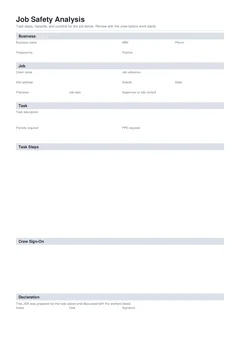
A JSA without crew sign-on is only half a record. Signatures without a briefing are the other half of a weak system. Principals want proof that the people on the tools saw the steps and controls for this job, not only that someone typed a document in the office.
This guide covers how to run sign-on on site, how to handle late starters and crew changes, and how to hand the finished PDF to the principal without losing pieces.
Writing the steps: How to write a JSA on site. Common failures: Common JSA mistakes. Building forms: building forms hub.
Why does crew sign-on sit on the JSA?
Safe Work Australia expects PCBUs to manage risks and to involve workers in WHS matters in ways that fit the work. On site, the practical version for a package is simple: the people doing the job understand the hazards and controls for the steps they will take.
Putting name, company, date, and signature on the same form as the steps:
- Stops the signature sheet going missing
- Ties people to a specific method version
- Makes portal uploads and email handovers one file
- Shows who was briefed for this address and date
The national JSA keeps crew sign-on in the same document for that reason.
Before you ask for signatures
Do this first:
- Finish business, job, and task fields
- Write steps with hazards, risk ratings, controls, and who owns each control
- Check permits and PPE match the steps
- Walk the work face where practical, or use drawings and photos when access is not yet safe
- Adjust steps if the crew knows a better safe method
Do not lock the PDF and chase signatures for a method nobody has seen.
How to run the review (10 to 15 minutes done well)
A good sign-on review is short and concrete:
- Read the overall task and permits
- Walk each step in order
- Point to real controls: where the exclusion zone is, who isolates, which scaffold bay is approved
- Call out interfaces with other trades and plant
- Ask what could go wrong that is not written yet
- Update the JSA live if the crew raises a valid gap
- Then collect sign-on
Step 1
Read the task and permits
Whoever prepared the JSA
The overall scope before the step detail.
Step 2
Walk each step in order
With the crew
Pointing at real controls: the exclusion zone, who isolates, which scaffold bay.
Step 3
Ask what is missing
Crew
Interfaces with other trades and plant are where gaps usually surface.
Step 4
Update, then collect sign-on
In that order
A live update before signatures beats a correction after them.
Sign-on last is the whole point: signatures on a document the crew has just changed mean something.
Phones work if everyone can see the steps. A printed draft works if that is clearer on a windy slab. The record that matters is the final signed PDF.
What does each sign-on row need?
On the national JSA template:
- Name: as used on site induction
- Company: employer or labour hire entity
- Date: day of the review and sign-on
- Signature: the worker's own mark or accepted digital signature
What about late starters and crew changes?
Construction crews change during the day. Treat sign-on as live.
Someone arrives after the morning brief:
- Stop them before they start the package work
- Review the current JSA (and SWMS if high risk work applies)
- Add their sign-on row
- Only then put them on the tools for that method
Someone leaves mid-job:
Leave their historical sign-on if they worked under that method. Do not delete history to "tidy" the form if the record needs to show who was briefed. For a fresh version after a major method change, start a revised JSA and sign the active crew on the new version.
Labour hire and borrowed labour:
Include them on sign-on when they work to your JSA. Their company name should reflect the entity that employs them. Confirm who is supervising their work.
Multi-employer packages
When more than one PCBU shares a face:
- Agree whose JSA is the working method for the shared steps
- Consult so controls do not clash (for example exclusion zones vs delivery access)
- Make sure each worker signs the document that covers their tasks
- Keep SWMS coordination clear when high risk construction work is shared
Consultation, cooperation, and coordination between PCBUs is a core WHS expectation. A single messy PDF with conflicting methods fails everyone.
Sign-on vs toolbox talk vs Take 5
These often run on the same morning:
| Record | Main job |
|---|---|
| JSA sign-on | Confirms workers reviewed the step analysis for the package |
| Toolbox talk | Group brief and attendance for a topic or daily hazards |
| Take 5 | Short personal pre-task check, often on change or per task |
| SWMS worker communication | High risk method understood and available for HRCW |
You do not need four long meetings. You need the right depth for the risk and the pack. A toolbox can walk the JSA steps. A Take 5 can follow when conditions shift. SWMS rules still apply for high risk construction work. See SWMS vs JSA vs Take 5.
Declaration after crew sign-on
When the crew has signed, the preparer or authorised person completes the declaration: name, date, signature. That closes the document version for download. If steps change after declaration, update and re-declare, and re-brief affected workers.
Handover to the principal
After download:
- Name the file clearly:
JSA-[job]-[package]-[YYYY-MM-DD].pdf - Upload or email through the channel the induction named
- Keep a copy in your job system
- Confirm receipt if the portal does not auto-acknowledge
If the principal wants paper in a site folder, print the signed PDF. Do not hand a different unsigned draft.
When the advisor asks later for "crew sign-on for last week", send the JSA PDFs that include both steps and signatures for those dates, not a separate attendance list that cannot be matched to a method.
Handover at end of package or site exit
Before you leave a stage:
- Collect final JSA versions for the package
- Confirm high risk work SWMS files are in the same hand-over set when applicable
- Include any revision that followed a method change
- Note which crew lists apply to which dates if multiple versions exist
Your business may need those files after the principal's site office is gone.
Common sign-on and handover failures
- Clipboard signatures while people load tools, no review
- Steps on paper, signatures on a second pad, one lost
- Portal upload of an unsigned draft
- Only the supervisor signed "for the crew"
- File named
scan001.pdfwith three jobs mixed - No company copy after handing the only PDF to the site office
- Method changed after rain, old sign-on left to stand without re-brief
Practical morning script
Use this as a default for small crews:
- Preparer finalises steps on the phone at the work face
- Crew gathers for a short review against the live form
- Questions and edits happen now
- Each worker signs on
- Preparer declares and downloads
- PDF drops into job folder and principal channel
- Work starts only after required controls for step one are in place
- Late starter joins via mini review and new sign-on row
That rhythm is faster than fixing a rejected pack at 10am.
Language to use in the briefing
Keep the talk concrete. Examples that work on site:
- "Step three is isolation. Nobody opens the board until Alex has locked out and proved dead."
- "Exclusion under the east scaffold stays up while we fix sheets. If the builder needs access, we stop that step first."
- "If the method changes after the crane arrives, we stop, update the JSA, and sign again before we restart."
Avoid vague lines like "work safe" and "use common sense" as the only content. The steps already carry the detail. The briefing makes sure people heard it.
When someone refuses to sign
Occasionally a worker will not sign because they disagree with the method or feel rushed. That is useful information, not only an admin problem.
- Ask which step or control they reject
- Fix the method if they are right
- Escalate to the supervisor or PCBU if the disagreement is about whether work should proceed
- Do not pressure a signature to clear the gate while the objection stands
A forced signature on a method someone believes is unsafe is a weak record and a real risk.
Related guides
- How to write a JSA on site
- When is a JSA required on construction sites
- Common JSA mistakes tradies make
- JSA vs SWMS for builders
- Take 5 record keeping and handover
- How to complete a NSW SWMS on site
End of day and crew change
When the crew changes mid-job, treat the JSA as a living record. New workers need the same walk-through and sign-on before they take on the task. If the method changed during the day, update the steps and controls first, then brief the new names.
At handover to the principal or client safety contact, download a clean PDF that shows the job details, the final method, and the sign-on list for the people who worked. Keep your own copy with the job record so you are not hunting photos of a paper pad later.