Tradie Forms: build a cleaner Queensland building certificate pack on site. Fill the right certificate, reuse licence and business details, catch missing fields, preview the official PDF layout, and download a finished copy for the builder, certifier, owner or job record.
Queensland building paperwork rarely arrives as one neat form. A job can involve design certificates before approval, aspect certificates during the build, stage inspection certificates before the next trade moves in, and a final inspection certificate at completion. If the forms are left until the end of the day, the details start to blur.
This guide is for the job-site moment where the builder is asking what can proceed, the certifier needs inspection documentation, and the person signing the certificate wants the PDF to match the work they actually inspected or certified. It covers the practical flow around QLD Form 12, QLD Form 15, QLD Form 16, QLD Form 21, QLD Form 30, and QLD Form 43. You can also browse QLD building forms.
Start with the job moment, not the PDF
The fastest way to choose the wrong certificate is to start with a file name. Start with the job moment instead.
Form 15 is about design or specification. It is used before the relevant work is installed or carried out, so the building certifier can assess whether the design or specification will comply if followed.
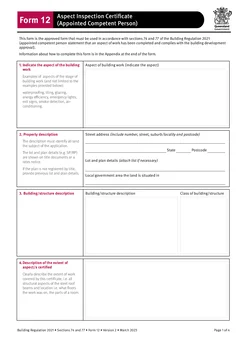
Form 12 is about an aspect inspection by an appointed competent person. The official Queensland guidance says competent person inspection certificates for inspection aspects must use Form 12 and may be given to a building certifier after the aspect has been inspected and the competent person is satisfied it is complete and complies with the building development approval.
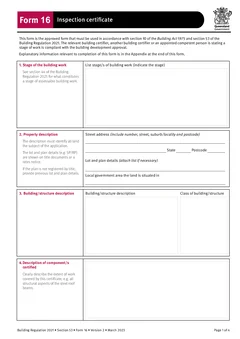
Form 16 is about a stage inspection. Queensland guidance describes it as the inspection certificate given after an inspecting person has inspected a stage of work and is satisfied the relevant aspects of that stage are complete and comply with the building development approval.
Form 21 is the final inspection certificate for single detached class 1a buildings and class 10 buildings or structures, excluding swimming pools and swimming pool fences. The official Form 21 says the building certifier must give the signed form to the owner as the final inspection certificate.
Form 43 is a QBCC licensee aspect certificate for aspect work subject to a building development approval for single detached class 1a buildings and class 10 buildings or structures. Form 30 is the related QBCC licensee aspect certificate for accepted development, where the prescribed work is not assessed under a building development approval.
Tradie Forms maps your entries onto the official PDF layout. It does not decide which certificate applies, whether a person is properly appointed, or whether the work complies. The person issuing the certificate still needs to check the work, appointment, licence class, basis, references and downloaded PDF.
Which certificates go in the pack?
Before you fill anything, collect the job references. This is where most wasted time starts.
For a clean Queensland building certificate pack, gather:
- Street address, lot and plan, local government area and property description
- Building description and class
- Building development approval number where one applies
- Building certifier reference number
- Stage, aspect, design, specification or final inspection scope
- Person signing, company, contact, registration or licence details
- Basis for certification, including inspections, tests, standards, specifications or other documents relied on
- Drawing numbers, revisions, product documents, photos and inspection notes
- Dates, signatures and any completion notes
Those details should match the approval, plans and job file. A certificate with a vague property description or old drawing reference creates rework for the certifier and confusion for the builder.
Build the workflow around completion
The form should follow the work, not sit in a separate admin pile.
Step 1
Identify the role
Who is signing
Competent person, inspecting person, licensee or certifier. The role changes the form.
Step 2
Record the exact scope
While you are still there
Which stage, which portion, which rooms.
Step 3
Name the documents
Numbers and revisions
Entered while the plans are open, not reconstructed later.
Step 4
Preview, then file
Official layout
Small fields cut off long descriptions. Store the PDF with the job.
Each step is cheap on site and expensive from the office a week later.
First, identify the role of the person signing. Are they a competent person for design-specification help, a competent person for inspection help, an inspecting person, a QBCC licensee, or the building certifier? The role changes the form.
Second, record the exact scope. "Waterproofing" is not enough if the certificate covers only the ensuite shower walls and floor. "Frame" is not enough if the inspection was for one stage or one portion of the job.
Third, name the documents. Put drawing numbers, revisions and specification references into the certificate while they are open on the tablet or in the ute. Do not rely on "as per plans" unless the plans are identified somewhere else in the same job record.
Fourth, preview the official PDF layout before it leaves your hands. Queensland forms often have small fields and appendix wording. Previewing catches cut-off descriptions, missing dates and stale licence details.
Fifth, store the PDF with the job. Attach it to the job record, send it to the builder or certifier as required, and keep the supporting photos, notes and references nearby.
How Tradie Forms supports the pack
Tradie Forms turns the forms into sections you work through one at a time instead of flat PDF boxes. That matters on site because the person filling the form can work through the same blocks every time.
For a QLD building certificate, that usually means:
- Property and building details
- Stage, aspect, design or final inspection scope
- Basis of certification
- Reference documentation
- Certifier, competent person or QBCC licensee details
- Signature and date
Saved business and licence details help cut repeat typing. Missing-field checks help catch gaps before download. The PDF preview lets you confirm the official layout before the certificate goes to the builder, certifier, owner or local government process.
The product benefit is simple: finish the paperwork while the work, drawings and inspection notes are still in front of you.
Common workflow traps
Treating Form 12 and Form 16 as interchangeable
Form 12 is for an aspect inspection certificate from an appointed competent person. Form 16 is for an inspection certificate for a stage of work. They sit close together in the job flow, but they are not the same document.
Using Form 43 where Form 30 is the better fit
Form 43 is tied to aspect work subject to a building development approval. Form 30 is for prescribed accepted development where the work is not assessed by a building certifier under a building development approval. Check the approval pathway before choosing the form.
Letting references stay vague
The form may be accepted on the day, but vague references make later questions painful. Name the plans, revisions, specifications and test records that support the certificate.
Forgetting the owner copy
Form 21 is a completion record as well as an inspection record. If the final certificate is issued, keep the owner copy and related inspection documentation clear in the job file.
Reusing stale licence details
Saved details are useful only when they are current. Check licence class, registration, contact details and company name before signing.
What to complete
A good certificate site pack is not just the PDF. Depending on the job, include:
- The downloaded certificate
- Referenced drawings and revisions
- Product technical documents
- Test or inspection notes
- Photos or marked-up plans
- Builder, certifier or owner correspondence
- Any related certificates, such as plumbing, electrical or fire safety paperwork
This helps the office close the job without ringing the person who was on site. It also helps the next person understand what was certified and what was outside scope.
Team habits that stop certificate drift
If your building business, inspection practice or subcontractor team handles the same certificate types often, make the record habit repeatable. Use the same naming pattern for files, the same job-system folder, and the same completion note each time.
For example, the job record might use:
- Property address
- Certificate type
- Stage or aspect
- Certificate date
- Signer name
That makes it easier to find "Form 16 frame stage" or "Form 43 waterproofing" later. It also helps the office check whether a builder, certifier or owner has already received the PDF.
Saved details in Tradie Forms help with the repeat fields, but the deeper win is consistency. The same sections, the same preview step, and the same download habit mean certificates are not being rebuilt differently by each person in the business.
When to pause before download
Some certificate jobs should slow down for a second check. Pause before download if:
- The form type does not match the certifier's request
- The signer is unsure whether they have been appointed or can issue that certificate
- The aspect or stage wording covers work that was not inspected or certified
- The basis relies on a drawing or specification that is not in the job file
- The approval number, certifier reference or property details are missing
- The certificate includes a broad statement that the signer would not be comfortable explaining later
Tradie Forms can flag empty fields, but it cannot judge the professional decision behind the certificate. Use the product to make the paperwork cleaner, then use your trade and certification judgement before the PDF goes out.
Next steps
Start with the QLD Form 12 aspect inspection certificate if the job is an appointed competent person aspect inspection. Use QLD Form 15 for design or specification, QLD Form 16 for stage inspection, QLD Form 21 for final inspection, QLD Form 30 for accepted development aspect certification, or QLD Form 43 for QBCC licensee aspect certification under a building development approval.
Use the Form 12 vs Form 15 guide when the job is sitting between inspection and design help. For QBCC licensee aspect work, compare the Form 30 accepted development guide with the Form 43 aspect certificate guide before choosing the certificate.
Official references
For current requirements, check the Business Queensland building forms page, the Queensland Form 12 PDF, the Queensland Form 21 PDF, the Queensland Form 30 PDF, the Queensland Form 43 PDF, the Queensland competent persons newsflash, and the guidelines for inspection of class 1a and class 10 buildings.