Tradie Forms: complete QLD Form 21 one section at a time, preview the official final inspection certificate layout, then download a clean PDF for the owner, certifier file and project site pack.
QLD Form 21 sits at the serious end of a residential building job. The owner wants final paperwork, the builder wants close-out moving, and the building certifier needs a clear record that the final inspection certificate matches the building approval and inspection documentation.
The form itself is not long. The risk is the job record around it. A missing approval reference, unclear owner details, or a certificate issued before supporting inspection documents are lined up can create back-and-forth at the exact moment everyone wants the job closed.
Use the QLD Form 21 template when you want a section-by-section fill, saved certifier or owner details, missing-field checks, official PDF preview and a finished PDF download. You can also browse QLD building forms, or use related forms such as QLD Form 16, QLD Form 12 and QLD Form 43. For the field walkthrough, see the Form 21 completion guide. For the whole certificate set on a building job, see the QLD building certificates on-site workflow..
What does Form 21 record?
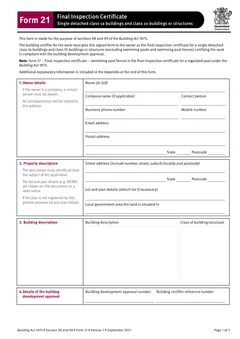
The official Queensland Form 21 says it is made for sections 98 and 99 of the Building Act 1975. It is for single detached class 1a buildings and class 10 buildings or structures, excluding swimming pools and swimming pool fences. It says the building certifier for the work must give the signed form to the owner as the final inspection certificate certifying the work is compliant with the building development approval.
The form also notes that Form 17 is the final inspection certificate for a regulated pool under the Building Act 1975.
That wording matters. Form 21 is not a general completion note. It is the final inspection certificate for the relevant class 1a or class 10 work. The building certifier still needs to check that the job is at the right point for the certificate and that the inspection record supports the certificate.
Tradie Forms maps your entries onto the official PDF layout. It does not decide whether the final inspection certificate can be issued.
Gather the record before filling
Form 21 is easiest when the certificate pack is already organised. Before filling the PDF, gather:
- Owner name and contact details
- Property street address, lot and plan, and local government area
- Building description and building class
- Building development approval number
- Building certifier reference number
- Final inspection date
- Any inspection certificates relied on
- Any aspect certificates relied on
- Certifier name, registration and contact details
- Signature and certificate date
Check these against the building approval and inspection notes, not against an old job folder. Owner names, lot details and approval numbers are easy to copy forward by accident.
Keep related certificates close
The owner usually cares about one question: do I have the paperwork I need? The certifier and builder need a more complete answer.
For a clean Form 21 completion, keep the related building certificates together:
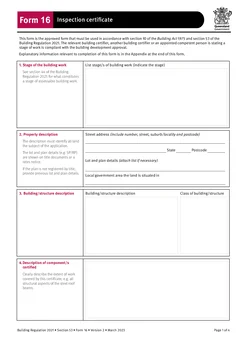
- Stage inspection certificates such as Form 16
- Aspect inspection certificates such as Form 12
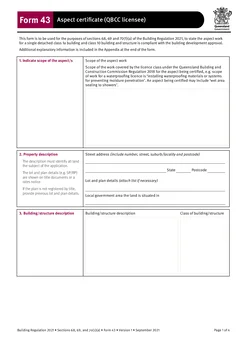
- QBCC licensee aspect certificates such as Form 43
- Accepted development aspect certificates such as Form 30, where relevant to other work
- Product technical statements or design references, where they support the file
- Photos, test results, inspection notes and plans used in the decision
This is where a digital workflow helps. The PDF can be attached or stored with the job record, while the supporting documents stay in the same closeout pack.
Where do Form 21 filing mistakes happen?
Owner details are treated as admin
The owner copy matters. If the owner is a company, trust, builder, developer or other entity, check the correct name and contact. The official form includes owner details for a reason.
Pool work is mixed into Form 21
Do not use Form 21 as a catch-all for every final certificate on the property.
Approval references are copied from another job
Building development approval numbers can look similar across staged projects or repeat builders. Check the approval reference against the current job file before download.
Supporting certificates are scattered
If the Form 21 relies on stage or aspect documentation, keep those records findable. A final certificate with no clear supporting file makes later questions harder than they need to be.
The PDF is not previewed
Small layout issues become real once the owner receives the certificate. Preview the official layout before sending. Check long names, addresses, lot details, certifier details and dates.
A practical Form 21 closeout rhythm
Use the same rhythm on every eligible job:
- Confirm the job is eligible for Form 21.
- Check that required stage, aspect and inspection documents are in the job file.
- Confirm owner and property details against the approval.
- Confirm the final inspection date and certifier reference.
- Fill the form one section at a time.
- Preview the official PDF layout.
- Download the final certificate.
- Give the owner copy and store the PDF with supporting inspection records.
This keeps the form close to the work, not as a loose PDF created after the job has already moved on.
Better completion for the owner and the office
Owners often do not know which certificate means what. They may have building, plumbing, electrical, gas and waterproofing documents arriving from different people.
When you send Form 21, label it clearly in the job record and email subject. Include the property address and certificate date. Keep related certificates in the same folder or job task. That makes future sales, warranty queries, insurance questions and owner requests easier to answer.
After download, the job record should show:
- The final Form 21 PDF
- Date sent to the owner
- How the copy was sent
- Building development approval reference
- Related Form 12, Form 16 or Form 43 certificates relied on
- Any final inspection photos or notes
- Any remaining non-certificate completion items, such as warranties or product manuals
This is especially useful when the owner asks a question months later. The office can see the PDF, the send record and the supporting inspection documents in one place.
How Tradie Forms helps on site
Tradie Forms breaks QLD Form 21 into sections you work through one at a time for the owner, property, building work, inspection and certifier details. Instead of pinching a flat PDF on a phone, you work through the same order each time.
Saved details can reduce repeat typing for the certifier or business block. Validation catches missing required fields before download. The official PDF preview shows whether the certificate reads cleanly before it leaves the job.
After download, store the PDF with the job. If your office uses a job software, attach the Form 21 to the final inspection or completion task so the admin team can see exactly what went out.
The point is not to replace the certifier's judgement. The point is to make the final certificate easier to fill, check and complete while the file is still open. Read the owner name, land description, building approval number, certifier reference and inspection date against the source documents before the owner copy leaves. The official Form 21 is the final inspection certificate for the eligible class 1a and class 10 work described on it, excluding regulated pools. It is not a generic project close-out letter.
Next steps
Start QLD Form 21 when the final inspection certificate is ready to prepare. If the job is still at a stage inspection, use QLD Form 16. If the record is an aspect certificate, check QLD Form 12 or QLD Form 43.
For the field walkthrough, open the Form 21 completion guide. Browse QLD building forms for related templates.
Official references
For current requirements, check the Queensland Form 21 PDF, the Business Queensland building forms page, the Queensland Building Regulation 2021 forms update, and the QBCC completion and final documentation guidance.