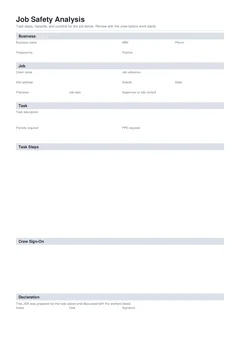
Principals and safety advisors do not open a JSA looking for pretty headers. They look for blanks and mismatches: last suburb's address, crew names who are not on the attendance list, steps that say "general construction", controls that are not on the ground, and a JSA uploaded where the pack filed "SWMS".
This list is those reject reasons. Field writing craft: How to write a JSA on site. When sites ask for one: When is a JSA required. Labels: JSA vs SWMS for builders.
1. Address from last suburb
The PDF looks finished. The site field still says the job you finished on Tuesday. Advisors cross-check against the induction address and the PO. Wrong suburb is an instant reject, even when the steps happen to fit.
What they look for: client name, street address, lot or stage that match this project today.
Fix: change job fields first when you duplicate a draft. Then rewrite every step that does not match.
2. Sign-on that is not attendance
Names of workers on leave, on another site, or who left at smoko undermine the pack when checked against the gate list. Signatures collected while people load the truck do not prove anyone reviewed the steps.
What they look for: names that match today's attendance; dates that match the brief; late starters added properly.
Fix: only sign people present for the review who will work the package. Remove leavers when the crew changes. Detail: JSA crew sign-on and handover.
3. Steps that say nothing useful
Safe Work Australia's risk guidance expects hazards identified and risks controlled so far as reasonably practicable. Vague rows fail that purpose even if the PDF looks full.
4. Risk ratings that never move
Every step rated Low on a site with plant, height, and live services looks false. Every step rated Extreme with no extra control looks like theatre.
What they look for: High or Extreme steps that earn stronger controls; ratings that change as conditions change.
Fix: rate for this site today. Be consistent inside one JSA.
5. Controls written on paper but missing on site
"Edge protection installed" only counts when it is installed. "Board isolated" only counts when isolation and prove dead are done. Advisors walk the face when they sample packs.
Fix: walk controls before the related step starts. If a control is not ready, do not start that step. Update the JSA if the method must change.
6. Blank permits, PPE, or plant fields
Steps mention hot work or excavation but the permits field is blank. Plant appears on site but never in hazards. The task section and the step rows contradict each other.
What they look for: permits and PPE filled in the task section, then mirrored in the steps that need them.
Fix: fill the header fields first, then write steps that assume the same gear and permits.
7. Empty "who" on high risk steps
If nobody owns the control, it often does not happen. Isolation, exclusion zones, and plant interfaces need a name or clear role.
Fix: put a real role or name in the who field for each step, especially the ones that can hurt someone.
8. JSA where the gate needed a SWMS
A thorough JSA table can look like a SWMS. That does not meet the SWMS duty for high risk construction work under model WHS rules. Principals who asked for Form 05 or a SWMS will reject a JSA-only response for that trigger.
What they look for: the document name the pack filed, plus a SWMS whenever high risk construction work is on the program.
Fix: prepare a SWMS when high risk construction work applies, and a JSA when the pack wants that format. Keep methods aligned. See JSA vs SWMS for builders.
9. Library hazards that bury the real ones
A 20-page JSA full of generic industry hazards is hard to use. Workers stop reading. Advisors pick contradictions between the library text and the live site.
Fix: stick to hazards for this package and this site. Broader company procedures can live in the WHS manual without being pasted into every step.
10. Method that contradicts the Take 5 or SWMS
JSA says harness primary; SWMS says edge protection primary; Take 5 says "be careful". Crews follow the last thing they signed. Advisors sample packs for that conflict.
Fix: one method of work. Update all live documents when the method changes. Comparison: SWMS vs JSA vs Take 5.
11. Backdated or after-the-fact JSA
Writing the JSA at week's end for work already done trains the crew that the document is admin only. Dates that sit after the first day's attendance are an easy reject.
Fix: date and sign before start. If you must document a change mid-job, mark the review time honestly and stop work until the new method is agreed when risk requires it.
Pre-start quality check
Before you hand the JSA to the gate or start the first task:
- Job and site details match this address and this stage of work
- Steps cover the work you will actually do today, not last week's job
- Hazards and controls are specific enough that a new crew member can follow them
- Controls exist or will exist before the step starts
- Crew sign-on matches people on site now after a real review
- Declaration complete
- SWMS also prepared if high risk construction work applies
If any point fails, fix the JSA before tools come out.
Office drafts that never meet the slab
Some businesses write JSAs only in the office on Friday for next week's jobs. The intent is good. The failure mode is distance: the author never saw the access, the neighbour's crane, or the incomplete scaffold.
Walk the site before crew sign-on and edit steps to match. Do not collect signatures until the live review happens. Kill steps that only exist on the drawing. An office draft is a starting point. The site version is the record that matters.
The pattern behind the list
Most of these come from the JSA being written to satisfy a gate rather than to plan the work.
A JSA produced the night before, from a template, for a package nobody has walked, will have generic steps and generic controls. That is not a documentation failure so much as a planning one, and it shows up as exactly the errors above.
A JSA built with the crew who will do the work, covering the steps they will actually take, produces specific hazards and usable controls almost automatically.
Sign-on is not a formality
The crew sign-on is the part most often treated as a signature-collection exercise, and it is the part that carries the most weight later.
A JSA signed by people who never read it is worse than one with fewer signatures, because it documents a consultation that did not happen. If someone joins the crew mid-job, they sign on when they arrive rather than being added retrospectively.
Related reading
- How to write a JSA on site
- When is a JSA required on construction sites
- JSA crew sign-on and handover
- JSA vs SWMS for builders
- Common SWMS mistakes that fail NSW site audits
- 9 Take 5 shortcuts that fail toolbox audits
- Building forms hub
Official sources
- Manage risks (Safe Work Australia)
- Identify, assess and control hazards
- Model Code of Practice: How to manage work health and safety risks
- Prepare safe work method statement (SafeWork NSW)
A clean JSA PDF supports site systems. It does not replace legal SWMS duties for high risk construction work where they apply.