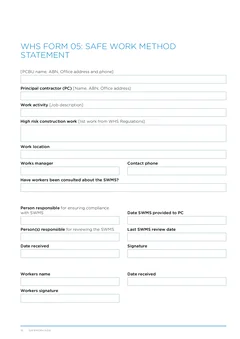
Use this checklist before you download the NSW WHS SWMS. Clean task rows and real controls beat a long document nobody follows.
Most SWMS failures are not missing logos. They are vague rows, generic templates, and methods that never match what the crew does when the truck is unloaded.
SafeWork NSW wants a site-specific plan for high risk construction work, available to workers, with controls in place before the activity starts. This guide lists the mistakes that waste the most time with principals, clients, and auditors.
For when a SWMS is mandatory, read When is a SWMS required in NSW. Field filling steps: How to complete a NSW SWMS on site.
1. Starting high risk work before the SWMS exists
SafeWork NSW requires the SWMS prepared before high risk construction work commences. Printing it after the first sheets go on the roof is the wrong order.
How to avoid it: treat the SWMS like plant and materials. If the high risk step is on tomorrow's plan, finish the SWMS and the pre-start talk today.
2. Copy-paste SWMS that never meets this site
SafeWork NSW allows generic SWMS for regular activities, then requires a review for site-specific hazards. Auditors and principals look for:
- This site's address and activity description
- Nearby power, plant, traffic, voids, and other trades
- Controls that actually exist on this job today
How to avoid it: open last job's SWMS as a draft only. Change location, high risk description, and any row that does not match before download.
3. Task rows that say nothing useful
The SWMS must identify the high risk work, the hazards and risks, the controls, and how controls are implemented, monitored, and reviewed.
| Mistake | Fix |
|---|---|
| "Working at heights" with no height or location | Name the elevation, void, or roof area and the fall distance risk |
| "Use PPE" as the only control | Prefer elimination and engineering controls first; name the specific PPE when it is needed |
| No owner for implementing controls | State who installs, checks, and re-checks the control |
4. Listing every task on site in the SWMS
SafeWork NSW says you do not need to include activities that are not high risk construction work. A 20-page SWMS full of ordinary tasks is harder for workers to use and easier for auditors to pick apart.
How to avoid it: keep the SWMS on high risk construction work. Use toolbox talks, JSA, or Take 5 for broader site communication where your system needs them.
5. Controls written on paper but missing on site
SafeWork NSW requires controls in place before the activity starts. Edge protection, isolation, exclusion zones, and plant spotters only count when they are real.
How to avoid it: walk the controls before high risk work. If a control is not ready, do not start that step. Update the SWMS if the method has to change.
6. No consultation or communication record
The SWMS must be understood by people using it. SafeWork NSW expects hazards, risks, and controls to be communicated to workers. A signature block without a conversation is a weak system.
How to avoid it: run a short walk-through against the task rows. Record consultation on Form 05 and, where your pack uses it, a toolbox talk record.
7. Wrong PCBU or principal details
Site packs fail simple checks when the ABN, business name, or principal contractor block is leftover from another job.
How to avoid it: check the header block every time. Saved licence and business details help, but you still confirm the principal and site for this project.
8. No copy for the principal when one is required
SafeWork NSW construction guidance expects the principal contractor to get a copy of the SWMS for high risk construction work, and updates when controls change.
How to avoid it: download the finished PDF, send or hand over the copy the principal needs, and keep one available on site for workers.
9. Work continues after the method changes
Weather, redesign, late plant, or another trade can break the planned controls. SafeWork NSW says if work is not in accordance with the SWMS, stop as soon as it is safe, review the SWMS, and only resume when work can follow it.
How to avoid it: treat method changes as a stop-and-update moment, not a "finish the day and fix paperwork later" moment.
10. Confusing SWMS with JSA or Take 5
A Take 5 is a short pre-task check. A JSA is a broader job safety analysis style document. A SWMS is the high risk construction work planning document SafeWork NSW describes for those defined activities.
Using the wrong document name on a principal's checklist creates rework even when the crew talked about the risks.
How to avoid it: read SWMS vs JSA vs Take 5 and give the site the document it asked for.
11. Unreadable PDFs on a phone at the gate
Some crews still photograph a paper SWMS or email a multi-megabyte scan. Gate checks fail when the text is unreadable, pages are missing, or the wrong revision is attached.
How to avoid it: keep a clean digital copy that matches the current method. Electronic storage is acceptable under SafeWork NSW guidance when workers can access it on site. A online form that downloads the HIISP layout reduces the "wrong scan of last month's job" problem.
12. No link between risk assessment and SWMS
HIISP Form 04 captures site hazards. Form 05 plans high risk construction work. When they contradict each other, auditors ask which document the crew actually follows.
How to avoid it: after Form 04, lift only the high risk items into Form 05. If Form 04 later finds a new high risk issue, update the SWMS before that work starts. See NSW WHS site pack overview.
13. Leaving review dates and responsible people blank
SafeWork NSW wants controls implemented, monitored, and reviewed. Empty reviewer fields and blank "last review" dates look like a document nobody owns.
How to avoid it: name the responsible person, record when the SWMS was provided to the principal where required, and set a review trigger after weather events, design changes, or control changes.
Pre-download checklist
Before you download the HIISP Form 05 PDF:
- High risk construction work is named clearly
- Location matches the site
- Each row has task, hazards and risks, and usable controls
- Implementation and monitoring are clear enough for supervisors
- Consultation happened and is recorded
- PCBU and principal details are current
- Controls are available on site now
- Workers can get the document on site (paper or electronic)
- The method matches Form 04 and any toolbox talk for this stage
- You know who holds the latest revision
Open the NSW SWMS form and run that list before you leave for the next job. More NSW WHS templates: NSW building forms.
What good looks like on a real job
A strong SWMS is short enough for a leading hand to walk in five minutes, specific enough that a new worker knows where the edge protection is, and current enough that yesterday's weather change is already reflected.
If a stranger on site cannot tell which high risk work is covered, which controls must be up first, and who to call when something does not match, the document still needs work even if every field has text in it.
Field habit that prevents most of these mistakes
Block fifteen minutes before high risk work:
- Open yesterday's SWMS or a saved draft
- Change site, activity, and any row that does not match
- Walk the controls that must exist before the first high risk step
- Talk the crew through the rows and record consultation
- Download the PDF and store it where workers and the principal can find it
That habit beats rewriting the whole pack after a failed gate check. It also keeps electronic copies current, which SafeWork NSW allows when the document stays available on site.
If you only fix one thing this week, fix vague rows and missing site-specific review. Those two issues create most of the rework for residential subcontractors using HIISP Form 05 on real housing sites.
Official sources
- Prepare safe work method statement
- Construction work
- Housing industry site safety pack
- HIISP Form 05 PDF
You remain responsible for SWMS content and how work is carried out.