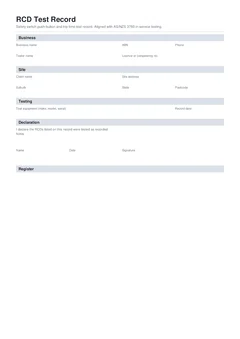
You have just worked through a bank of safety switches, a few socket RCDs, and a portable unit on a lead set. Push-button results and trip times are on the tester screen. Someone wants proof. That proof is an RCD test record: every device tied to a date, a result, and a next due date.
This guide is the day-of fill path. Set the header once, then loop device by device, close fails, run a short checklist, and sign last. For standards overview, competent person framing, and how appliance test and tag sits under AS/NZS 3760, use test and tag register and AS/NZS 3760. For client language and paper-to-PDF migration, use RCD log book and safety switch testing records.
Open the national RCD test record on site. Browse electrical forms. When portable appliances are on the same visit, keep a separate national test and tag register.
Before the first device
Do not start at the first safety switch with a blank header. Five minutes up front stops every row from carrying the same gaps.
Who and where. Business name, tester name, contact, and licence or competency details where the site asks for them. Client, job reference, and site address. Use the same job reference on photos and any related appliance register so the visit stays one file.
Instrument. Make, model, serial, and last verification or calibration date for the RCD tester. A trip time without a tool history is soft evidence if someone challenges the reading later.
Testing basis and visit type. For most in-service work that is AS/NZS 3760:2022. On construction and demolition, AS/NZS 3012 also shapes the site rules. Name the basis on the record. Say whether this visit is push-button, operating time, or both. Interval detail without inventing a national table sits in RCD test intervals and records.
Default retest interval. Set the interval that applies to this visit type and environment, so next due dates on passes are not invented row by row from memory.
Access plan. On multi-board sites, decide the board order and finish one board before the next. Note areas you cannot access rather than implying those devices were tested.
If you need the broader "what is test and tag / who is competent / environment intervals" essay, that lives on the AS/NZS 3760 hub. This page stays on the RCD board loop.
The on-site loop: one safety switch at a time
Work the device in front of you. Do not batch writing for the ute.
- Identify. RCD ID or circuit reference, short description, location a stranger could walk to. "MSB RCD 2, circuits 5 to 8" beats "safety switch downstairs".
- Type and rating. Fixed, socket, or portable, plus rating in milliamps from the device face, not from last job's memory.
- Push-button. Press, watch, record pass or fail while you are still at the unit.
- Trip time (if this visit measures it). Enter milliseconds while the tester still shows them. Leave blank on button-only visits. If it did not trip inside the instrument window, record that clearly (for example
>300) rather than inventing a neat pass. - Overall result. Pass or fail for this device on this visit.
- Dates. Test date now. Next due date on every pass from the interval you set for this visit type. No fake due date on a fail.
- Fail action (if fail). Isolate, tag out, replace, quarantine a portable unit, or notify the client that a circuit is unprotected. Write the action before you walk to the next device.
- Next device. Only then.
That loop is the whole method. Writing three boards from memory at lunch is how 24 ms becomes 30 ms and the wrong circuit gets the fail.
What does each register row have to carry?
Keep the row thin and specific. The register body is not a paragraph of notes.
| Field | Why it is there |
|---|---|
| ID / circuit + location | Lets the next person match the row to the board |
| Type + mA rating | Frames how trip results are judged |
| Push-button result | Shows the built-in test path was checked |
| Trip time (ms) | Only when measured; blank means not measured |
| Pass / fail | Headline outcome for this visit |
| Test date + next due | Drives the retest; fails get an action instead |
| Fail action + detail | Closes the safety loop on the day |
Notes at the bottom are for extras: portable unit removed from a van, client advised overnight isolation, board locked pending replacement. Notes are not a substitute for missing rows.
What do you do when an RCD fails?
A fail is not a blank next due date. Any RCD that does not comply needs to be taken out of service or replaced so people do not keep trusting a dead device.
At the moment of fail:
- Mark fail
- Record what failed (button, trip time, or both)
- Record the action taken
- Physically isolate, tag, replace, or quarantine
- Tell the site contact before you leave that area
- Only then move on
A register that lists a fail with an empty action field is an open hazard list. How to walk the client through that conversation sits in RCD test record handover to clients.
Pre-sign checklist
Run this before the declaration, ideally once per board on large sites:
- Every RCD has an ID or circuit and a findable location
- Type and rating match the device face
- Push-button results are filled
- Trip times are filled only when measured, and they match the instrument
- Every pass has a next due date aligned with this visit type
- Every fail has action and detail, and the device is out of service or replaced
- Tester name and instrument details are complete
- Job reference matches photos and any related test and tag register
- Areas you could not access are noted, not silently implied as tested
If any line fails, fix it before download. Returning tomorrow to re-measure a trip time costs more than two minutes at the board today.
Sign-off last
Name, date, signature, and short notes. The declaration is you standing behind the round, so it goes on after devices, readings, results, and fail actions are correct. If more devices appear after download, issue an updated register rather than editing memory with no trail.

On-site traps that burn the visit
A fuller list lives in common RCD test record mistakes. These four burn the day while you are still on site.
Vague identity. A description that fits several devices on the same board means a row cannot be matched later.
Trip times from memory. Writing up after three boards is how readings swap. Capture while the tester shows the number.
Pass with no next due date. The site cannot book the next visit from a blank.
Fail with no action. Paperwork says problem; the floor may still have the risk.
Same visit as test and tag? Keep two registers
RCD testing and portable appliance testing often share a site day. They are not the same record. The appliance register carries earth continuity, insulation, and related readings under AS/NZS 3760. The RCD record carries push-button and trip time for fixed, socket, and portable safety switches.
Share a job reference. Keep separate PDFs so a failed lead does not blur into a failed board RCD. Construction three-month rhythm for portable gear sits in construction site test and tag every three months. Standards overview for the appliance side sits in the AS/NZS 3760 hub.
Finish and hand over
Preview the PDF, download a signed copy, give the client their copy, and store yours against the job. Tradie Forms maps entries onto a clean RCD register layout and flags missing fields before download. It is not a government form and is not affiliated with regulators. The competent person still checks devices, readings, and the downloaded PDF.
Start the national RCD test record, browse electrical forms, or read RCD log book and safety switch testing records when the client asks for a "safety switch log" rather than a fill tutorial.
Official references
Check the Standards Australia spotlight on AS/NZS 3760:2022 for the scope of in-service testing of equipment and RCDs, the Safe Work Australia model Code of Practice: Managing electrical risks in the workplace for competent person and workplace electrical risk duties, WorkSafe Queensland testing and tagging of electrical equipment for state guidance that points back to regulation and AS/NZS 3760, and SafeWork NSW electrical inspection and testing for how that state frames inspection and testing against the standard. Your state or territory WHS regulator, electrical safety laws, and current licence conditions govern how requirements apply on a given site, so confirm the testing basis and interval before you sign the record.