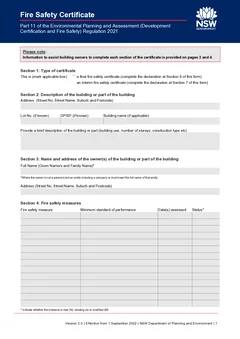
Most certificate rework is avoidable. The building work is done, the schedule exists, and the assessment happened, but the PDF picks the wrong certificate type, copies an old measure list, or leaves owner and declarant details half finished.
Run this checklist before you download the NSW Fire Safety Certificate. Clean measure rows beat a rushed PDF that comes back from the certifier. When the certificate is required: when is a NSW fire safety certificate required. Field walkthrough: on-site guide. Browse NSW fire safety forms.
Why does final vs interim keep going wrong?
Because the forms look similar and teams copy the last PDF. NSW Planning and the Regulation distinguish final certificates for the building work as a whole from interim certificates for a completed part of a building. The declaration section later must match that choice.
Final when the work is only partial. The PDF is marked final, but occupation or certifier instructions only cover a stage or part of the building. Read the consent, construction certificate, occupation pathway, and certifier notes. Choose interim when the certificate is not for the whole building work.
Interim language on a finished whole building. The reverse error is also common. If the certificate covers the completed building work as a whole, use the final declaration path. For the type decision in more depth, see final vs interim.
Mistake: measure rows that do not match the schedule
The certificate certifies relevant essential fire safety measures in the current fire safety schedule as capable of performing to at least the standard required by that schedule.
How it fails:
- Old schedule version copied from a previous certificate or similar building type
- Missing measures that the current schedule includes
- Extra measures that are not on this schedule
- Wrong or truncated minimum standard of performance text
- Building description that does not match the schedule
Open this building's current schedule beside the form. Enter each relevant measure with the standard the schedule actually requires. Match building name, address tokens, and part-of-building language for interim certificates. If you cannot match a measure to the schedule, stop and resolve the schedule or assessment pack. Do not invent a "close enough" row.
Mistake: empty or vague assessment dates
Certifiers and owners look for assessment evidence tied to measures. Blank dates or "various" with no support invite rejection.
Record assessment dates that match the qualified person's records. Behind each date should be something you can retrieve: test sheet, commissioning record, inspection note, or practitioner report as applicable. The certificate PDF is the summary, not the entire evidence library. If a measure was not assessed, do not pretend it was.
Mistake: building address and owner details from the wrong record
Street aliases, lot-only descriptions, and wrong unit numbers break file matching. Match the address to the development consent, construction certificate, and schedule building description. Include lot and DP details where the form expects them.
The certificate is issued by or on behalf of the building owner. Putting only a managing agent or tenant name in the owner block without the correct owner identity creates confusion. If the owner is a company or owners corporation, use the legal name on the building record. If an agent acts for the owner, keep roles clear in the fields that ask for them.
Mistake: declarant block incomplete or completed too early
Name, organisation, contact, and the correct final or interim declaration need to be complete. Signing the wrong declaration block is a structural error. Completing the declarant while measure rows are still blank is how empty standards leave the building.
Finish measures first, then the declarant section. Use the final declaration only for final certificates and the interim declaration only for interim certificates. The form separates those blocks so you are not filling both by accident.
Mistake: mixing certificate work with annual statement work
Teams sometimes paste AFSS-style annual statement language into a certificate job, or the reverse.
If the job is ongoing annual statement duty, use the fire safety statement form. If the job is new building work certification against the schedule, stay on the certificate path. See certificate vs statement. For statement mistakes that are a different checklist entirely, see common AFSS mistakes.
Mistake: no plan for copies and display
A finished PDF that never reaches the owner, certifier, or required display path still fails the job closeout even if the content is perfect.
Confirm who needs a copy before you leave site or close the job file. Keep a clean download with the job record. See handover and records.
Field patterns that keep failing
Schedule PDF from six months ago. The builder emails "the schedule" from an old pack while the certifier holds an amended schedule. Your certificate matches the wrong document. Ask which schedule version is current before you type a single measure row.
Interim without a part label. The PDF says interim, but the building description reads like the whole site. Later readers treat it as a final for everything. Put the stage or wing in the building description and filename.
One contractor assessed half the measures. You download a certificate covering the full schedule while half the assessment reports never arrived. List only measures you can evidence for this certificate, or wait until the pack is complete.
Certificate emailed, schedule not attached. The owner has a pretty PDF and no idea which schedule it sat against. Send schedule, certificate, and assessment pack as one named bundle.
Pre-download checklist
- Certificate type is final or interim for the real stage of work
- Building description matches the approval and schedule
- Owner details are correct
- Every relevant schedule measure is listed with the right performance standard
- Assessment dates and status fields are complete
- Declarant details and the matching declaration block are complete
- Preview shows a clean PDF
- You know who receives copies
Long measure tables are easy to mis-tap on a phone. Preview the official layout, scroll every measure row, then download. If two people are on the job, have the second person check certificate type, building description, first and last measure rows, declarant name, and declaration block type. The form flags gaps before download.
Tradie Forms maps your entries onto the official PDF layout. It does not certify measures, lodge anything, or approve the work. You remain responsible for certificate content and declarations.
Why these cluster at the end
Nearly every error above happens at issue, when the certificate is needed for an occupation deadline and gets completed quickly from the previous document.
Preparing it from the current schedule and the actual assessment, rather than from the last certificate for the building, removes most of them. The measures, the assessment dates, and the declarant details are the three fields most likely to be carried forward from something that no longer applies.
The schedule is the field that matters
If one thing repays attention it is the fire safety measures schedule.
A certificate whose measures do not match the building's approved schedule is the most common reason for rejection, and it is entirely avoidable by working from the current schedule rather than a copy. Where the schedule itself looks wrong, that is a question to resolve before issuing rather than something to smooth over in the certificate.
Next steps
Start the NSW Fire Safety Certificate when the schedule and assessment pack are ready. Confirm the trigger with when a certificate is required, walk the fields with the on-site guide, or browse NSW fire safety forms. Fire safety forms for every state sit on the fire safety forms hub.
Official references
For current requirements, check the NSW Planning fire safety certification page, the Environmental Planning and Assessment (Development Certification and Fire Safety) Regulation 2021, the Fire and Rescue NSW fire safety statement lodgement guidance where statement work is involved, and the NSW guide to selecting an accredited practitioner.