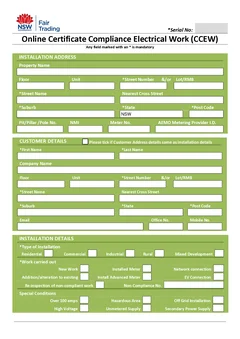
The best time to finish a CCEW is while the work is still fresh: results in front of you, photos on the phone, customer still on site. Leave it and the office starts chasing details that were obvious at the switchboard.
This is the business-level workflow. For the paper-versus-digital decision itself, see digital vs paper CCEWs.
Get the NSW CCEW lodgement path straight first, then work through the BCNSW eCert portal. Browse other Australian trade forms and NSW CCEW guides for more field habits.
The short version
A clean workflow has one rule: nothing important lives only in your head or in a blurry photo on the camera roll.
On a typical NSW job that means running and recording the required tests while the board is open, capturing installation details, circuit labels and nameplate photos before you pack up, completing the eCert while customer and site details are in front of you, and filing the portal confirmation with the test notes in the job folder the office actually uses.
Step 1
Test while the board is open
Licensed electrician
Required tests run and recorded before anything is closed up.
Step 2
Capture before you pack up
On site
Installation details, circuit labels and nameplate photos.
Step 3
Complete the eCert
Same visit
While customer and site details are still in front of you.
Step 4
File the confirmation
In the folder the office uses
Portal confirmation stored with the test notes, not on the camera roll.
Every step here happens on the same visit. The office chase starts wherever one of them slips to tomorrow.
The BCNSW portal holds the current CCEW. It does not replace your judgement about the work or who is allowed to certify it. The licensed electrician remains responsible for checking the installation and the submitted details.
Before you arrive on site
Good habits start in the van. Pull the job details you already have - client name, site address, scope, and who is signing. If an apprentice did part of the install, confirm supervisor details before you test. If a subcontractor ran the rough-in, confirm who is certifying before you assume it is your name on the form. Who can sign an NSW CCEW covers where that authority sits.
Keep a job kit ready: testing notes or a digital form that matches the certificate fields, calibrated test gear with current calibration, circuit labels that match how you will describe the work, and a way to photograph the board, RCDs, and any non-standard gear.
Tell the customer when the certificate will be submitted. Most domestic clients care that the power is safe and they receive the required copy. One line at the start saves an argument at the end.
On-site testing and capture
Run tests in an order that matches your gear setup rather than a wander around the house. A practical residential sequence is the visual check at the board, insulation resistance on new circuits before energising where required, earth continuity and bonding, RCD trip tests with times recorded, then polarity and any loop impedance tests the job needs. The NSW testing checklist has the detail.
Write results in the units and format you will enter on the certificate. If your tester stores readings, still note circuit numbers alongside them so you are not guessing which result belongs where.
Take photos while the context is obvious: board overview, new circuits, RCD labels, anything unusual you might need to describe. A photo of the tester display next to the board beats trying to remember a marginal reading three days later.
Where does the office chase actually come from?
Almost always from four gaps between field and paperwork: test results still on the tester or in random phone notes, circuit descriptions that do not match the board labels, old licence numbers copied from a previous job, and a customer address missing a unit or lot detail.
None of those are paperwork problems. They are capture problems that only become visible at paperwork time. Fixing the capture removes the chase; buying a better form does not.
Prepare the certificate details on site where you can. Enter results while the board is open, check the customer and licence details, then complete the eCert as soon as possible. If the job needs another person's review, send the job record the same day with test photos attached. Waiting until Friday afternoon is how certificates sit in limbo over the weekend.
Set clear handoffs for a crew
Use simple status labels rather than a long office process: testing in progress, ready for review, submitted, customer copy sent. The label has to reflect what actually happened. Do not mark a certificate complete until the eCert submission succeeds.
At the end of a multi-person job, the installer sends circuit information, test results, photos, and any variation notes under the job reference. The reviewer should see that evidence without chasing it through personal messages, and should ask questions while the crew is still on site. That is cheaper and safer than recreating the job on Friday.
Solo operators and crews fail differently. Solo sparkies lose time to retrieval - hunting photos, rebuilding addresses, retyping licence details - which saved details and on-site completion mostly fix. Crews lose time to handoffs, which only agreements fix.
Contractors certifying subcontractor work need more than a signature: inspection notes, photos of critical stages, and test results linked to the job reference. Your certification authority is only as strong as the file behind it.
Add the portal step to the same-day close-out
The field record and the regulator submission are related, but they are not the same thing. NSW requires CCEWs to be submitted through the BCNSW eCert portal. Site notes and test records support the submission but do not complete it.
Put that distinction in the team checklist with an owner against each line. The person preparing field details marks the record ready for review. The authorised person checks the work and the certificate information. The responsible person completes the current eCert process and saves the confirmation against the job reference.
Everyone should know who owns each step before the job starts, particularly where an apprentice, a subcontractor, or a remote supervisor is involved.
One source of truth for details that repeat
Business names, licence information, customer contact details, and common work descriptions are good candidates for saved details. They only save time when someone owns the check - review them against the current job after a staff change, licence update, new customer, or new property.
For field evidence, choose one location for tester output, photos, and notes. The folder does not need to be sophisticated. It needs a shared job reference, sensible permissions, and a routine everyone follows. An office administrator should be able to find the same information the electrician used to prepare the certificate.
Pick a reference format such as 2026-0312-Smith-Resi-Upgrade and use it on the certificate filename, tester output, customer emails, and job software attachments. Keep the issued certificate, test results, photos, portal confirmation, and correspondence together for the period required under current NSW rules and your own obligations - check current regulator guidance for retention rather than relying on an old team rule.
When an audit or warranty call comes in, you should open one folder and have the full story.
Recover quickly when a job is not ready
Some certificates cannot be completed before packing up. A permit detail may be missing, a result may need investigation, or a supervisor may need to inspect the work.
Record the exact gap before leaving and assign one person to close it. Save the draft under the job reference, but do not treat it as a final certificate or promise the customer it has been lodged. When the missing information arrives, go back to the source record, update the form, review the whole document again, and complete the submission. That discipline stops old draft details surfacing in a final record.
Client handover on the same visit
Hand the customer a clear copy when the work is done and explain in plain language what was tested and what the certificate covers. If remedial work is still required, say so before they read a defect list.
Tell the client what you can say with confidence: the work completed, the testing done, any further action, and the record they will receive. If submission is still pending, say it is pending. That reduces the chance a client mistakes an emailed copy for a finished compliance process. Explaining a CCEW to your customer has the scripts.
If they need the certificate for a builder, strata manager, or insurer, ask where they want it sent while you are still on site.
Measuring whether the workflow is working
You do not need a dashboard. Track three numbers for a month: minutes from last test to issued certificate, return visits caused by missing documentation, and office time spent chasing sparkies for test results.
Measure your own baseline rather than trusting an industry average. Once you know what a certificate actually costs you end to end, the value of removing a step is a real number rather than a guess - and the goal is fewer callbacks, not a prettier process chart.
Next steps
Fix the biggest capture gap first: wherever test results, photos, or customer details get lost between the job and the office. Once that is reliable, move the certificate into the same on-site routine.
Tradie Forms does not currently provide or lodge the new NSW CCEW. Open the BCNSW eCert portal or browse Australian trade forms.
Official references
Before setting your process, read the current NSW electrical compliance requirements, BCNSW eCert portal information, and Service NSW submit a CCEW.