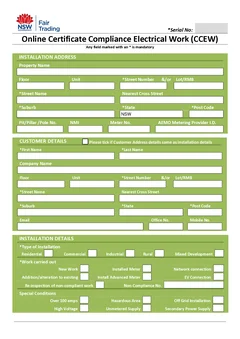
Paper CCEWs are no longer accepted in NSW. From 1 July 2026, every CCEW must go through the BCNSW eCert portal. The useful comparison now is between loose field notes and a reliable capture-to-portal process.
This is the practical comparison. For rolling a process out across a crew, see the CCEW workflow guide.
Paper CCEWs are not the lodgement method any more. How NSW CCEW lodgement works walks through what replaced them, and the certificate is completed in the BCNSW eCert portal. You can also browse NSW CCEW articles.
Submission has changed the question
NSW requires CCEWs to be submitted through the BCNSW eCert portal. Handwritten and PDF CCEWs are no longer accepted, so the portal record is the certificate process.
This ends the paper-versus-PDF debate. The practical question is how you capture accurate field data, give the responsible electrician a chance to review it, complete the portal submission, and keep the confirmation with the job. Check the current NSW electrical compliance requirements and BCNSW eCert portal guidance before changing systems.
Side-by-side
| Topic | Weak field capture | Reliable eCert workflow |
|---|---|---|
| Site details | Rebuilt later from messages | Confirmed while the job is in front of you |
| Test results | Transcribed from loose notes or photos | Recorded while the tester is connected |
| Missing information | Found after you have left site | Checked before portal submission |
| Customer email | Copied from an old job or invoice | Confirmed with the customer |
| Submission proof | Left in an inbox | Saved against the job reference |
| Retrieval two years later | Camera roll and email search | Job record with the eCert reference |
Where digital actually saves time
The gain is skipping double entry, and it only exists if you currently do double entry.
A weak path runs: write results in loose notes, rebuild the customer and licence details later, discover a missing field after leaving site, then search messages when the office asks for proof. Most of those steps are re-recording something you already knew.
The portal path runs: capture the job and test details on site, enter them in eCert, review the declaration, submit, then attach the confirmation to the job.
That difference compounds with volume. On one certificate a fortnight it barely registers. On several a week, with an office that needs the confirmation on the job card the same day, it can become most of your evening admin.
Accuracy on site
The recurring capture errors are predictable: cable size or protection rating copied from an old job, results transcribed with the wrong unit, a missing date or licence number, and circuit descriptions that do not match the board.
The portal catches some missing fields. It does not replace knowing how to test the installation, and no validation catches a number that was measured wrong or typed in from the wrong circuit. You still verify every value before you submit. See common CCEW mistakes for the errors that survive a digital workflow.
What does it cost to find a certificate from two years ago?
That question decides more than the printing cost. NSW expects certification records to be kept for years, and the retrieval test is the honest one: can you produce a specific certificate from a specific address, right now, without ringing anyone?
Storage only wins if you file consistently. An eCert reference in an inbox is not useful if nobody can find it against the job.
Deciding what "digital" means for your business
Digital is not one thing. A phone photo, a job app, field test records and the regulator portal each solve a different part of the job.
Your field method captures the source details accurately. Your job system keeps the customer, site, test notes and attachments together. Your review gives the responsible electrician a chance to check what will be submitted. The portal handles the certificate and confirmation.
Work out where each piece belongs before telling the crew to go digital.
What matters on site
The test is simple: can you finish the certificate before you leave?
Phone-first capture only works when missing results surface while the tester is still connected and the details can be checked before portal submission. Beyond that, the useful features are offline tolerance, reliable job records and one storage location the whole crew uses.
Team consistency matters as much as the tool. One sparkie using loose notes and another using personal messages produces two versions of the truth and no reliable review trail.
Trying it without disrupting the crew
You do not need a transformation project. Pick one job type, such as switchboard upgrades or standard domestic finals, and tighten the close-out while the rest of the work carries on as normal. Agree the filing rules up front: same job reference, same folder, eCert confirmation attached on the day of submission.
Time one live job end to end, then run the next similar job through the current eCert process and compare the real numbers rather than guessing.
Expand once everyone can finish at the board without an office chase. The workflow guide covers the crew-level rollout in detail.
Keep the customer conversation simple
Tell the customer the work has been tested, explain any follow-up plainly, and send the record they need. Do not say a certificate has been lodged unless the responsible person has completed the required submission. For builders and strata managers, confirm the recipient and job reference before you leave. Explaining a CCEW to your customer covers the scripts.
Make the portal process stick
Give the crew one close-out rule: the job is not complete until the eCert submission succeeds and its reference is saved against the job. Decide where field results, photos and supporting notes live before the first submission.
Plan for a flat battery, no signal at a rural job and an account password problem. Those are reasons to keep reliable field notes and a clear fallback for later portal entry. They are not reasons to use the retired paper or PDF certificate.
Next steps
The choice is not paper versus technology for its own sake. It is whether the certificate gets finished while the job is still fresh, with the submission completed and filed.
Tradie Forms does not currently provide or lodge the new NSW CCEW. Open the BCNSW eCert portal or browse Australian trade forms.
Official references
Read the current NSW electrical compliance requirements, BCNSW eCert information, and Service NSW submit a CCEW before changing a CCEW process.