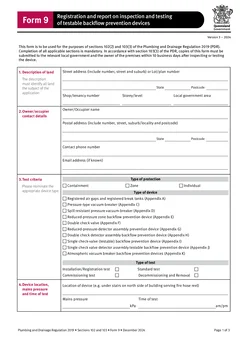
Tradie Forms: record QLD Form 9 backflow testing details while the device, test kit, and owner information are still in front of you.
Backflow paperwork is easiest while the test kit is still out. The device location is fresh, the readings are in your notes, the owner or occupier details are available, and the tester can check the declaration before leaving site.
Leave it and the record frays. Was the bypass device tested? Which serial number was entered? Did the owner copy go out? Was the council copy sent in time?
Use the QLD Form 9 template, or browse QLD plumbing forms.
What is QLD Form 9 for?
The official Queensland Form 9 is titled "Registration and report on inspection and testing of testable backflow prevention devices", and says it is used for sections 102(2) and 103(3) of the Plumbing and Drainage Regulation 2019.
The PDF says completion of all applicable sections is mandatory, and that copies must be submitted to the relevant local government and the owner of the premises within 10 business days after inspecting or testing the device.
That gives the form two jobs: it records the technical test, and it generates the copies for council and the owner. For the testing detail itself, see the Form 9 backflow testing guide; for cross-border work, QLD Form 9 vs the SA backflow report.
Capture it at the device
Before you finish, collect:
- Description of land and street address
- Owner or occupier contact details
- Protection type and device type
- Device location
- Mains pressure and time of test
- Main device details and readings
- Bypass device details where applicable
- Pressure vacuum breaker or registered air gap details where applicable
- Test kit serial number and verification details
- Authorised tester name, licence, contact details, and test date
- Test outcome and declaration date
Where a device or section does not apply, make that clear in the job notes and on the form where the layout allows. Do not leave the office to infer it from photos.
Where do the records go wrong?
Land, site, and owner details get mixed up. The land, site, and owner or occupier details all need to make sense to council and the property contact. Check the postal address fields specifically.
Bypass or special sections get skipped. The form covers more than one device arrangement. Work through the applicable parts rather than the familiar ones.
Test kit details are missing. Enter the serial and verification details while the kit is in use, not after the next job.
The owner copy is forgotten. The form requires a copy to the owner as well as the local government.
Track both copies
Because the form names both the relevant local government and the owner, the workflow has to track both. After the report is finished, add a short job note recording:
- Council copy sent - by email, portal, post, or another accepted pathway
- Owner copy sent - by email, agent, portal, or printed copy
- Date sent
- Any reference or receipt number
That answers the simple question the office always ends up asking: did both copies go out?
Step 1
Test at the device
Backflow prevention licensee
Readings and test kit details captured while the kit is still connected.
Step 2
Complete the Form 9
Authorised tester
Every applicable section, on the current version of the form.
Step 3
Council copy
Within 10 business days
Lodged the way that local government accepts it.
Step 4
Owner copy
Within 10 business days
Same window, separate obligation, easy to leave until last.
Both copies run off the same clock. A job note with the date and reference for each is what proves the pair went out.
Make the device history useful next year
Backflow testing is recurring work, so treat each report as part of a device history rather than a single document.
A useful history carries the site name and address, device location, make, model and serial where recorded, previous test date, current test date, result, repair or replacement notes, council submission record, owner copy record, and the next action or follow-up.
If the same tester returns, the job starts faster. If a different tester attends, the device is easier to identify and last year's result is not buried in an email thread.
Where a test leads to repair work or retesting, keep that tied to the same record - the failed or incomplete result, the repair quote, the follow-up booking, the retest result, and the final submitted copy should sit together.
Write comments a non-plumber can read
Owners, agents, and council staff read the report without standing at the device. Use plain language in the comments and outcome areas.
Where a device failed, needs repair, was replaced, or could not be fully tested, write it so the follow-up is obvious. Shorthand only one tester understands causes a phone call later. That does not replace the technical result - it makes the record usable by the office and the customer.
An annual testing rhythm
- Confirm the device and site details before testing
- Fill owner or occupier details while the contact is available
- Record readings directly from the test
- Add test kit details before packing away
- Apply saved authorised tester details and check they are current
- Review the official layout
- Send copies to council and the owner through the required pathway
- Store the report with the device history
Before the tester drives away, run the end-of-visit check: device identified and location clear, applicable readings entered, test kit details entered, tester details current, owner or occupier details checked, outcome and declaration completed, photos or repair notes attached, and the copy plan noted. It takes less time than a follow-up phone call.
What to keep with it
- Device photos or asset notes
- Test kit verification record
- Owner or agent correspondence
- Council submission email, portal receipt, or lodgement note
- Any repair quote or follow-up task
- Next test due note where your job software supports it
The form records the test. The job record shows what happened around it.
When the device is replaced
A replacement resets the history, and that is the moment records most often break.
The new device has its own make, model, and serial, and testing it against the old serial number is how a device history quietly becomes fiction. Record the removal and the installation as separate events, with the date, the reason the old device came out, and the details of what went in.
Keep the old device's testing history rather than deleting it. The property has a record of what was protecting it and when, and a backflow prevention device that failed and was replaced is a more useful history than one that simply disappears from the file.
Where the replacement changes the hazard rating or the device type, that belongs in the record too. Someone testing it next year should not have to work out from the serial number that they are looking at a different class of device to the one in last year's report.
Handing over to a new owner or manager
Commercial properties change hands and change managers, and the backflow file is one of the things that gets lost in the handover.
When a new building manager takes over, the useful pack is the current test report, the device history, and the location detail that says where each device actually is. A new manager who cannot find the device cannot arrange the test, and the first they hear about it is a reminder from the local government.
Write the location so it survives the handover. "Front boundary, in ground box, north of driveway" is findable by someone who has never been on site. "Main line" is not.
If you are the tester who has serviced a property for years, you are often the only continuous record. Offering the history at handover is worth doing, both because it keeps the property compliant and because it is usually what keeps you on the job.
Next steps
Start QLD Form 9 while the test kit is still out, or browse QLD plumbing forms. Browse the plumbing forms hub for job and safety paperwork that travels with you.
Related paperwork includes QLD Form 1 for permit work applications and QLD Form 5 for testing or commissioning reports. See common Form 9 mistakes for the errors worth catching, or the QLD plumbing forms list for the wider set.
Tradie Forms organises Form 9 into sections you work through one at a time for land, owner or occupier, test criteria, device location, readings, test kit, authorised tester details, and declaration. The authorised tester remains responsible for the device, the readings, the declaration, and the finished report.
Official references
Check the Queensland Form 9 PDF, the Business Queensland plumbing and drainage forms page, the Plumbing and Drainage Regulation 2019, and QBCC backflow guidance.