Annual backflow tests generate a steady pile of paperwork for Queensland plumbers. Each device needs accurate location, test kit and pass or fail results. When those details live in camera roll photos, half-filled PDFs and scribbled site notes, lodgement can slip to the next week.
The easiest Form 9 is the one you complete while the kit is still connected and the device is still in front of you. Use the QLD Form 9 template or browse QLD plumbing forms. For copies, archive and device history, use the Form 9 record keeping and handover guide. If you work across more than one state, see the Australian backflow test report guide.
What is QLD Form 9 for?
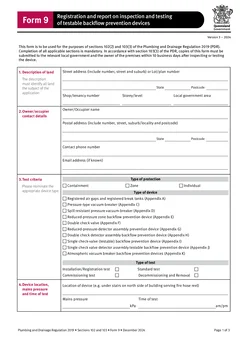
The Queensland Form 9 is the approved form for registration and report on inspection and testing of testable backflow prevention devices, registered air gaps and registered break tanks.
The current Form 9 says it is used for sections 102(2) and 103(3) of the Plumbing and Drainage Regulation 2019. It also says completion of all applicable sections is mandatory and that copies must be submitted to the relevant local government and the owner of the premises within 10 business days after inspecting or testing the device.
That makes the form more than a worksheet. It is the record that connects the device, the premises, the test result, the authorised tester and the people who need a copy.
Which backflow job are you reporting?
Form 9 is not only for a simple annual test. Before filling it, identify what happened on the job so the right sections make sense.
Use the job type to decide what you need to capture and whether other paperwork applies:
| Job at the premises | What Form 9 needs to show | Form 4 check |
|---|---|---|
| Annual inspection and test | Current device details, readings, test kit details and result | Testing alone is minor work and does not need Form 4 |
| New testable device | Registration, device, location and test details | Installation can be notifiable work, so check the Form 4 requirement |
| Device replacement or removal | Which device changed and the resulting council record | Replacement or removal can be notifiable work, so check the Form 4 requirement |
| Registered air gap or break tank | The applicable inspection or testing fields on the current Form 9 | Confirm the work category before closing the job |
The job type affects the details you need. A new installation may need clearer device registration information. A repeat annual test still needs fresh readings and current test kit verification. A removal or replacement needs enough detail for council records to track what changed at the premises.

Annual tests, new devices and Form 4
The job type also decides which paperwork applies. The Plumbing and Drainage Regulation requires the owner to arrange for a backflow prevention licensee to maintain and test a registered testable device at least once each year. The tester records the result on Form 9 and submits it to the relevant local government within 10 business days.
At least yearly
Testing a registered testable device
Arranged by the owner with a backflow prevention licensee.
10 business days
Submitting the result to council and owner
After inspecting or testing the device.
An annual test on its own is minor work. The QBCC guide to notifiable work lists testing a backflow prevention device as minor work with no Form 4. Installing, replacing or removing a testable backflow prevention device can be notifiable work instead. On those jobs the plumber may need to lodge Form 4 with the QBCC as well as Form 9 with council. Confirm the work category before you close the job rather than attaching Form 4 to every annual test by habit.
Use the current Form 9. Queensland Building and Plumbing Newsflash 627 says the form was amended on 15 May 2024 to reference AS/NZS 2845.3:2020 and improve the test fields. The previous form could continue only where it was signed before 15 May 2024, with the amended form expected to be the sole version used after 31 August 2024. Download the current file from Business Queensland rather than reusing an old copy.
Who needs to receive the form?
Under the Regulation, the backflow prevention licensee must give notice of relevant work in the approved form to the local government and the owner of the premises within the required timeframe. For practical job planning, leave the site with enough detail to send both copies without having to chase the customer later.
Before you leave, confirm:
- Which local government area applies to the premises
- Owner or occupier contact details
- Email or postal details for the owner copy
- How that council accepts Form 9 lodgement
- Whether the job involves a new device, replacement, removal, maintenance, annual test, registered air gap or registered break tank
Council processes can vary. Some accept email, some use portals, and some have extra local requirements. Tradie Forms prepares the PDF layout, but you still lodge it the way the relevant council accepts. The record keeping guide covers tracking both copies after the test.
What does Form 9 capture?
Typical sections include:
- Property and local government area
- Owner or occupier contact details
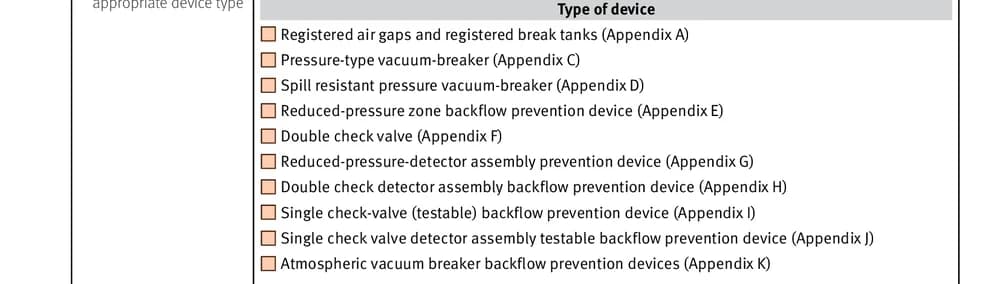
- Testable device type and protection level
- Device location and mains pressure
- Main device, bypass device, PVB, registered air gap or break tank details
- Test kit serial number and verification date
- Authorised tester licence and contact details
- Contractor licence details where needed
- Pass, fail, comments, signature and date
A single missed pressure reading, wrong local government area or stale kit verification date can hold up acceptance.

Finish the test report on site
Testing at the device is the right time to complete Form 9. You have the serial number, device size, differential pressure readings and site access details in front of you. You can also confirm the owner details with the person on site instead of hoping the booking record is correct.
The on-site habit is simple:
Step 1
Property and device
Before the kit comes out
Local government area, then device identity and protection level from the tag.
Step 2
Test and record
While the kit is connected
Results, plus the test kit serial and verification details.
Step 3
Tester and contractor
Authorised tester
Details that let someone verify who did the test.
Step 4
Preview before you leave
On the official layout
A serial one digit out is invisible until someone checks the register.
Every step happens at the device. None of it reconstructs well from the ute.
- Send or lodge the form through the correct council process.
Frequent Form 9 field errors
Local government area does not match the premises. Backflow reporting is tied to the relevant local government. Check the premises, not just the billing address, especially on boundary suburbs, industrial estates and jobs booked by head offices outside the local area.
Device location is too vague. Plant room might be enough for you on the day, but it may not be enough for the next plumber, the owner or council records. Better examples include ground floor pump room, east wall; behind tenancy 3, beside cold water meter; car park level B1, fire services cupboard; or roof plant deck, northern riser.
Bypass or PVB section left blank when it applies. If a bypass device, pressure type vacuum breaker, registered air gap or break tank is part of the installation, the matching section needs attention. Do not let the main device pass result hide a missing related section.
Test kit verification date is missing or stale. Add the serial number and verification date while the kit is in your hand. If the verification date is out of date, fix that problem before the form goes out.
Contractor details are missing. The form separates authorised tester details and contractor licence details where required. Check that the correct block is complete.
Pass or fail comments do not explain the result. A failed result should not be a mystery. Write enough for the owner or council to understand what failed and what happens next. If remedial work is needed, say that clearly and keep supporting notes with the job.
For a focused mistakes list, see common QLD Form 9 mistakes. If your crews also work in South Australia, compare both reports in the QLD Form 9 vs SA backflow report guide.
Annual testing without last year's copy-and-paste
Repeat annual tests are where Form 9 can either run smoothly or become a paper chase. The details are similar each year, but the results, test kit verification, dates and owner contacts still need checking.
A good repeat workflow looks like this:
- Start from the same device record or saved details.
- Confirm the owner or occupier contact has not changed.
- Check the device location still matches what is on site.
- Enter fresh readings, not last year's result.
- Confirm the test kit verification date.
- Download the new Form 9 PDF.
- Send copies to council and the owner within the required timeframe.
Saved details help with tester and business details, but do not blindly copy the job-specific fields. Annual forms are only useful if they reflect this year's inspection or test.
What to keep with the completed Form 9
Keep a copy of the final PDF, and also keep the notes that support the result:
- Photos of the device and serial plate
- Test kit details and verification evidence
- Readings taken during the test
- Notes about access issues or site conditions
- Council lodgement confirmation
- Customer or owner email trail
This matters when a customer asks for last year's result, council queries a device record, or another plumber needs to understand what happened before. The record keeping guide covers building a device history the next tester can use.
How Tradie Forms helps
Tradie Forms turns Form 9 into sections you work through one at a time instead of a flat PDF. That makes it easier to complete the report from the device, especially on a phone.
You can work through property, owner, device, test kit, tester, contractor and declaration sections, save tester and business details for repeat annual work, catch missing required fields before download, preview the official PDF layout before lodgement, and download the finished form for council and owner records.
Tradie Forms is not affiliated with the Queensland Government or local government. Always verify the finished PDF before lodgement. The authorised tester remains responsible for the device, the readings, the declaration and the finished report.
Next steps
Start QLD Form 9 backflow on site, or see all QLD plumber forms in one place. For archive and owner or council copies, use the Form 9 record keeping guide. For field traps, use common Form 9 mistakes. Plumbing forms for every state sit on the plumbing forms hub.
Official references
Check the Queensland Form 9 PDF, the Business Queensland plumbing and drainage forms page, the Plumbing and Drainage Regulation 2019, Queensland Building and Plumbing Newsflash 627, the QBCC notifiable work guide, and Brisbane City Council backflow prevention and testing. Council processes vary, so confirm the local lodgement method and your current backflow endorsement before you certify a device.