Most Form 9 problems are not exotic. They are the same field shortcuts that look fine at the device and fall over when council, the owner or next year's tester reads the PDF.
Wrong local government area. A plant-room location that could be any of three risers. Bypass left blank because "there wasn't one" with no note. Test kit verification date from last season. Owner copy still sitting in drafts after day twelve.
This guide is a mistakes checklist for Queensland backflow testers and office staff. For the full how-to, use the QLD Form 9 testing guide. For archive and completion paths, use the Form 9 record keeping and handover guide. If you also work in South Australia, compare both reports in the QLD Form 9 vs SA backflow report guide.
Browse QLD plumbing forms for related permit, testing and completion paperwork, or use the national backflow test report guide when jobs cross state borders.
Mistake 1: treating Form 9 as optional notes
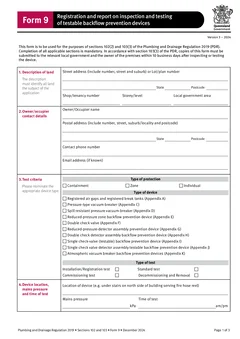
The official Queensland Form 9 is the approved form for registration and report on inspection and testing of testable backflow prevention devices, registered air gaps and registered break tanks. It is used for sections 102(2) and 103(3) of the Plumbing and Drainage Regulation 2019.
It is not a personal worksheet you can replace with a photo of the gauge and a text message. The form says completion of all applicable sections is mandatory, and copies must go to the relevant local government and the owner within 10 business days after inspecting or testing the device.
If the job needs a Form 9, finish the form. Do not invent a private template and hope council accepts it.
Mistake 2: guessing the local government area
Local government area errors are common on boundary sites, newly developed estates and jobs where the invoice address sits in a different council from the device.
Fix:
- Confirm the premises local government from the property details, not from the client's postal suburb alone
- Check how that council accepts Form 9 before you leave site if the process is unfamiliar
- Keep the same LGA on the form, the job file and the lodgement email or portal
A clean test report with the wrong council is still a failed completion path.
Mistake 3: vague device location
A location that means something to you today can mean nothing to the next tester in twelve months.
On multi-building sites, shopping centres, schools and industrial parks, write a location another licensed tester can find without calling you.
Better location notes often include:
- Building or block name
- Level or plant room number
- Which riser, meter assembly or fire service
- Side of building or boundary reference
- Asset tag or site register ID if the owner uses one
If the form field is short, put the precise location in the allowed comments and keep a matching note in the job record.
Mistake 4: device identity copied from last year without a check
Serial numbers, make, model and size should come from the device in front of you. Last year's PDF is a reference, not proof the same device is still installed.
Common slip-ups:
- Device replaced since last annual test, but old serial reused
- Main and bypass details swapped
- Size or type guessed from memory after the cover is back on
- Registered air gap or break tank left off because the visit "felt like a standard RPZ job"
Read the tag again after the test, then fill the form. If the device was replaced on this visit, make the report match the installed unit and keep any removed-unit notes with the job file.
Mistake 5: incomplete main, bypass or PVB readings
Form 9 includes sections for the main device and, where relevant, bypass, pressure vacuum breaker, registered air gap or registered break tank details. Leaving a whole section blank because it was awkward on a phone is how rework starts.
Before download, check:
- Protection type and device type match the installation
- Mains pressure and time of test are entered where required
- Valve or test criteria for the actual device type are complete
- Bypass is either fully reported or clearly not applicable in the job notes and form layout
- Pass or fail is consistent with the readings and any repair notes
If the device fails, do not tidy the first result into a silent pass. Record the fail, the repair or replacement work, and the retest result so council and the owner can see the real sequence.
Mistake 6: stale test kit verification details
Test kit serial number and verification or calibration details are easy to copy from a saved profile and forget to update.
A report with perfect valve numbers and an out-of-date kit verification date still looks unfinished. Check the kit record before the first test of the day, not after five PDFs have already gone out with the old date.
Keep the physical kit sticker, the office kit register and the saved Tradie Forms details aligned.
Mistake 7: wrong or incomplete authorised tester details
QBCC guidance notes a backflow prevention endorsement is required to test, commission or maintain these devices. The Form 9 needs the authorised tester details that match the person responsible for the test.
Watch for:
- Licence number from a colleague who did not do this test
- Old phone or email after a business rebrand
- Contractor licence details missing where the form needs them
- Signature and test date that do not match the site diary
Saved details save typing. They do not remove the need to confirm who tested this device today.
Mistake 8: owner and occupier contacts are mixed up
Council and owner copies need real people who can receive the report. Common mistakes include:
- Using the site manager as owner when the owner is a different entity
- Entering the accounts email only, with no owner legal name
- Leaving occupier details blank on tenanted sites where the form expects them
- Sending the owner copy to a builder who has already left the project
Before you leave, confirm who should receive the owner copy and how they want it delivered. The 10 business day clock does not care that the body corporate portal password changed last week.
Mistake 9: missing the 10 business day window
The Form 9 framework requires copies to the relevant local government and the owner of the premises within 10 business days after inspecting or testing the device.
Teams miss the window when:
- The PDF waits for Friday office time
- Photos stay on a phone until the next site visit
- The tester waits for a repair part before writing up the original fail
- The owner copy is forgotten after council is lodged
Fix the process, not just the calendar reminder. Complete the form at the device or in the van, then send both copies as part of job closeout. If a device fails and needs repair, still keep a clear record of the inspection or test event and any follow-up report the council process expects.
Mistake 10: only one copy path completed
Council lodgement without an owner copy is incomplete. Owner copy without council lodgement is incomplete. A PDF sitting only in your cloud drive helps nobody outside the business.
Step 1
Test at the device
Authorised tester
Readings written while the kit is still connected.
Step 2
Complete and download
In the van, same visit
Waiting for Friday office time is where the window is lost.
Step 3
Copy to local government
Council method on record
Keep the portal reference or email acknowledgement.
Step 4
Copy to the owner
Owner of the premises
The step most often forgotten once council is done.
Both copies are required. Completing one path does not close the obligation.
Track:
- Council method and date
- Owner method and date
- File name of the exact PDF sent
- Any portal reference or email acknowledgement
The record keeping guide covers the archive side of this in more detail.
Mistake 11: using Form 9 for the wrong job type story
Form 9 can cover more than a routine annual pass. New registration, replacement, removal, registered air gap and registered break tank situations need the report to match what actually happened.
If you removed a device, do not write the form as if it is still protecting the hazard. If you commissioned a new device, do not leave registration-style details so thin that the council register cannot identify the asset. If the visit was maintenance with a retest, keep the repair trail with the result.
Mistake 12: downloading without a PDF read-through
Online forms catch missing fields, but they cannot tell you that the serial number is one digit off or that the location describes the wrong plant room.
Before download, preview the official layout and check:
- Street address and local government
- Owner or occupier details
- Device type, size, make, model and serial
- Location text
- Readings and pass or fail
- Test kit details
- Tester name, licence, signature and date
That one-minute read is cheaper than a council rejection or an owner dispute later.
Mistake 13: scattering support evidence across inboxes
The PDF is the formal report. The support pack still matters.
Keep together:
- Completed Form 9 PDF
- Photos of the device tag and location if your process uses them
- Repair invoices or parts notes after a fail
- Test kit verification record
- Council and owner send confirmations
- Next due date for the device
When the next annual booking arrives, that pack stops the "which device was it?" phone call.
A van-side habit that cuts rework
If your crew only fixes Form 9 quality at the office, the same mistakes will keep coming back. Put a short field habit around every test:
- Confirm LGA and owner contact before the first gauge reading.
- Photograph or note the device tag and exact location before the cover goes back on.
- Write main and bypass or PVB results while the kit is still connected.
- Check kit verification details once at the start of the day, not after five jobs.
- Fill tester licence and signature before you leave the premises or the driveway.
- Download, preview, and queue both send paths as part of job closeout.
Office staff can still help with portal lodgement and filing. They should not be guessing serial numbers from blurry photos or inventing a location from the invoice suburb. The tester owns the technical content. The office owns the send proof and archive.
That split keeps the 10 business day window realistic on busy weeks. The form is mostly done at the device. The remaining work is delivery and storage, not reconstruction.
Pre-download Form 9 checklist
- Job type is clear: annual test, new device, replacement, removal or other report situation.
- Local government area matches the premises.
- Owner and occupier contacts can receive the owner copy.
- Device identity matches the tag in front of you.
- Location is specific enough for next year's tester.
- All applicable reading sections are complete.
- Fail, repair and retest notes are honest and complete.
- Test kit serial and verification details are current.
- Authorised tester licence and contact details are current.
- Signature and date match the test day.
- Council and owner send methods are ready inside 10 business days.
- PDF has been previewed on the official layout.
Run that list while you are still near the device when you can. It is harder from the kitchen table two nights later.
Related paperwork on the same sites
Backflow work often sits beside other Queensland plumbing forms:
- QLD Form 1 for permit work applications
- QLD Form 5 for testing or commissioning reports on other systems
- QLD Form 14 for compliance declarations on permitted work
Do not use Form 5 as a substitute for Form 9 on a testable backflow device that needs the approved backflow report. Keep each form doing its own job. The QLD plumbing forms list shows how the pack usually sits together.
Next steps
Start QLD Form 9 backflow while the device and kit are still in front of you. Read the testing guide for field workflow, the record keeping guide for copies and archive, and the QLD vs SA comparison if your crews work both states.
Browse QLD plumbing forms for the wider Queensland library. Browse the plumbing forms hub for job and safety paperwork that travels with you.
Official references
Check the current Queensland Form 9 PDF, Business Queensland plumbing and drainage forms page, Plumbing and Drainage Regulation 2019, and QBCC backflow guidance before relying on this checklist for a live job.