Tradie Forms: prepare QLD Form 19 one section at a time, check the declaration scope, preview the official final inspection certificate layout, and keep the finished record with the job.
Form 19 is the final inspection certificate for Queensland plumbing and drainage permit work. It closes the loop once the relevant local government or public sector entity has decided to issue a final inspection certificate for the work described on it.
It usually appears at completion: the work has been inspected, the permit details need to be right, and the certificate has to say whether it covers all of the permit work or only part.
Prepare QLD Form 19, or browse QLD plumbing forms. The plumbing forms hub covers the other states.
What is QLD Form 19 for?
Business Queensland says the local government or public sector entity uses Form 19 to certify that permit work is compliant, operational, and fit for use, and that it can be issued when all work under the permit, or a distinct part of the work, is complete.
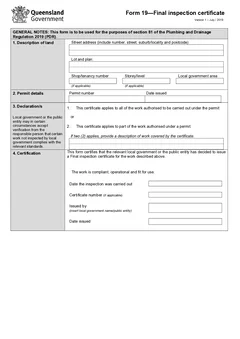
The official PDF says it is used for section 81 of the Plumbing and Drainage Regulation 2019, with sections for description of land, permit details, declarations, and certification.
So this is not a general completion note from the plumber. Plumbers and office staff may prepare details, but the issuing authority controls when the certificate can be issued.
Where does Form 19 fit in the job?
Form 19 sits near the end of the permit work pathway. Business Queensland's guidance explains that plumbing and drainage permit work is inspected by local government or a public sector representative, and that the regulation sets out the inspection process and the requirements for issuing inspection and final certificates.
In the job record it usually sits beside the original permit and any amendment, inspection booking or completion notes, covered work declarations where relevant, testing or commissioning reports, photos and job records, and the completion emails to the owner, builder, or permit holder.
For a small plumbing business the certificate may arrive from council or be prepared from details supplied by the issuing authority. For a builder or office admin it may be the document that unlocks a site pack. Either way, check it against the permit and inspection record before saving it as complete.
Do not let it float away from the work history. Whoever reads it later may not know the job, the stage, or why only part of the work was certified.
Description of land
The land section captures street address, lot and plan, shop or tenancy number, storey or level, and local government area where applicable.
Use the same land details as the permit and inspection record. Where the job is staged, in a complex, or covers several dwellings, check whether the certificate applies to all land or to a distinct part of the work.
Permit details
The form asks for the permit number and date issued. Copy both from the permit itself, not from a job title or an invoice - permit numbers look similar across a builder's jobs, and the wrong one is difficult to spot later.
These details matter because the declaration turns on them: the certificate either applies to all work authorised under the permit, or to part of it.
Getting the declaration scope right
This is the section to slow down on. The PDF gives two choices:
- The certificate applies to all of the work authorised to be carried out under the permit
- The certificate applies to part of the work authorised under a permit
Where it applies to part of the work, the form asks for a description of the work covered - and that description has to be specific. If it covers one townhouse in a complex, a stage, a portion of drainage, or a defined part of the permit, say so plainly. The person receiving the certificate should know what is fit for use without reading the whole permit file.
Use the same stage, area, fixture group, or work-package wording that appears in the permit and inspection records.


Certification details
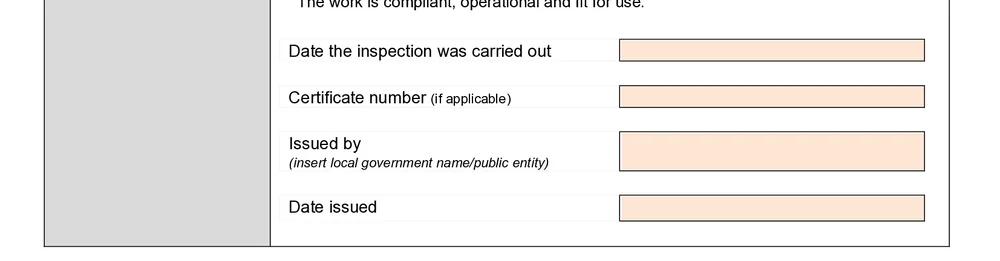
The certification section records the inspection date, the certificate number where applicable, the local government or public entity issuing the certificate, and the date issued.
These should match the authority's inspection and issuing records. Where the authority uses a certificate number, keep it consistent across the document, your job software, and correspondence. Treat the inspection date and the date issued as the separate events they are.
Saved issuing authority details save typing, but local government names, public entity details, and contact preferences still need checking against the actual job.
A practical workflow
- Confirm a final inspection certificate can be prepared for this job stage
- Open the permit record and inspection details
- Enter the land description
- Copy the permit number and issue date from the permit
- Select whether the certificate applies to all permit work or part of it
- Where it covers part only, describe the work covered
- Enter inspection date, certificate number where applicable, issuing authority, and issue date
- Preview the official layout and check it against the permit and inspection record
- Store the finished certificate with the close-out pack
The QLD Form 19 template organises property, permit, declaration, and certification into sections you work through one at a time, saves issuing authority details for repeat certificates, flags missing fields, and previews the official layout. It does not decide whether the certificate can be issued.
For the full error list, see common Form 19 mistakes.
Keep the close-out pack together
Once issued, keep the certificate with the current permit, amendments, inspection notes, and any related testing or declaration records. Because it may cover all permit work or a distinct completed part, label the file with the site, permit, and scope - that stops a later reader mistaking a townhouse or stage certificate for whole-project completion.
Where the job has a builder, owner, and office contact, send or attach the certificate through the agreed channel and record it. Where it applies to part of the work only, put that in the message subject or job note so it is not read as full permit completion.
What to do when the job is not ready
Final inspection requests arrive on the day the builder wants to hand over, and sometimes the job is not there yet.
The pressure is always the same shape. The owner is moving in, the client is waiting on the certificate, and the outstanding items are small. Small outstanding items are still outstanding, and the certificate says the work was inspected and complies.
The workable answer is to identify precisely what is incomplete, agree a re-inspection, and say so on the day rather than in the paperwork a week later. Builders can usually work around a short delay if they know about it while there is still time to fix the item. What they cannot work around is finding out after they have booked the handover.
Where the item is genuinely trivial and does not affect the certification, that is a judgement call for the person signing. The test worth applying is whether you would be comfortable explaining the decision to someone reading the certificate in two years without you there to add context.
The certificate is a statement, not a formality
It is worth being blunt about what the document does, because the volume of them makes it easy to treat as routine.
The certificate records that the final inspection happened and that the work complies to the extent the certificate covers. Your licence sits behind it. That is true on the hundredth one as much as the first, and it is why the scope wording and the date matter more than the speed of turning it around.
Signing a certificate for work someone else inspected, or backdating one to suit a handover, are the two shortcuts that turn a routine document into a serious problem. Neither is worth the convenience.
Next steps
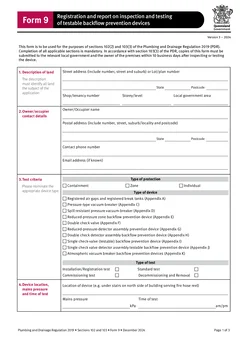
Related records may include QLD Form 1, QLD Form 3, QLD Form 5, QLD Form 14, and QLD Form 9, depending on the job.
For a filing routine, see the Form 19 record keeping guide, or the QLD plumbing forms list for the wider set.
Official references
Check the Business Queensland inspection certificates guidance, the Business Queensland plumbing forms page, the current QLD Form 19 PDF, and the Plumbing and Drainage Regulation 2019.