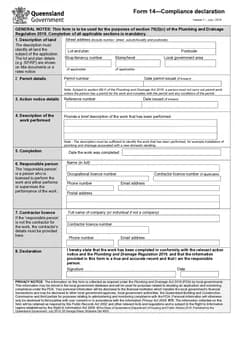
Tradie Forms: complete Queensland Form 14 compliance declarations on the official PDF layout after permitted plumbing work is finished. Capture land, permit, action notice, work, completion, responsible person, and declaration details on site.
Form 14 is the sign-off saying the permitted work was performed and is ready for the next step in the compliance chain. Councils and permit authorities expect the land description, permit references, work performed, completion date, and licensed party details to line up with the job file.
This is the field workflow. For the error list, see common Form 14 mistakes; for storage and handover, see Form 14 record keeping.
Use the QLD Form 14 template on site, or browse QLD plumbing forms. Working interstate? The plumbing forms hub lists the lot.
What is QLD Form 14 for?
Queensland Form 14 is a compliance declaration for completed plumbing and drainage work under the Plumbing and Drainage Regulation 2019. It confirms the work performed under the permit and supports council or permit authority records.
It is one record in the permit process. It does not replace inspections, testing reports, notices, or other forms that may apply, so use the official forms page and local government guidance to confirm what your job actually needs.
Is the job ready for this declaration?
Prepare it from the current permit records and the work actually completed. It is not a generic close-out sheet to be finalised from a saved template.
Before you fill anything in, bring together the issued permit, any action notice, site notes, testing or commissioning records, and the details of the person who performed or supervised the work. That gives you one place to check the declaration against the job, rather than reconstructing a permit number from memory.
Get the property section from the permit record
Form 14 asks for a description identifying all land subject to the declaration. Start with the issued permit, then complete the street address plus the extra identifying detail the form allows - lot and plan, tenancy, level, or local government area where relevant.
That extra detail earns its place on a unit, a commercial fit-out, a multi-building site, or a staged project. The delivery address gets you to the gate; it may not identify the part of the land the declaration covers. Do not paste an address from an earlier stage without comparing it against the current permit.
Where the work description names a particular building, tenancy, or component, check it does not conflict with the property information. The finished document should read as one record, not a set of independently completed fields.
Separate the permit from any action notice
The form provides a permit section and an action notice section. Read the paperwork carefully so the permit number and issue date land in the permit fields, and an action notice reference and issue date are entered only where an action notice applies.
Do not assume an empty notice field is an error - whether it applies depends on the job and current process. Equally, do not put a notice reference in a permit field because the notice was the document you were sent most recently. Where the correct pathway is unclear, ask the local government or responsible person before signing.
Save the actual permit and notice alongside the finished declaration, so an office handover has the original source for each number and date.
Describe what was completed, not the whole project

The work section briefly describes the plumbing work performed. Use plain job language matching the permit scope and job records.
Keep it accurate and bounded. Describe the completed plumbing or drainage work, not unrelated work elsewhere on the project. Where work is still in progress or the scope changed, stop and confirm which part is ready to be declared and whether another record is needed.
Do not use the declaration date as a substitute for checking the actual completion date. On a busy handover, write the description while the responsible person is still available - they can confirm it matches the work they performed or supervised, and you can correct it before a signature goes on.
Check the people blocks before signing
The responsible person is the licensed person who performed or supervised the work. The contractor section is for contractor details where the responsible person is not the contractor. They are separate blocks, not duplicate contact fields.
Use current licence, phone, email, and postal details. Saved details save typing and quietly carry an old business name or address into a fresh job.
Have the responsible person review the finished document - work description and dates included - then sign and date it once it is complete. This review matters even for someone who completes Form 14 every week. A signature makes a document look final, and catching a blank field or mismatched permit reference before that point is much simpler than sending a replacement.
The on-site sequence
Use this order before you leave the job:
- Open the current permit, any action notice, and the job records
- Copy the full property details from the permit
- Enter the permit number and issue date, then action notice details only where they apply
- Write a clear description of the completed work and confirm the completion date
- Check responsible person and contractor details against current records
- Preview the document, have the responsible person review it, then sign and date the final version
The QLD Form 14 template places property, permit, action notice, work, completion, people, and declaration fields into sections you work through one at a time, flags missing declaration fields, reuses saved licence details, and previews the official layout. The licensed person remains responsible for confirming the completed declaration and the relevant permit requirements.
Completion checks
- Land description covers the full site as the permit describes it
- Permit number and issue date match council paperwork
- Action notice details included only where they apply
- Work description and completion date match the job records
- Responsible person licence details are current
- Declaration signature and date are complete
What the declaration actually commits you to
The form is short, which makes it easy to treat as a formality. It is a declaration, and the person signing is stating something about the work.
That means the person named should be the person who can stand behind the claim, not whoever happened to be free when the pack was assembled. On a job where several people contributed, the declaration covers what the declarant is responsible for, and the scope wording is what keeps that boundary visible.
The practical habit is to read the declaration wording on the form itself before signing rather than relying on memory of what it says. Forms get revised. A declaration you signed twenty times last year may not say exactly what it said then.
Getting it right when the job runs long
Jobs that stretch across weeks create a specific problem for a declaration made at completion.
Details drift. The licence renews, the responsible person changes, a variation alters the scope, and the declaration gets completed from the state of the job at the start rather than at the end. The fix is to build the declaration from the current job record on the day it is signed, not from the details captured when the job was quoted.
Where the responsible person changed mid-job, that needs resolving before the declaration is made rather than being papered over. Two people who each did part of the work and one signature covering both is a position nobody wants to explain later.
Next steps
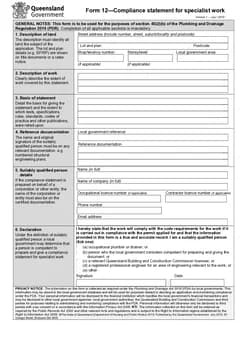
Store the finished Form 14 with the permit, notices, job records, and the documents supporting the declared work. Depending on the job that may include QLD Form 1, QLD Form 5, QLD PDR Form 12, or QLD Form 19.
Use a filename identifying the site and declaration date, then send it through the lodgement or handover route the job requires. Tradie Forms maps entries onto the official PDF layout; it does not lodge the form or make a permit decision.
See the QLD plumbing forms list for how Form 14 sits with the rest of the set.
Official references
Business Queensland publishes Form 14 as the plumbing and drainage compliance declaration listed for lodgement with local government. Check the Business Queensland plumbing forms page, the current Form 14 PDF, and the Plumbing and Drainage Regulation 2019 before you lodge.