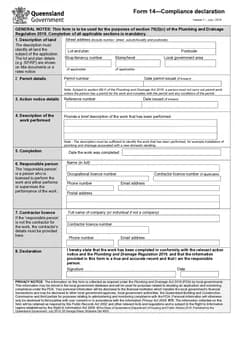
Form 14 errors surface after the work is done: a wrong permit number, an incomplete land description, a missing action notice reference, or licence details carried over from an old job.
Use this alongside the Form 14 on-site guide and the Form 14 record keeping guide.
Use the QLD Form 14 template, or browse QLD plumbing forms. See the plumbing forms hub for the rest of the Australian set.
Mistake 1: Using the wrong permit number
Permit numbers get copied from the builder's email, an old Form 1, or a different stage of the job. All three produce a number that looks right.
Read the permit number and issue date from the current council issue paperwork, and check them together - a date that does not belong with the number is a reliable sign something has been carried over.
Mistake 2: Describing only part of the land
The declaration must identify all land the subject of the declaration, not just the street address line you remember first.
On a straightforward house, the street address may be recognisable enough. On a unit, multi-building site, shop tenancy, or staged project the permit record usually carries lot and plan information, tenancy, level, or local government area. Use the permit documents as the source of truth.
An address from a purchase order, job management system, or delivery docket gets the crew to site. It is not necessarily the description used in the permit record. Compare the finished declaration against the permit before it leaves the phone or the office.
Where the declaration covers a particular tenancy, building, or stage, let the work description reinforce the location without trying to replace the property details.
Mistake 3: Mixing up permit details and action notice details
Form 14 has separate sections for the permit and for an action notice where one applies. Not every declaration needs every field, and a notice number does not belong in the permit field.
Read the current permit, any action notice, and local government correspondence together before starting. Where an action notice applies, copy its reference and date from the notice itself. Where the correct pathway is unclear, check with the local government or the responsible person rather than guessing.
Keep the source documents in the job record. A photo of a notice in a group chat is not a good source for final data - use the issued document or an approved digital copy, and make sure dates have not been carried over from a different stage.
Mistake 4: Vague work performed descriptions
A council officer reading the declaration months later has only this field to tell them what was covered.
Describe the plumbing or drainage work actually installed, tested, or commissioned, in the same terms used in the permit documents. Short and specific works best. Where several components are involved, say enough to distinguish completed work from work still in progress.
Mistake 5: Declaring before the completion details are known
The form carries a work description, a completion date, and a declaration, and all three should describe work that has actually been performed.
Do not set the completion date from a booking date, a promised handover, or the day an invoice was drafted. On a job that has changed scope, take a moment with the responsible person and the job records to confirm which work is being declared, whether it is complete for the purpose of the declaration, and what supporting reports, test results, or inspection correspondence belong beside it.
The declaration does not replace the other records that apply to the job.
Mistake 6: Confusing the responsible person and the contractor
The responsible person section is for the licensed person who performed or supervised the work. The contractor fields are separate, and they are not always the same party.
This goes wrong most often when the office pre-fills from the last job. Saved information helps, but it needs reviewing against the actual person, licence, and contact details involved in this work.
Make final sign-off a two-person check where it makes sense: whoever prepared the declaration compares property, permit, action notice, and work details, then the licensed person confirms the people, licence information, declaration, and date before signing. That is faster than unwinding a signed document later.
Mistake 7: Stale licence details
Licence numbers and responsible person names get copied forward from the last job and quietly go out of date.
Apply saved licence details only after confirming they are current for this person and this work.
Mistake 8: Signing before the form is complete
A signed declaration with missing permit or completion details creates rework under pressure, usually at the worst moment.
Complete the record, review it, then sign.
Mistake 9: Not reading the document as a whole
Field-by-field completion hides problems that are obvious on the finished page. Preview the official layout and read the property, permit, notice, work, and declaration sections top to bottom, as someone who was never on the job.
Look for the simple mismatches: a suburb from the last project, a postcode that does not match the land description, a permit date that does not belong with the number, a blank action notice field where one applies, or a completion date falling after the declaration date.
A clean close-out routine
Before you leave site or send the document to the office:
- Match property details to the current permit, including lot, plan, tenancy, or level where relevant
- Match permit number and issue date to the issued permit
- Check whether an action notice applies and copy its reference and date from the notice
- Describe the completed work in terms that match the job records
- Confirm the completion date with the person responsible for the work
- Check responsible person and contractor details against current licence and business records
- Preview the document, then sign and date it once the details are final
Use the current permit documents as the source for every number and date. That discipline keeps the declaration tied to the actual job rather than to a copied template or an old email thread.
It also leaves the person signing one simple question: does this document describe this completed work, at this land, under this permit? If not, go back to the job documents and correct it before signing.
Why most of these happen at the same moment
Nearly every item above occurs during close-out, when the declaration is remembered late and completed quickly from whatever details are to hand.
Preparing it when the work finishes rather than when the pack is due removes most of them. The details are current, the person responsible is contactable, and there is time to check a reference against the job record instead of typing it from memory.
Where a job genuinely closes out under pressure, run a short deliberate check rather than filling faster. The list above takes two minutes and catches the errors that otherwise come back as a query weeks later.
Read it as the recipient will
The last check is opening the finished PDF on a phone.
Entries that looked complete in the form can land badly on the page: a description that overruns, a licence number that reads ambiguously, a date field that is empty because it was never required on screen. All of it is obvious on the PDF and invisible before it.
Next steps
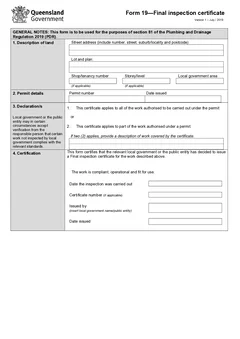
Save the finished document with the permit, notices, job photos, testing or commissioning records, and any later inspection certificates. Related paperwork may include QLD Form 1, QLD Form 5, QLD PDR Form 12, and QLD Form 19.
Start the QLD Form 14, or see the QLD plumbing forms list for the wider set.
Tradie Forms organises Form 14 into property, permit, action notice, work, completion, responsible person, contractor, and declaration sections, flags required gaps, reuses saved licence details, and previews the official layout. It does not decide what the permit or notice requires, and the licensed person remains responsible for the declaration.
Official references
Business Queensland publishes Form 14 as a compliance declaration among the plumbing and drainage forms lodged with local government. Check the Business Queensland plumbing forms page and the Plumbing and Drainage Regulation 2019, along with Business Queensland inspection certificates guidance for how the certificates fit together and the QBCC guidance on common notifiable work errors for the errors the regulator sees most. Confirm the permit and local government requirements before lodging.