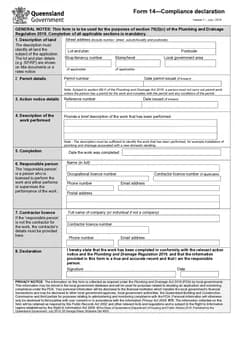
Tradie Forms: finish QLD Form 14 on the official PDF layout, then keep the declaration with the permit, action notice details, work records, and customer copy documents.
A Form 14 should not live as a random download. It is most useful sitting in the same job record as the permit, the action notice where relevant, completed work notes, photos, test reports, and completion emails.
If someone later asks what work was declared, who the responsible person was, or which permit it related to, the declaration should answer without a hunt through messages.
This covers the record keeping. For filling it in, see the Form 14 on-site guide; for the errors, see common Form 14 mistakes.
Use QLD Form 14, or browse QLD plumbing forms. See the plumbing forms hub for the rest of the Australian set.
Why the record matters
Business Queensland lists Form 14 as the compliance declaration in the Queensland plumbing and drainage forms set, and the official PDF says it is used for section 79(2)(c) of the Plumbing and Drainage Regulation 2019.
The declaration records the land, permit, action notice details where relevant, work performed, completion date, responsible person, and contractor details, along with a declaration by the responsible person. Stored properly, it lets the office answer council or builder questions, lets the responsible person show what was declared, gives the owner or permit holder a completion record, connects the declaration to photos and testing, and gives future service work the right history to start from.
An online form produces a clean document. The record keeping habit still belongs to the business.
What to store with it
Think of the declaration as one piece of a job folder, sitting with the evidence and communications that explain it.
The folder does not need to be sophisticated - a clear job folder, a field app, cloud storage, or the job system file area you already trust. What matters is that the declaration is not separated from the permit, photos, and completion trail, and that it can be found by job address, permit number, or customer name.
Permit record
Keep the permit number, issue date, and permit conditions with the finished declaration, and make sure the permit section matches them. Where the permit was amended, keep the amendment record nearby too - a declaration pointing at an old or incomplete permit reference confuses the completion.
Action notice records
Where an action notice applies, keep the reference number, issue date, and any correspondence about the work required. The action notice fields should match the actual notice rather than a note copied from a text message.
The official declaration refers to conformity with the relevant action notice and the regulation, which makes the notice part of the record.
Work notes and photos
Store photos, daily notes, inspection notes, marked-up plans, and completion evidence where they help explain the work performed. You do not need to send the customer every internal file - the point is that your own record is complete enough for the declaration to be understood later.
Test and commissioning reports
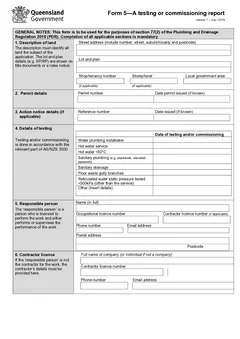
Where testing or commissioning records relate to the work, keep them nearby. On some jobs QLD Form 5 sits beside Form 14; on backflow jobs QLD Form 9 may be part of the same history.
Those forms should not contradict each other. Dates, site details, and work descriptions should read as though they came from the same job, because they did.
Completion emails or portal receipts
Keep the email, upload receipt, or portal reference showing what happened after the document was finished. A clean declaration is useful; a record of where it went is often what the office actually needs.
Where the job runs through a builder portal, council portal, or shared inbox, put the reference in the job note. One line - "Form 14 uploaded to portal, reference ABC123" - turns a hard search into a lookup.
Naming it so it can be found
A useful filename saves an afternoon months later. Instead of leaving it as download.pdf, use a pattern your office can search:
QLD Form 14 - 12 Smith St - 2026-06-21.pdfForm 14 Compliance Declaration - Permit 12345 - Jones Dwelling.pdfQLD Form 14 - Action Notice AN456 - Completed Work.pdf
Include the form name, the site or permit reference, and the date. The best pattern is the one the team will actually use.
Where do the records go missing?
Five gaps account for most of it.
The document is saved outside the job. Move it into the job record before starting the next task.
The work description only makes sense to the plumber. A future office admin, council contact, or builder does not know the shorthand. Write it so someone outside the site conversation understands it.
The action notice is not attached. If the declaration refers to a notice, keep the notice with it.
The responsible person details are old. Saved details help on repeat work, and licence, phone, email, and business details all change. Review before finishing.
Completion is not logged. If it went to a builder, owner, or council, record how and when. A short job note is enough.
A close-out checklist
Before the job is closed, check that the finished document is saved in the right job folder; the permit number and issue date match the permit record; the action notice reference is included where relevant; the work description identifies what was completed; the completion date matches site notes; responsible person and contractor details are current; the declaration is signed and dated; related photos, tests, or commissioning records are attached; and the customer, builder, permit holder, or local government has received it where the job process requires.
This is an office habit, not a regulatory substitute.
A weekly office check
For busy shops, a short weekly pass stops declarations going missing. Look at completed jobs and confirm each one has a saved document, a permit reference, a completion date, responsible person details, any related action notice, and a sent-or-stored note.
The point is catching loose ends before the job is old and the person who remembers the details is on another site.
Matching the declaration to the rest of the pack
A declaration filed on its own answers very little. What makes it useful is that it sits with the documents it refers to.
That means the permit or approval reference, the plans or specification the work was carried out against, and any inspection or test records generated along the way. Someone reviewing the file later is checking that these agree with each other, and the most common problem is not a wrong declaration but a declaration that describes the job in different words to everything around it.
Align the work description across the pack where you can. It costs a minute at close-out and it removes the most frequent reason for a follow-up question.
Corrections without rewriting history
Occasionally a declaration goes out with something wrong on it, and the instinct is to fix the file quietly.
The better pattern is a dated correction that explains what changed, kept alongside the original. A file showing an error and its correction reads as a business that checks its own work. A file where the only version has been edited, with no trail, raises the question of what else was changed.
Where the correction is material, tell whoever received the original rather than only fixing your copy. A corrected document nobody was told about is not much of a correction.
Next steps
Before filing, compare the land, permit, action notice fields, work description, and completion date against the source job records. The declaration is most useful when a later reader can trace it to the actual permit work, evidence, and handover without guessing which version is final.
Form 14 usually sits with QLD Form 1 at application, QLD PDR Form 12 for specialist work, QLD Form 5 for testing or commissioning, and QLD Form 19 for final inspection certification. The QLD plumbing forms list keeps the set visible as a job moves from permit to completion.
Tradie Forms maps entries onto the official PDF layout and flags missing fields. The responsible person still checks the declaration and the finished document.
Official references
Check the Business Queensland plumbing forms page, the current QLD Form 14 PDF, and the Plumbing and Drainage Regulation 2019.