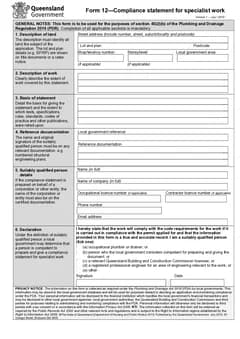
Specialist work statements fail in predictable places: the basis section is thin, the qualified person details are stale, or the work scope does not match the design package sent to council.
For the step-by-step version, see preparing Form 12 statements on site. If you are unsure whether you need the plumbing Form 12 or the building one, start with plumbing PDR Form 12 vs building Form 12.
Use the QLD Form 12 template before attaching the statement to a permit application, or browse QLD plumbing forms. Working interstate? The plumbing forms hub lists the lot.
Mistake 1: Treating Form 12 like a generic compliance tick
Form 12 needs a real basis, the publications relied on, and qualified person details. A one-line work description with everything else left thin is not a statement, it is a cover sheet.
Complete the basis and references sections while the design package is still open in front of you.
Mistake 2: Naming the wrong land
The statement has to identify the land it covers. A street address alone is a weak record on a large site, a tenancy fit-out, or a staged development. The official form has room for street address, suburb, state, postcode, tenancy or level, and local government area - use the fields that identify the actual part of the site.
Start from the current permit package and check every address field against it. Do not take an address from a supplier delivery docket, a builder's estimate, or a previous stage. All three can be close enough to look right while describing a different parcel, tenancy, or building level.
On a site with more than one building, write the work description so it supports the address details.
Mistake 3: A work description that says nothing useful
The work line should say what specialist plumbing or drainage work the statement covers. It is not the place for a broad project label like "shop fit-out" with the drawings expected to do the rest.
A useful description is short but names the system or specialist work and the part of the job covered, in the same language as the drawings and specifications. Before signing, put the form beside the current drawings and ask two questions: could someone reading only this statement understand the specialist work covered, and does the description match the documents and revision you are relying on?
If either answer is unclear, fix the wording. The form has a separate basis and documentation section for detail that would make the work line unwieldy.
Mistake 4: Copying a standard without checking the current job
The basis section asks for the basis for giving the statement and the publications relied on. That is a prompt to identify the real technical basis for this work, not a reusable block to paste into every job.
Start with the current drawing set, specification, approval documents, and the relevant laws, codes, or standards. Check the title, revision, and date of anything you name. If a consultant issued a revised drawing or the scope changed after design, make sure the statement does not point at a superseded version.
Avoid padding the space with standards that were not actually used. A shorter accurate list is more useful than a generic block, and easier to defend. Where you are unsure whether a publication applies, resolve the technical question through the right person before giving the statement.
Mistake 5: Describing work that does not match the design
Council officers compare the statement against the permit application and drawings. A mismatch reads as carelessness at best and as a scope problem at worst.
Describe the same specialist scope that is being lodged, in the same terms.
Mistake 6: Treating the local government reference as an afterthought
The reference field connects the permit conversation to the statement. Copy it from current local government correspondence or permit paperwork, not from a memory of the job number.
This matters most when several jobs share a similar street name, when an application has been amended, or when an office team is preparing paperwork for more than one stage. A quick cross-check against the document being lodged saves a phone call later.
Mistake 7: The person signing is not the person described
The declaration is about the person actually giving the statement. It should not be signed on behalf of someone who has not checked the final record.
Build a small handover routine. The person preparing the form collects the site, work, basis, and reference details. The suitably qualified person then checks the finished document against the current drawings, confirms their own details, chooses the appropriate declaration option, and signs and dates it.
Saved licence details help on repeat work but need a quick check every time. A changed phone number, company name, or licence detail is far easier to correct before the statement is attached to an application.
Mistake 8: Attaching an unchecked document
A Form 12 with a missing declaration date or signature creates immediate rework, usually under lodgement pressure.
Preview the whole statement, confirm every section is complete, and only then produce the final copy.
A practical check before it goes out
Use this sequence while the plans are open and the job details are fresh:
- Open the current permit application documents, drawings, and specifications
- Identify the exact land, tenancy or level, and local government area covered
- Write the specialist work description in the same terms as the current design package
- Record the genuine basis, publications, and supporting documentation, with revisions
- Add the local government reference from current correspondence
- Have the suitably qualified person review their details, qualification, signature, and date
The QLD Form 12 template organises those into property, work, basis, references, qualified person, and declaration sections, reuses saved person details, flags missing required fields, and previews the official layout. The licensed person still checks the completed statement before it is attached.
Why these mistakes cluster at the end of the job
Almost every item on this list happens at the same moment, which is the close-out rush.
The work finished, the pack is being assembled, someone realises the Form 12 is missing, and it gets completed quickly from whatever details are to hand. That is where the wrong person signs, where the description gets copied from a previous job, and where an unchecked attachment goes in unread.
The habit that removes most of them is preparing the statement when the specialist work is done rather than when the pack is due. The details are fresh, the person who did the work is still contactable, and there is time to check an attachment properly.
Where a job genuinely closes out in a hurry, the fallback is a short deliberate check rather than a faster fill. The list above takes a couple of minutes to run and it catches the things that otherwise come back as a query weeks later.
The version that gets read is the PDF
One habit prevents a share of the items above, and it is reading the finished PDF the way the recipient will.
Entries that look complete in a form can land badly on the page. A description that runs past its field, a licence number that reads ambiguously, or an attachment reference pointing at a document nobody included are all obvious on the PDF and invisible before it.
Give it thirty seconds on the screen you would actually read it on. That is usually a phone, which is also where most assessors open it.
Keep the statement with its supporting documents
Store the finished Form 12 with the permit application, the drawings and specifications it relies on, the correspondence, and the version of any supporting reports. That gives the office and the person signing a clear trail if scope changes later.
On a longer job, name the file so it is recognisable without opening it, then keep it beside related records such as the QLD Form 1 permit work application, QLD Form 5 testing report, QLD Form 14 compliance declaration, or QLD Form 19 final inspection certificate where those apply. The QLD plumbing forms list shows how they fit together.
Official references
Business Queensland publishes Form 12 as the compliance statement for specialised work and lists it among forms lodged with local government. Check the Business Queensland plumbing forms page for the current form and the Plumbing and Drainage Regulation 2019 for the regulation the form refers to. Business Queensland inspection certificates guidance covers how the certificates around it are used, and the QBCC guidance on common notifiable work errors sets out the mistakes the regulator sees most. Confirm local government requirements for the job as well.