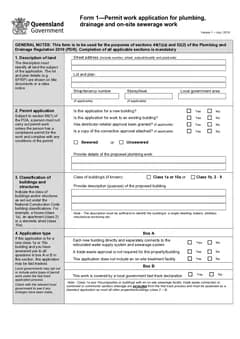
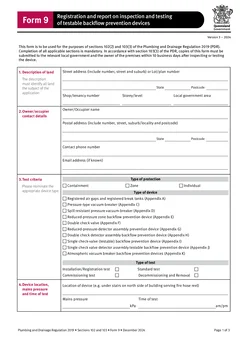
Tradie Forms: complete QLD Form 1, Form 5 and Form 9 on the official PDF layouts, reuse saved licence and applicant details, and download a finished PDF you can hand to council, the owner or the office without rebuilding it later.
Most Queensland plumbing paperwork problems are not filling problems. They are handover problems. The form gets completed, then sits on a phone until the person who actually needs it chases it.
Form 1, Form 5 and Form 9 each leave your hands and go somewhere different, on different timing, to different people. This guide is about that movement - who holds each form, who receives it, when, and what has to stay consistent as it travels. For filling the fields, use the individual guides linked through this article.
Start QLD Form 1, QLD Form 5 or QLD Form 9, or browse QLD plumbing forms.
Where does each form go?
Business Queensland lists Form 1, Form 5 and Form 9 under the plumbing and drainage forms for the Plumbing and Drainage Act 2018. They look like a set, but they travel differently.
Form 1 is the permit work application. It goes from the applicant to the local government, before permit work starts, and it carries attachments with it. Nothing else on the job moves until that application has been assessed and a permit issued.
Form 5 is a testing or commissioning report. It does not go straight to council from the person who did the test. The competent person gives it to the responsible person within 5 business days after the testing or commissioning is finished, and where the responsible person receives it, they give it to the local government within the timeframe the regulation sets.
Form 9 is the registration and report on inspection and testing of testable backflow prevention devices. The official PDF says copies must be submitted to the relevant local government and to the owner of the premises within 10 business days after inspecting or testing the device. Two recipients, not one.
Why does the Form 5 middle step get missed?
The Form 5 chain has a step most crews skip: the report has to reach the responsible person before it reaches council.
On a small job the responsible person and the competent person may be the same person, and the chain collapses into one action. On a larger job they are different people, often different businesses, and the report can sit with the tester while the responsible person assumes it has already gone in.
If you are the competent person, your obligation is to get a usable report to the responsible person, not to file it. If you are the responsible person, you cannot pass on a report you have not read - you need it complete before it goes to local government. Name the person on the job who is receiving it, and confirm they have it.
The Form 5 testing or commissioning guide covers the field detail behind that report.
Why does Form 9 need two deliveries tracked?
Form 9 is the form most likely to be half-delivered. The council copy goes out, the owner copy does not, and nobody notices until the next annual test.
Because the form names both recipients, the workflow has to track both. After the report is finished, record the council copy pathway and date, the owner copy pathway and date, and any reference or receipt number. That answers the question the office always ends up asking months later.
Backflow work also recurs, so the handover is not the end of the record. The Form 9 record keeping and handover guide covers building a device history the next tester can use.
What has to stay consistent across the three
The three forms are connected by the site, not by the sequence. If the site details drift, every downstream document gets harder to match.
Keep these identical wherever they appear:
- The land description - street address, lot and plan, shop or tenancy, storey or level, local government area
- The permit number and issue date, once a permit exists
- The action notice reference and date, where one applies
- Licence numbers and business details for the people named on the forms
Use one verified source for the site details rather than a booking address. A title document, rates notice, approved plan set or council reference beats what was typed into the job when it was booked. On shopping centres, unit blocks, rural sites, subdivisions and industrial jobs, the address a plumber sees on arrival is often not enough for council to identify the land.
Roles do not transfer between forms
Each form asks for different people, and the blocks are not spare space for whoever is handy.
Form 1 has owner details and applicant details. The applicant does not have to be the owner, but the applicant is responsible for the information being correct and for being authorised to manage the application on the owner's behalf.
Form 5 has a responsible person, a contractor block where the responsible person is not the contractor, and a competent person who carried out the testing or commissioning.
Form 9 has owner or occupier details, authorised tester details, and contractor licence details where applicable.
Saved details speed this up, but only if you pick the block by role first and the saved contact second. Copying one person into every field produces a PDF that looks finished and describes a job that did not happen that way.
When a report replaces an inspection
Business Queensland's inspection certificates guidance says that in some cases local government may accept a declaration or report instead of completing an inspection, and it lists Form 5 as the testing or commissioning report used to certify that plumbing and drainage work was tested or commissioned in compliance with code requirements.
That raises the stakes on the handover. Where a report is carrying weight an inspection would otherwise carry, a late or incomplete report is not just admin. Check the current local government process before treating any report as a substitute for an inspection.
A handover routine that holds up
Step 1
Fix the land details once
From a verified source
Lot and plan, tenancy and LGA, reused across all three forms.
Step 2
Form 1, permit work
Council pathway
Lodge it and save the receipt or reference against the job.
Step 3
Form 5, testing
While the test record is open
Name who receives it, then confirm it reached the local government.
Step 4
Form 9, at the device
Before the kit is packed
The backflow report is the one that cannot be written from memory.
Getting the land details right once is what stops three forms disagreeing with each other.
- Send the Form 9 council copy and owner copy, and note both dates
- Store each finished PDF with the evidence that explains it
The evidence that belongs alongside them varies by job: plans, owner approvals, connection approvals, soil reports, site and soil evaluation reports, test readings, photos, device serial numbers, test kit verification, action notices and council correspondence.
Tradie Forms maps your entries onto the official Queensland layouts and lets you preview each one before you download the finished PDF. It does not lodge a form, submit a copy, or decide which work needs a permit. The applicant, responsible person, competent person and authorised tester remain responsible for the record and for getting it where it needs to go.
Next steps
Start QLD Form 1, QLD Form 5 or QLD Form 9 on the official PDF layout, or browse QLD plumbing forms. The plumbing forms hub covers the other states.
For the field detail on each form, read the Form 1 permit work application guide, the Form 5 testing or commissioning guide and the Form 9 record keeping guide. Later stages are covered by the Form 14 compliance declaration guide and the Form 19 final inspection certificate guide. The QLD plumbing forms list maps the whole set by job stage.
Official references
For current requirements, check the Business Queensland plumbing and drainage forms page, the Business Queensland inspection certificates guidance, the QLD Form 1 PDF, the QLD Form 5 PDF, the QLD Form 9 PDF, and the Plumbing and Drainage Regulation 2019.