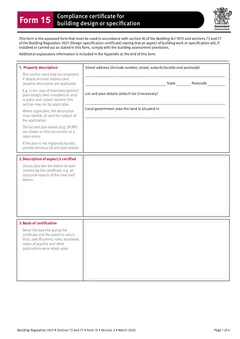
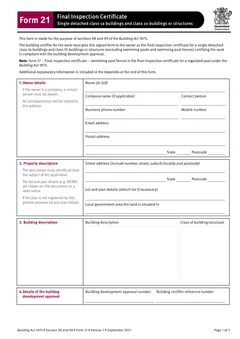
Tradie Forms: complete QLD Form 15 on the official PDF layout when a building certifier needs a design or specification certificate. Work through property, extent, basis, reference documents, certifier details, competent person block, signature and date in one pass.
QLD Form 15 turns up when the building certifier needs a proper certificate for a design or specification, not a half-readable note stapled to an email. The job is simple in theory: state the aspect or specification, explain the basis, list the drawings, standards, tests or product documents relied on, add the appointed competent person details, and sign.
The messy part is doing that cleanly while the project has moving drawings, revised specifications, product substitutions and approval numbers flying around. This guide walks the form section by section. If you want the failure modes instead, read common Form 15 mistakes.
Use the QLD Form 15 template for a fillable version of the official layout, or browse QLD building forms.
What does QLD Form 15 actually certify?
A design or specification, ahead of the work. The official Form 15 says it is the approved form used under section 10 of the Building Act 1975 and sections 73 and 77 of the Building Regulation 2021, and that it states an aspect of building work or specification will, if installed or carried out as stated in the form, comply with the building assessment provisions.
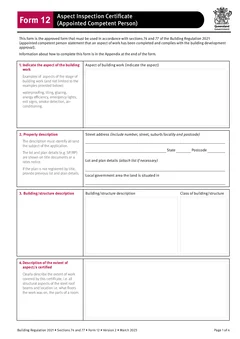
That forward-looking wording is what separates it from Form 12, the aspect inspection certificate given after work has been completed and inspected. Form 15 helps the building certifier assess a building development application, issue the approval, or deal with updated aspect information such as glazing, truss specifications or revised excavation drawings. The Form 12 vs Form 15 guide sets the two out side by side if the choice is not obvious on your job.
Who can complete and sign Form 15?
The individual the building certifier has assessed and appointed as competent for that design-specification help. The Form 15 appendix says a building certifier can accept the certificate from a competent person for design-specification work, and that the certifier must assess and decide to appoint the individual before accepting the help.
The official form also says the certifier must consider the person's experience, qualifications and skills, and ensure the person holds a licence or registration if required. The certificate must be signed by that assessed and appointed individual.
Before you start filling anything, confirm:
- The building certifier appointed you for this type of design-specification help
- The aspect or specification sits inside that appointment
- Your licence, registration, role and contact details are current where they apply
- You can explain the basis for the certificate
- The reference documents are the current drawings, specifications, test results or product documents
Filling the form section by section
Property description
The property section only needs completing where street address and property details are applicable. The official form gives examples where it may not apply, such as standard or generic pool design, shell manufacture, or patio and carport systems.
When property details do apply, the description must identify all land subject to the application: street address, suburb or locality, state, postcode, lot and plan details, and local government area. The official form notes lot and plan details can be found on title documents or a rates notice, and that previous lot and plan details should be used if the plan is not registered by title. An invoice address is not a substitute, especially on staged sites, subdivisions, commercial buildings or body corporate work.
Description of aspect or specification
This field says what the certificate covers, and the official form asks you to clearly describe the extent of work. It gives structural steel roof beams as an example.
Write it narrow enough that the certifier, builder and owner can understand the scope later. Include the system, material, room, building area, plan reference, stage or product range where they help.
If it is a standard product design, say so. If it covers one part of a staged project, say which part.
Basis of certification
The basis field explains why you can give the certificate. The official form asks for the basis and the extent to which tests, specifications, rules, standards, codes of practice and other publications were relied on.
Use plain wording, but be specific. Name the standard, code, drawing set, report, design criteria or product documents that support the certificate. If you relied on a test result, say which result. If you relied on a specification, name it. "As per plans" is not a basis when drawing numbers, revision letters, calculations, product specifications, test reports and standards all exist.
Reference documentation
The reference section makes the paper trail findable. The official form asks you to clearly identify relevant documentation, such as numbered structural engineering plans.
Use document numbers, drawing titles, revisions, dates, project names, report numbers and product data where available. Where the space is not enough, the official appendix says additional material can be created and referred to in an addendum or attachment. That does not mean every file belongs in the form body - it means the form should point clearly at the documents behind the certificate.
Certifier reference and approval numbers
The form asks for the building certifier reference number and the building development application number if available. These match the certificate to the approval file. Copy them from the certifier request, approval documents or job software, not from the last certificate. Old approval numbers travel easily when a builder has several projects open at once.
Competent person details and signature
This block needs full name, company name where applicable, contact person, phone, mobile, email, postal address, licence class or registration type where applicable, and licence or registration number where applicable.
Tradie Forms can save competent person details so you are not retyping the same name, licence, address and contact block on every certificate. Check them before you send, especially after licence renewals, role changes or a business address update. The signature belongs to the appointed individual - the official form states the certificate must be signed by the person the building certifier assessed and appointed to give that design-specification help.
Manufacturer and supplier certificates
Product-driven jobs raise this often. The official Form 15 appendix says the building certifier may accept Form 15 from a manufacturer or supplier if the certifier has decided they are a competent person for design-specification, and a manufacturer or supplier can give the form where they have undertaken the design component for the product.
Where the supplier did not do the design work, the appendix points to evidence of suitability such as a product technical statement instead. Do not dress a supply-only arrangement up as a design certificate.
A clean completion habit
For most teams, the same order works every time:
- Confirm the certifier appointment and its scope.
- Open the current drawings, specifications, product documents and approval references.
- Fill the property section if it applies to this certificate.
- Describe the exact aspect or specification covered.
- Write the basis in plain, specific language.
- Name the reference documents with dates and revisions.
- Add the certifier reference and approval number.
- Check the competent person details.
- Preview the official PDF layout.
- Store the finished PDF with the supporting job records.
Tradie Forms maps your entries onto the official Form 15 layout, reuses saved competent person details, flags missing required fields, and previews the PDF so you can see where long basis text and references land. It does not decide whether the design complies, whether you are the right competent person, or whether the certifier can rely on the certificate. That stays with the appointed competent person and the building certifier.
Next steps
Start the QLD Form 15 design or specification certificate when you are ready to prepare the official layout, or browse QLD building forms.
If the job is a completed and inspected aspect, use QLD Form 12 and its aspect inspection guide. To see how design, aspect, stage and final certificates connect across a job, read the QLD building certificates workflow.
Official references
For current requirements, check the Business Queensland building forms page, the Queensland Form 15 PDF, the Business Queensland competent persons guidance, and the Queensland Form 12 PDF.