Tradie Forms: complete Tasmania Form 60 on the official start work notification and authorisation layout before plumbing work begins. Fill the permit authority, work type, site, categories, licensed plumber and start date sections, then preview and download the finished PDF.
The job is booked, the materials are on site and the owner is chasing a start date. The permit number is buried in one email, the certificate of likely compliance reference is in another, and the licence details get copied off an old document at the last minute. That is how a short form turns into a morning of hunting.
Form 60 is the bridge between approval and the first day on the tools. This guide covers what it is for, where it sits in the job, what to gather before you open it, and the mistakes that send it back.
What is TAS Form 60 used for?
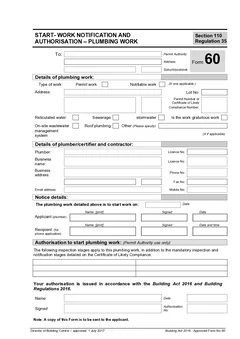
Form 60 is the approved form for a Start Work Notification and Authorisation for Plumbing Work, listed by Consumer, Building and Occupational Services on its approved forms page. The CBOS guide to approved plumbing forms describes it as the form used by the plumber seeking authorisation to start plumbing work, sent to the council permit authority, which gives the authorisation to start.
The same guide explains it in job terms: the plumber hired by the owner uses Form 60 to notify that they are ready to start the work on a certain day.
So Form 60 is not a completion certificate. It records who is starting, where the work is, what type of work it is, and when the plumber intends to begin. Start it on the TAS Form 60 template, or see the whole Tasmanian set in the TAS plumbing forms list.
Where does Form 60 sit in the job?
It sits after the approval or certificate details are known and before anyone turns a tool. CBOS guidance explains that some low risk plumbing work may need notification before or after work depending on the type of work, and that medium risk work, called notifiable work, requires notification to the plumbing permit authority before work starts and again when the work is completed.
Some work requires plumbing design and a certificate of likely compliance from the plumbing permit authority before work starts. For permit plumbing work, the CBOS guide describes the plumber notifying the permit authority before commencing work, and notes that the permit authority may notify the responsible person that work is not to commence if it is not satisfied the necessary steps have been taken.
That last point is the reason to treat Form 60 as part of the start-work rhythm rather than an afterthought. Tradie Forms does not decide which risk category applies or whether a job needs Form 60. Check current CBOS guidance, the Building Act framework and the permit authority instructions for the job.
Details to collect before you open Form 60
The form is short. It is only painful when the job pack is not ready.
Permit authority
The permit authority is usually the council or authority receiving the notice. Add the authority name and address accurately.
If your business works across several Tasmanian councils, do not reuse a saved block without checking. The permit authority should match the job site and approval pathway, not the plumber's usual council area.
Type of work
Form 60 separates permit work and notifiable work. Choose the classification that applies to this job, and make it match the authorisation and approval documents already issued.
If the classification is not clear, stop and check with the official guidance or the permit authority. Do not make the category decision by guesswork on a PDF.
Work site details
The work details section captures the site address, lot number, and the permit number or certificate of likely compliance number.
For rural properties, unit sites, new subdivisions and larger commercial properties, a street address is rarely enough. Add lot information and references that let the permit authority match the notice to the right approval. The permit or certificate number is one of the easiest details to mistype, so copy it from the approval document rather than an email chain.
Work categories
The Form 60 layout includes categories such as reticulated water, sewerage, stormwater, gratuitous work, on-site wastewater management system, roof plumbing, and other work where specified.
Tick the categories that match the work being started. If the job covers stormwater and roof plumbing, or sewerage and on-site wastewater, say so. If "other" applies, describe it clearly enough that the permit authority understands the scope.
Licensed plumber and start date
The licensed plumber section identifies the plumber lodging the notice: name, licence number, business name, address, phone and email where applicable. Saved licence details speed up repeat jobs, but review the licence number and contact details before you download.
The intended start date should line up with the day the plumber actually intends to begin. A notice prepared weeks early and never revisited causes confusion later, so if access, materials or crew timing shifts, check the notice still reflects the work program.
Common Form 60 mistakes
References are copied from an old job. Repeat work with the same builder makes numbers feel familiar. Copy the current permit number or certificate of likely compliance number from the latest document.
Work type is guessed. Permit work and notifiable work are not labels to pick casually. If the category is unclear, check before issuing the notice.
Categories are too broad. One tick rarely covers a multi-trade plumbing scope. Tick what actually applies.
The start date is aspirational. If the schedule moves, the notice should reflect the real plan.
How does Form 60 connect to Form 71B and Form 21?
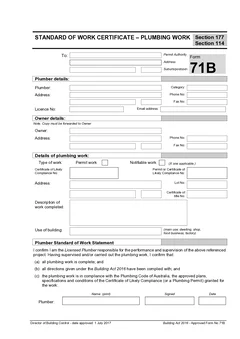
Form 60 belongs before work starts. Form 71B belongs at completion. The CBOS guide describes Form 71B as the Standard of Work Certificate for Plumbing Work, and says that when permit or notifiable plumbing work is completed the plumber is required to complete that certificate and send it to the permit authority, with a copy to the owner.
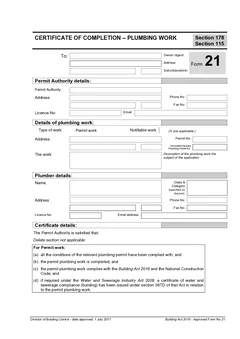
Form 21 is the separate Certificate of Completion for plumbing work. A clean Tasmanian job record can hold all three, and the Form 60 and Form 71B workflow guide walks the pair end to end. If you are unsure which completion document you need, the Form 21 vs Form 71B comparison sorts them out.
How Tradie Forms helps
Tradie Forms turns Form 60 into sections you work through one at a time for permit authority, type of work, plumbing work details, work categories, licensed plumber and notification of intention to start.
You can save permit authority and plumber details for repeat Tasmanian jobs, use address search for site and authority addresses, catch missing required fields, preview the official PDF layout, and download the finished Form 60 for the permit authority and the job record.
Tradie Forms maps your entries onto the Tasmania Form 60 PDF layout. It is not affiliated with CBOS or any Tasmanian permit authority, it does not lodge anything on your behalf, and it does not decide whether your job is permit, notifiable or another category of work. Downloading or emailing the PDF is not the same as completing the permit authority process. The licensed plumber remains responsible for the pathway and the finished document.
Next steps
Start TAS Form 60 before the work begins. When the work is finished, move to TAS Form 71B for the standard of work certificate and TAS Form 21 for the certificate of completion where they apply. The Form 71B guide covers the closeout detail, and TAS plumber forms lists the live Tasmanian templates. The plumbing forms hub covers the other states.
Official references
Check the CBOS approved forms page for the current Form 60, the CBOS guide to approved plumbing forms for how the form is used, the CBOS Guide to the Building Act 2016 for the work categories and notification steps, and the Index of approved forms for the current approved form list. Permit authority processes vary between councils, so confirm the local method before you lodge.