TAS Gratuitous Work
TAS · Compliance
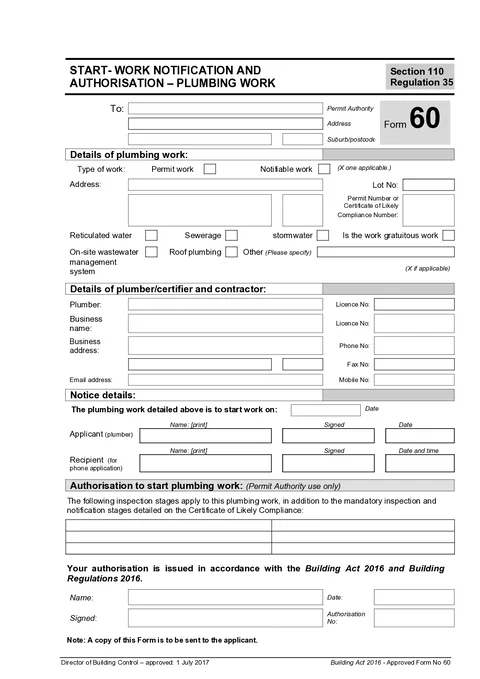
Complete the Tasmania start work notification for plumbing work in the Form 60 PDF order.
Notify your permit authority with the finished notice while you are still on site.
TAS Form 60
Consumer, Building and Occupational Services (Tasmania)
Import from job
Customer
Business
Saved detailTests & results
Fix before download
1 required field incomplete
All changes saved
Saved details prefilled
Business and licence
AI assistant
Helps you fill the form
What gets in the way when notification paperwork is left until you are back at the van.
Permit authority, plumber licence, and contact details should carry over from your last notice.
The form needs site address and permit numbers. Easy to mistype on a flat PDF.
Generic editors are awkward when you just want to fill, download, and lodge on site.

Notify your permit authority with the finished notice while you are still on site.
Three steps on your phone or laptop at the job.
Demo: pick a template from the catalog, fill the form on site using shortcuts like job import and address search, then download the finished PDF.
Resume a draft or pick a fresh template from the library.
Same TAS Form 60 paperwork goal, but built to finish at the job instead of fighting a PDF editor.
TAS Form 60 is the start work notification and authorisation for plumbing work in Tasmania.
Guided groups across the official Form 60 notice.
Who receives the notice and where the work is.
Licensed plumber details and intended start date.

Tradie Forms checks these requirements against the Consumer, Building and Occupational Services (Tasmania) template before the PDF is ready to complete.
The technical details that prove what was completed or checked.
Compliance and workflow articles matched to this form.
Nearby templates for the same state, trade, or paperwork type.
Open the guide, browse the catalogue, or send a PDF we can map.
Start the guided notice and download the finished form today.