Tradie Forms: prepare TAS Form 21 on the official certificate of completion layout, reuse owner, permit authority and plumber details, catch missing fields and preview the PDF before you complete.
TAS Form 21 is the plumbing certificate of completion that helps close the job record when the relevant Tasmanian plumbing work reaches completion stage. It is the form you want clean before the owner, permit authority, plumber and office all start asking for the same information in different places.
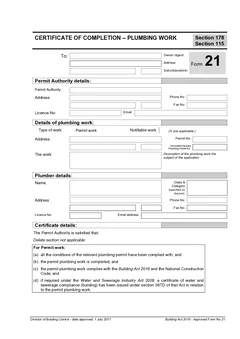
The form needs owner or agent details, permit authority details, work details, plumber information and sign-off. It is not long, but it sits at a serious close-out moment. If the permit number, property address or plumber licence details are wrong, the completion record becomes harder to trust.
This guide is for Tasmanian plumbers, permit authorities, plumbing businesses and admins preparing TAS Form 21. For the wider form set, browse TAS plumbing forms.
What is TAS Form 21 for?
The CBOS approved forms page lists "Form 21 - Certificate of Completion - Plumbing Work" and describes it as the form to use for a certificate of completion for plumbing work.
The CBOS Guide to the Building Act 2016 explains the Tasmanian framework for building, plumbing and demolition work. It describes a risk-based approach that includes low risk, notifiable and permit work, and explains the role of permit authorities in keeping records and issuing certificates where the Act framework requires it.
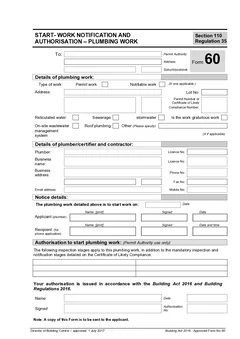
In plain site terms, Form 21 is a completion certificate record for plumbing work. It is different from Form 60, which sits before work starts, and different from Form 71B, where the plumber gives the standard of work certificate.
Tradie Forms maps your entries onto the official Form 21 PDF layout. It is not affiliated with CBOS or any permit authority, and it does not decide whether the certificate can be issued. The permit authority, plumber and business still need to check the current requirements and the downloaded PDF.
When does Form 21 appear in the job flow?
Form 21 is usually part of the close-out record. The work has reached completion stage, the permit authority details need to be right, and the owner needs a clear record.
It may sit beside:
- Form 60 start work notification and authorisation
- Form 71B standard of work certificate
- Plumbing permit or certificate of likely compliance records
- Inspection notes
- As-constructed drainage plans where relevant
- Owner completion records
The point is to keep the start, standard of work and completion paperwork connected. A certificate of completion that is separated from the rest of the file is harder to use later.
On a busy week, this is where paperwork can go sideways. The plumber may have finished the practical work, the owner may be ready on site, and the office may be waiting on one missing permit reference. Preparing the Form 21 one section at a time helps everyone see what is still needed before the PDF is treated as complete.
Details to gather before filling Form 21
Have the job record open before you start.
For repeat builders or regular owner clients, resist the urge to fill from memory. Use the current permit authority record, current owner details and current work description. A completion certificate should describe this job, not the last one that looked similar.
Owner or agent details
The form starts with the owner or agent receiving the certificate. Enter the name and address carefully. For agents, property managers or builders acting on behalf of the owner, make sure your job record explains the relationship.
Saved customer details help with repeat work, but do not blindly apply an old owner block. Check spelling, postal address and contact details before download.
Permit authority details
Form 21 includes the permit authority name, address, phone, licence number where applicable and email.
If your business works across Hobart, Launceston, Devonport, Burnie or regional councils, confirm the authority against the job site. The permit authority should match the work record, not the last council you dealt with.
Work type and property details
The work section identifies whether the certificate relates to permit work or notifiable work, then captures the property address, permit references and description of work.

Use plain words in the work description. "Plumbing completed" is too thin. Better descriptions include:
- "Sanitary plumbing and drainage for new dwelling"
- "Alteration to bathroom plumbing and drainage under permit reference [number]"
- "Notifiable stormwater plumbing work at rear addition"
- "On-site wastewater plumbing work connected to approved permit"
The form should make sense without someone opening every plan first.
Plumber details
Enter the licensed plumber's name, class and category, address, phone, licence number and email. Check licence details against your current record.
If the same plumber appears on Form 60 and Form 71B, make sure the details line up across the file.
Sign-off
The sign-off section captures the permit authority print name, signature, date and title. Sign-off should happen only after the certificate details have been checked against the work and permit file.
How Tradie Forms helps with Form 21
Tradie Forms turns TAS Form 21 into sections you work through one at a time for owner, permit authority, work, plumber, certificate basis and sign-off.
You can:
- Complete the form from a phone, tablet or laptop
- Reuse owner, permit authority and plumber details where they apply
- Search Tasmanian addresses or enter them manually
- Catch missing required fields before download
- Preview the official PDF layout
- Download the finished certificate for the owner, authority and job record
The benefit is practical. You can prepare the completion record while the job details are still close, instead of trying to rebuild the story from emails later.
A practical Form 21 completion process
Use the same steps every time:
- Confirm Form 21 is the correct certificate for the job stage.
- Open the permit and work records.
- Enter owner or agent details.
- Enter permit authority details.
- Select the work type.
- Enter the property, permit references and work description.
- Add plumber licence and contact details.
- Review the certificate wording shown in the PDF layout.
- Complete sign-off after checking the record.
- Preview and download the finished PDF.
- Store the PDF with Form 60, Form 71B and other completion records where relevant.
For related paperwork, use TAS Form 60 before work starts and TAS Form 71B when the plumber's standard of work certificate is due. Use TAS plumbing forms to keep the live form set together. The plumbing forms hub has the national set if you work across borders.
Common Form 21 mistakes
Confusing Form 21 with Form 71B
Form 21 is the certificate of completion. Form 71B is the standard of work certificate. They may both sit in the same job record, but they do not do the same job.
Wrong permit authority
Permit authority details should match the site and permit record. This is easy to miss for businesses working across multiple councils.
Thin work description
Write enough for the owner and authority to understand the work. A vague description does not help future close-out.
Plumber details copied without checking
Saved licence details save typing, but old licence or contact information can still sneak in. Review before download.
No storage plan after download
Move the downloaded PDF into the job record straight away. Store it with Form 71B, inspection notes, as-constructed records and owner completion records where relevant.
What to store with Form 21
Keep the certificate with the records that explain it:
- Form 60 start work notification where relevant
- Form 71B standard of work certificate where relevant
- Plumbing permit or certificate references
- Inspection notes
- As-constructed drainage plans where relevant
- Owner completion email or portal receipt
- Any permit authority correspondence
That bundle helps the next person follow the work from start to completion without calling the plumber back for details.
Before sending the PDF
Preview the official PDF layout and ask a simple question: would this make sense to the owner or permit authority without your verbal explanation? If not, tighten the work description, check the permit reference and confirm the sign-off details before download.
If the answer depends on a phone call, the form probably needs clearer wording or a supporting note in the job file. Good completion paperwork should travel well without the plumber standing beside it.
Use Form 21 as the end of a checked process
Form 21 is easier to complete when close-out has a clear owner. On a small job, that may be the plumber who has the permit records open. On a larger project, it may be an office administrator preparing the record from field notes and having the responsible people check it before sign-off. Either way, set a point where the practical work, site address, permit reference and certificate details are checked together.
Do not make that point the final invoice run. By then, the person who knows the work may be on another site and a missing reference turns into a string of calls. A better habit is to set aside ten minutes at the completion visit: confirm the property, take any final job photos, identify the current paperwork pathway and list what is still needed for the close-out file.
Match the description to the completed work
A helpful description says what a future reader needs to know, not every part number from the invoice. Name the system or area, the kind of work and the property context. For example, an addition might be described as sanitary plumbing and drainage to a rear bathroom addition, with the applicable job or permit reference. A short repair should still say what was repaired and where.
Avoid making claims in the description that belong in another certification field. The description should be factual enough to connect Form 21 to the drawings, test notes, Form 71B or permit material held in the job file.
Separate preparation, checking and sign-off
One person can enter details and another can be responsible for checking or signing the certificate. That is normal on busy work. The risk comes when no one owns the last check. Give the final reviewer a short list: owner or agent, work site, permit authority, work type, permit reference, plumber licence details, work description and sign-off fields.
Tradie Forms can flag missing entries and let the team preview the official Form 21 layout before download. It does not verify the legal pathway, licence status or completed work for you. The relevant responsible people need to compare the downloaded PDF with the actual job record before treating it as final.
When related paperwork arrives late
Sometimes the physical work is finished but a drawing, inspection note or authority detail is still outstanding. Do not fill the gap by guessing. Save the Form 21 as a draft, record what is missing in the job notes and assign the follow-up to one person. Once it arrives, update the form from the source record, preview it again and keep the final version with the supporting material.
This is also why one job reference helps. Use it on Form 60, Form 71B, Form 21, photos and correspondence where appropriate. It gives the office a clean trail without requiring staff to remember nicknames for a property or project.
A final handover check
Before sending the certificate, confirm who needs a copy and what the relevant process requires. The owner may need a plain-language note that the work is complete and the certificate is attached. The permit authority may have a different delivery requirement. Keep evidence of delivery or any authority correspondence with the job.
The practical aim is a close-out pack that survives staff changes and future property questions. A clean Form 21, stored with the records that support it, does that far better than a one-off PDF in an inbox.
If you are still deciding which certificate the job needs, compare them in TAS Form 21 vs Form 71B. For the full start-to-handover sequence, see the TAS plumbing forms list.
Official references
Check the CBOS approved forms page, the CBOS Guide to the Building Act 2016, the CBOS guide to approved plumbing forms, and the current Building Act 2016.