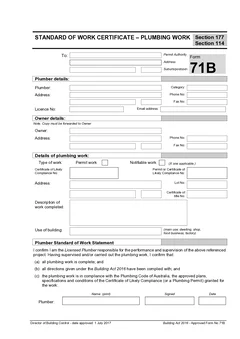
Tradie Forms: complete TAS Form 71B on the official Standard of Work Certificate layout while the job, owner and licence details are still in front of you. Preview the PDF, catch gaps, and download a clean copy for the owner, permit authority and job record.
Tasmanian plumbing work does not finish when the tools go back in the ute. The certificate still has to match the work, the owner, the site and the pathway the job actually followed.
Form 71B is the paperwork that gets pushed to the end of the day, which is exactly when details go missing. The owner address comes off an old booking. The permit authority is copied from the last council job. The work description says "plumbing works" when it should say what was completed. This guide walks the certificate field by field so it can be finished before you leave.
What does TAS Form 71B certify?
Consumer, Building and Occupational Services lists Form 71B as the approved Standard of Work Certificate for Plumbing Work. The CBOS guide to approved plumbing forms says the certificate is completed by the plumber, sent to the council permit authority, and copied to the owner, and that when permit or notifiable plumbing work is completed the plumber is required to complete it.
The CBOS Guide to the Building Act 2016 sets out the completion flow. For permit plumbing work, the plumber submits a standard of work certificate to the permit authority on completion of the work. For notifiable plumbing work, the plumber must provide the owner and permit authority with a standard of work certificate within 5 business days of the work finishing, with an as-constructed drainage plan if appropriate.
The Form 71B lodgement and completion guide covers the timing and lodgement side in more detail. This guide is about getting the fields right.
What to collect before you fill it
Open the job pack first. Everything below is easier when the approval, site, owner and plumber details are in one place.
Recipient or permit authority
The form needs the name and address of the recipient, usually the permit authority or council receiving the certificate. If you work across several Tasmanian council areas, check the authority against the site and approval documents. A saved block is useful only when it matches this job.
Plumber details
Add the plumber name, category, address, phone, licence number and email where applicable. Saved details save real time on repeat jobs, but check the licence number, business name and contact details, especially after a renewal or a business address change.
Owner copy details
The Form 71B layout carries a note that a copy of the certificate must be forwarded to the owner. Confirm the owner name, phone and address. If your site contact was a tenant, builder, project manager or agent, make sure the owner copy still lands with the legal owner.
Type of work
Select whether the work is permit work or notifiable work. The certificate should describe the pathway that actually applies. If the classification is unclear, check the approval, current CBOS guidance and the permit authority process before you certify anything.
Certificate of likely compliance references
Where the job has a certificate of likely compliance or permit reference, add the correct numbers, copied from the current approval or permit authority record rather than an old email chain. These references are what tie the certificate to the approval pathway.
Work site and title details
The work site section captures the address, lot number and certificate of title number where relevant. For rural properties, units, subdivisions, commercial buildings and multi-stage jobs, write enough that the permit authority, owner or next plumber can identify the work later.
Work description
The certificate is only as good as this field.
Name the work and its location:
- "Install hot and cold water reticulation for new dwelling"
- "Complete sanitary drainage and sewer connection for unit 2"
- "Install roof plumbing and stormwater connection to approved layout"
- "Complete on-site wastewater system installation and commissioning"
Keep it short, but make it clear enough to read cold in six months.
Where Form 71B goes wrong
Owner details get skipped. The owner copy matters. If the owner is not the person who met you on site, confirm the right name and address.
The description is too vague. Use plain words and name the work, not just the trade.
Permit work and notifiable work get mixed up. If the approval documents say permit work, do not tick notifiable work because it feels close enough.
References come from the wrong job. Similar jobs with the same builder blur together. Copy from the current approval, certificate of likely compliance or permit document.
As-constructed records drift away from the certificate. CBOS guidance refers to as-constructed drainage plans where appropriate. Keep them with the certificate so the job file tells the full story.
What should you keep with the finished certificate?
The certificate should not sit on its own. Store it with the records that explain the job: the Form 60 start work notification where one was used, permit or certificate of likely compliance details, inspection notes and permit authority correspondence, the as-constructed drainage plan where appropriate, photos of the completed work, the owner delivery note, and any direction or variation that changed the work.
That record is what answers a permit authority query, gives the owner a second copy without a hunt, and tells the next plumber what was completed before they touch the site.
How Tradie Forms helps
Tradie Forms turns TAS Form 71B into sections you work through one at a time in the official order: recipient or permit authority, plumber details, owner details, type of work, certificate of likely compliance references, work site details, standard of work description, and certification and signature.
You can save permit authority and plumber details for repeat Tasmanian jobs, use address search for site and owner blocks, catch missing required fields, preview the official layout, and download the finished certificate for the owner, permit authority and job record. On bigger jobs, treat the preview as a final read-through with the permit file open.
Tradie Forms maps your entries onto the Tasmania Form 71B PDF layout. It is not affiliated with CBOS or any permit authority, it does not lodge, inspect or approve anything, and downloading or emailing the PDF does not complete a permit authority process. The licensed plumber remains responsible for the work, the pathway and the finished document.
Where Form 71B sits against the rest of the job
The certificate is one document in a sequence, and most confusion about it comes from looking at it alone.
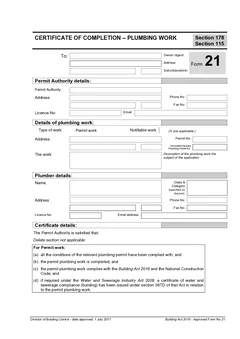
Form 60 opens the job as the start work notification. Form 71B is the plumber's statement about the standard of the work. Form 21 is the certificate of completion. They are separate documents doing separate jobs, and they are frequently prepared by different people at different moments.
Keeping one job reference across all of them is what makes the sequence readable later. Without it, the office is matching documents by address, which fails as soon as a property has two jobs or a street has similar numbers.
Getting the work description right
The description is the field that decides whether the certificate is useful in two years.
"Plumbing work" is technically a description and practically useless. Something like "sanitary plumbing and drainage to new dwelling, including stormwater connection" tells a reader what the certificate actually covers without them opening the permit.
Write it for someone who was not there. That is the test, and it applies to every certificate in the set rather than only this one.
Next steps
Start TAS Form 71B before you leave the job. For the start-work step, use TAS Form 60, and if a completion certificate is also required, TAS Form 21 is the separate document - the Form 21 vs Form 71B guide explains the difference. Browse TAS plumber forms for the live Tasmanian templates. Plumbing forms for every state sit on the plumbing forms hub.
Official references
Check the CBOS approved forms page for the current Form 71B, the CBOS guide to approved plumbing forms for who completes and receives it, the CBOS Guide to the Building Act 2016 for the completion flow, and the Building Act 2016 (Tasmania) for the standard of work certificate provisions.