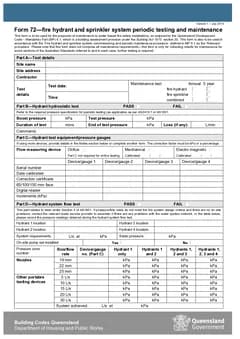
Tradie Forms: finish QLD Form 72 while the maintenance test is fresh, preview the official PDF layout, and download a record the occupier and the next technician can both use.
Filling QLD Form 72 is the easy half. The half that causes trouble later is the filing: where the finished PDF lives, what sits beside it, what it is called, and whether anyone can find it when the occupier asks about a defect eight months on.
Fire hydrant and sprinkler maintenance records get checked well after the visit. If the detail is spread across service sheets, photos, emails and memory, the record is doing less work than it should.
Prepare the QLD Form 72 template, or browse QLD fire-safety forms.
What belongs in a Form 72 record?
The finished PDF, plus everything that supports it. The official Form 72 says it is used for maintenance of water-based fire safety installations as required by Queensland Development Code Mandatory Part 6.1, in accordance with the fire hydrant and sprinkler system commissioning and periodic maintenance procedure. It also says it does not comprise all maintenance requirements and collects results for some sections of the Australian Standards referred to.
So the file needs more than the form:
- Site name and address, contractor details, test date and time
- Whether the test was annual or five-year, and whether it covered hydrant, sprinkler or combined systems
- Service sheets and raw readings behind the entered values
- Gauge or device references
- Photos, tags and marked-up notes
- Any critical defect notice and the repair or corrective action detail
- Licence and report number, signature and date
- A reference to the building maintenance record
The Form 72 maintenance guide covers what each test section asks for. This guide is about what happens to the document afterwards.
How long do you keep it?
QDC MP 6.1 says the person who carries out commissioning or maintenance of a water-based fire safety installation keeps a record of the form for at least five years after completing the work. That is your obligation as the contractor, separate from whatever the building keeps.
MP 6.1 also says the relevant form is given within 10 business days after completing the work. For maintenance that copy goes to the building occupier. Business Queensland guidance places maintenance obligations on building owners or occupiers depending on who occupies the building, which is why the completion step matters as much as the test.
Five years is long enough that "it is in my sent items" will not hold. Store the finished PDF in the job record under the site, not only in an email thread.
Name the file so it can be found
Owners and occupiers often need to produce fire safety records at short notice. Help them by naming the file properly: site name, form, test type and date.
Use the same discipline inside your own job software. The next technician should be able to find the last Form 72 for a building without searching across email, downloads and shared drives. It is the same habit that makes plumbing and building completions retrievable - the QLD Form 19 records guide applies the same thinking to permit work.
Connect defects to what happened next
Maintenance records are most useful when defects do not vanish once the PDF is sent. If a defect is found, the job record should show:
- What was found and where
- Whether it affects hydrant, sprinkler or combined systems
- Who was told, and when
- The quote or repair task reference
- Photos or marked-up notes
- The date follow-up was booked or completed
Form 72 records the maintenance test. The job software should show what happened after the test. If a critical defect was identified, the notice given to the owner or occupier belongs in the same file as the form.
Annual and five-year records need different care
The Form 72 layout includes annual and five-year maintenance test options, and the record should make the choice obvious rather than leaving the owner to infer it.
For annual records, the site, system, test date, readings and contractor details need to be clear. For five-year records, be stricter about supporting documents, photos, comments and follow-up tasks - the interval is longer, so the record is more likely to be read by someone who was not there and cannot ask.
Either way, mark the correct test type and keep the supporting service documentation with the finished file.
Keep it in the wider fire safety file
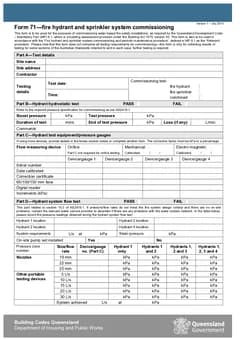
For many buildings, Form 72 is one part of a broader fire safety maintenance file. Keep it near logbook entries, service sheets, defect notices and any Form 71 commissioning record for new or extended installations. If you are not sure which of the two a past visit produced, the Form 71 and Form 72 comparison sorts it out.
That gives the owner, occupier and contractor a cleaner picture of the system over time, and it makes repeat work faster because the previous record is ready before the next visit.
Common record gaps
Form 71 and Form 72 mixed up. Commissioning and periodic maintenance are different job moments and belong on different forms.
The record does not say what was tested. Make the system type and the annual or five-year selection explicit.
Readings live outside the form. Put the required values into Form 72 and keep the raw notes beside it.
Stale contractor details. Saved details save typing, but the name, licence number and report details still need a check against the actual job.
Defects with no follow-up. A record that shows what was found but not what happened next is only half a record.
Before the PDF leaves the job, confirm the site, system, test type, date, results and defects match the service notes. Form 72 supports periodic maintenance under QDC MP 6.1. It does not by itself prove every maintenance obligation has been met, and the contractor remains responsible for checking the work and the finished PDF.
Why the maintenance record outlives the job
Fire safety maintenance records are kept because someone will need them when nobody who did the work is available.
That might be an insurer after an incident, a new building manager, or a certifier assessing the building's ongoing compliance. In each case the record is being read by someone with no context, which is why the building identity, the system scope, and the date carry as much weight as the technical findings.
A record that names the building precisely, says which systems it covers, and is dated is usable by a stranger. One that assumes the reader knows the site is not.
Keeping the run readable
Individual records matter less than the sequence, because the question is usually whether maintenance has been continuous rather than whether one visit happened.
File them in date order under the building, and keep any record of a defect alongside the record showing it was rectified. A defect noted in March with no closure in the file reads as an open item however long ago it was actually fixed.
Where a building changes contractors, the incoming one starts blind unless the history goes with the building. Handing over a clean set is worth doing even when you are the one leaving.
Next steps
Prepare QLD Form 72 when the maintenance test is ready to record. Use QLD Form 71 for commissioning work, or browse QLD fire-safety forms. See the fire safety forms hub for the rest of the Australian set.
Official references
For current requirements, check the Queensland Form 72 PDF, QDC MP 6.1, the Business Queensland fire safety installations guidance, and the Business Queensland building forms page.