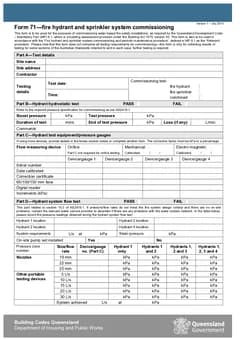
Tradie Forms: complete QLD Form 71 on the official Queensland PDF layout while the commissioning readings, test points, gauges and site details are still in front of you.
QLD Form 71 is the fire hydrant and sprinkler system commissioning record used under Queensland Development Code Mandatory Part 6.1. It looks like a short form, but it carries pressure readings, equipment details, pass and fail decisions, defect notes and a licensee sign-off.
The best time to fill it in is during the commissioning run, not later at the office. The gauges, test points, system requirements, site name and report number are all in front of you. Every hour that passes makes one reading or serial number more likely to go missing.
Prepare the QLD Form 71 template, or browse QLD fire-safety forms.
What is QLD Form 71 used for?
Form 71 records the commissioning of water-based fire safety installations as required by QDC MP 6.1. The official PDF says it is to be used in accordance with the fire hydrant and sprinkler system commissioning and periodic maintenance procedure, which MP 6.1 defines as the relevant procedure.
It is not the whole commissioning process. The official PDF states that the form only collects testing results for some sections of the Australian Standards referred to, and that further testing is required in each case.
That boundary matters for how you talk about the finished document. Tradie Forms helps you fill and download the official Form 71 layout. It does not decide whether commissioning is complete, whether the test procedures were adequate, or whether the system passes. The qualified person responsible for the work checks the readings, the supporting documents and the finished PDF before issuing it.
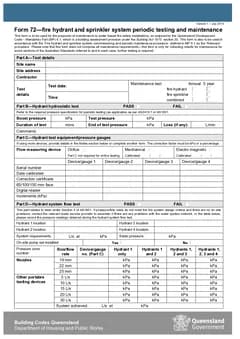
Do you need Form 71 or Form 72?
Use Form 71 for commissioning and Form 72 for periodic testing and maintenance. The form itself defines a commissioning test as a test required upon completion of a new system or an extension to an existing system, so the job moment decides the form.
On site the split is usually clear:
- New hydrant or sprinkler system being brought into service: Form 71
- Extension to an existing water-based fire safety installation: Form 71
- Routine maintenance testing of an existing system: Form 72
- Annual or five-year maintenance test record: Form 72
If a site has both commissioning and maintenance work in the same visit, keep the records separate. One form should not try to do both jobs. The Form 71 and Form 72 comparison works through the borderline cases, including tenancy fit-outs where a section is extended while the rest of the building stays on its maintenance schedule.
What to collect before you start
Form 71 is easiest when the details are gathered while testing is happening. Before you close the job, check you have:
- Site name and site address
- Contractor name
- Test date and time
- Whether the test covers fire hydrant, fire sprinkler or combined systems
- Hydrant hydrostatic test outcome and readings
- Flow measuring device type and gauge calibration details
- Hydrant flow test locations and readings
- Pump appliance booster test readings
- Sprinkler hydrostatic test readings
- Sprinkler flow test points and results
- Critical defects, repairs, corrective actions and system outcome
- Licensee name, signature, licence number and report number
That is too much to reconstruct from memory at the end of the week.
Working through the test parts
Part B records the hydrant hydrostatic test outcome, boost pressure, test pressure, duration, end pressure, any loss and comments.
Part C records the flow measuring device and pressure gauge details: device type, calibration dates, serial numbers, correction certificates, face type, digital reader and increments. These are easy to skim past, but if the readings depend on a gauge and the gauge is not identified, the record is harder to trust later. Where more devices are used than the table allows, the official form points you to notes or another form.
Part D records hydrant system flow test details, including hydrant locations, system requirements, static pressure, pump set, pressure zone, nozzle or portable device readings, and system achieved. Part E records the pump appliance booster test: hydrant locations, height of the highest hydrant above the booster, system requirements, static pressure, pump inlet and discharge pressures, boost pressure, calculated frictional loss and comments.
Part F records sprinkler hydrostatic test pressure, hold time, outcome and comments. Part G records sprinkler system flow test information. The official form notes that multiple testing points may be required for some systems, and that a simulated running test may be required for some systems without a flow measuring device.
Use location wording that still makes sense without the block plan open.
If pressure or flow rates do not meet design criteria, the official Form 71 wording points to contacting the relevant water service provider where there are no on-site problems. Record what you actually found and what action was taken.
Compliance outcome and signature
Part H records critical defects, repairs or corrective actions, and whether the system passed or failed. Part I is the licensee signature block.
By signing, the licensee confirms the information is correct to the best of their knowledge given the available information, and that Form 71 has been completed in accordance with relevant standards, codes and regulations. Check the report number, licence number and system outcome before you sign, not after.
If a critical defect or corrective action is recorded, keep the notice, action details, dates and photos with the job record. The finished PDF should match what actually happened on site.
Who gets the copy and how long do you keep it?
QDC MP 6.1 says an appropriately qualified person who carries out commissioning or maintenance of a water-based fire safety installation completes the relevant form and gives a copy within 10 business days after completing the work. For commissioning, that copy goes to the building owner. MP 6.1 also says the person must keep a record of the form for at least five years.
For the job file, keep the finished Form 71 PDF, the test notes and raw readings, gauge calibration references, block plans and test point locations, any critical defect notices or corrective action details, useful photos, and a note of the owner copy. The filing side is covered in more depth in the Form 72 maintenance records guide, and the same habits apply to a commissioning file.
Do not let the finished PDF drift away from the readings and notes that support it, and do not tell an owner that the document alone proves every commissioning requirement has been met. The form says otherwise.
Common Form 71 mistakes
Treating the form as the whole commissioning record. The official PDF says it does not cover all commissioning testing requirements. Keep the wider notes and drawings with the job.
Gauge details left blank. If a reading depends on a device, identify the device. Missing calibration or serial details weaken the record.
Unclear test point locations. Write locations that tie back to the block plan without needing it open.
Defects with no follow-through. A recorded corrective action should have a matching notice, date and photo in the job file.
Signing before checking. The signature block is the last chance to catch a wrong report number or system outcome.
Next steps
Prepare QLD Form 71 when the commissioning run is ready to record. If the job is periodic maintenance instead, the Form 72 maintenance guide walks through that record, or browse QLD fire-safety forms. The fire safety forms hub covers the other states.
Official references
Check the Business Queensland building forms page, the Queensland Form 71 PDF, the Business Queensland fire safety installations guidance, and QDC MP 6.1 before relying on this guide.