Queensland Government · Live template

QLD Form 71 hydrant and sprinkler commissioning ready for export

Record fire hydrant and sprinkler commissioning under QDC MP 6.1 and export the Queensland PDF.

Hand over Form 71 before you leave site, not a half-filled PDF tonight.
More forms for QLD fire safety practitioners

Exports the Form 71 PDF
Nine guided sections in PDF order
Contractor and licensee details saved for the next job
9:41

QLD Form 71

Queensland Government

Draft
Test DetailsHydrantSprinklerCompliance

Customer & site

Installer

Saved detail

Licence no.-Verified

Tests & results

Polarity correct-
Earth continuity-
RCD trip time (ms)Pass

Certification

Date of test

28 May 2026

Ready to export

Validation passed · ready to export

All changes saved

Export PDF

Saved details prefilled

Licence & business

PDF exported

Attached to job

Preview the QLD Form 71 PDF before you export

Fill the guided sections, then check the finished PDF layout before you download, send, or hand it over.

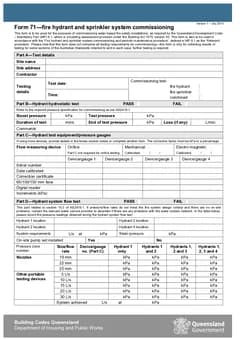
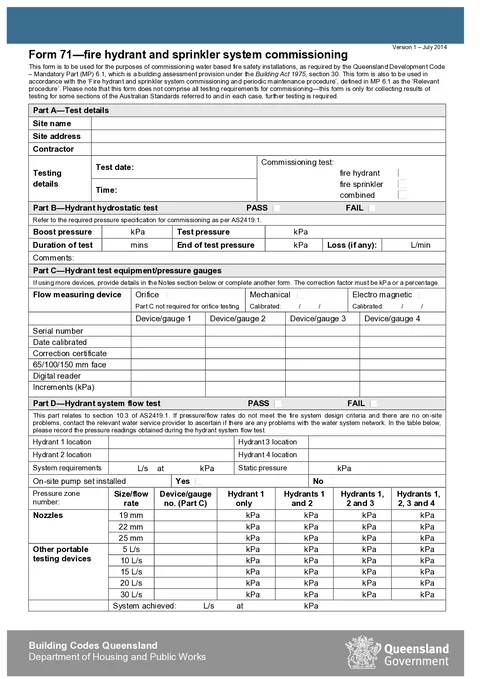
QLD Form 71 form preview
Preview of the QLD Form 71 - Fire Hydrant and Sprinkler Commissioning PDF layout used for export.

Review the PDF before download

Hand over the layout people expect

Keep a clean copy for the job record

What you fill in

Four guided groups follow the Form 71 layout.

  1. Test Details

    Site, contractor, commissioning test type, and systems covered.

  2. Hydrant Tests

    Hydrostatic, equipment, and flow test results for the hydrant system.

  3. Sprinkler and Booster

    Pump booster, sprinkler hydrostatic, and sprinkler flow test results.

  4. Compliance and Signature

    Compliance declarations and licensee signature.

Commissioning records are easy to get wrong on a flat PDF

What trips up fire protection contractors before the commissioning record goes to the building owner.

Big tables on a phone PDF

Flow test grids and gauge tables are painful to fill in a mobile PDF viewer between tests.

Same contractor details every job

Company name and licensee details should carry over when you start the next commissioning run.

Pass/fail boxes get missed

Hydrostatic, flow, booster, and compliance outcomes are easy to skip on a two-page government form.

Finish commissioning records on site

Three steps without fighting the government PDF on your phone.

Open Form 71

Open the form on your phone or laptop. Sign in later if you want cloud drafts across devices.

Preview the Queensland PDF layout before download.

Work through each test part

Fill hydrostatic, flow, booster, and sprinkler sections with guided pass/fail groups.

Saved details cut repeat typing on repeat jobs.

Export for the owner

Preview, sign, and download when the building owner or occupier needs the record.

Free tier includes monthly PDF exports.

Built for QLD fire system commissioning

Nine guided sections

Test details, hydrant tests, sprinkler and booster results, compliance, and signature in PDF order.

Fixed test tables

Gauge rows and hydrant flow readings follow the PDF table order so nothing is out of place.

Saved contractor and licensee blocks

Store repeat business and licence details and apply them on the next Form 71.

Validation before export

Missing signature or key outcomes surface while you fill, not after the owner sends it back.

Before you export

Tradie Forms checks these requirements against the Queensland Government template.

  • Licensee name and signature are required before export.

Frequently asked questions

Built for Australian tradies

Start Form 71 on site

Open the form, finish the commissioning record, and hand over the official PDF.

No credit card required
3 free PDF exports per month