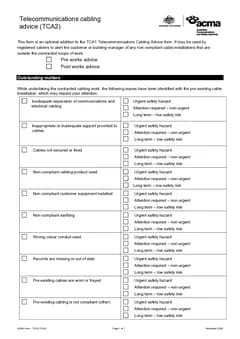
The TCA2 is short, so mistakes are usually about meaning, not missing pages. Cabler teams confuse it with the TCA1, pick the wrong pre or post works box, skip priorities, or never hand the form over.
Check this list before you download the ACMA TCA2. Clear priorities and the right advice type beat a vague PDF nobody acts on.
Triggers: When is an ACMA TCA2 required. Field guide: How to fill out the TCA2. For the rest of your cabling paperwork, browse electrical forms.
1. Using TCA2 instead of TCA1
Mistake: finishing customer cabling work and only writing outstanding matters advice.
Why it fails: ACMA treats TCA1 as the mandatory completion statement for the work you did. TCA2 is advisory for other non-compliant installations you noticed.
Fix: complete TCA1 for completed work. Add TCA2 when there are separate outstanding matters.
2. Stuffing legacy faults into the TCA1
Mistake: putting pre-existing faults into the TCA1 as if they were your completed work.
Fix: certify your work on the TCA1. Document legacy issues on the TCA2 with the right priority.
3. Wrong pre works versus post works
Mistake: marking post works for issues found on the quote walk, or pre works for issues only found after you opened the ceiling during the job.
Fix:
- Pre works: found before your cabling work starts
- Post works: found during or after your work
If you quote on Monday and install on Thursday, Monday finds are still pre works. Issues only uncovered while installing are post works.
4. Ticking matters without a priority
ACMA's TCA2 uses priorities so the customer knows how urgent each issue is. Typical bands are urgent safety hazard, attention required (non-urgent), and long term (low safety risk).
Mistake: leaving priority blank, or marking everything "long term" by default.
Fix: set priority from what you observed. Do not escalate every cosmetic mess to urgent, and do not bury a real hazard in long term.
5. Vague free text that names no location
Fix: make outstanding matters specific enough that the next cabler or building manager can find the issue. Use the form fields fully and keep supporting notes with the job record. Tick only conditions you observed; do not tick every box "just in case".
6. Advising work you are not registered to describe
Mistake: issuing a TCA2 when you are not the registered cabler for the advice, or leaving stale registration and business details on a shared device.
Fix: only registered cablers should complete ACMA cabling advice forms under the cabling provider rules. Check the registration and contact block before download. Always start a fresh form for the current site; saved outstanding matters from another building do not belong here.
7. Never giving the customer a copy
Mistake: filling the form for your own file and walking away, or sending it to the wrong person with no follow-up.
Fix: hand the form to the customer or building manager and keep your copy. Download, name, send, and file in one sitting. See record keeping and handover.
8. Treating TCA2 as a quote or invoice
Mistake: wording the form like a sales proposal, or mixing price and advice in one confusing email.
Fix: keep the TCA2 as outstanding matters advice with priorities. Separate commercial offers from the advice form. If they later engage you to remediate, that completed work needs its own TCA1 path.
9. Downloading without preview
Mistake: missed priority columns and half-selected matters on a small screen.
Fix: preview the PDF layout, confirm advice type, matters, and priorities, then download. The TCA2 form is built for field completion.
10. Leaving a bad PDF uncorrected
Mistake: hoping nobody notices a wrong advice type or blank priority after the PDF has already gone out.
Fix: issue a corrected TCA2 with a clear date, tell the customer which file to keep, and store both versions in the job file with a note. A corrected record beats an ambiguous one left floating in email.
Field patterns that keep showing up
Strata common area, wrong inbox. You email the lot owner who booked the data point, but the non-compliant riser cabling sits in common property. The TCA2 never reaches the building manager who can approve remediation. Fix: ask who owns the space before you send, and note the recipient on the job.
Priority calibration. "Urgent safety hazard" for a messy but separated cable run trains customers to ignore your next TCA2. Save urgent for real hazard conditions you observed. Use attention required and long term honestly so the priority column still means something.
Photos without a form. A camera roll of the ceiling cavity helps your quote, but without a TCA2 the building still has no written outstanding-matters record. Pair photos with the form and a location note (floor, riser, room) so the next cabler can find the same spot.
Shared tablet, last job's ticks. Opening yesterday's draft and changing the address leaves half the previous building's matters selected. Start fresh for each site, then preview.
Pre-download checklist
- This is outstanding matters advice, not a substitute TCA1
- Advice type is pre works or post works correctly
- Every relevant matter is selected
- Each matter has a priority
- Customer or building manager will receive a copy
- Your job file keeps a copy
- Preview looks complete
Laminated card for the van
Put a short card in the van and use it at pack-up:
- Finished customer cabling work? TCA1.
- Saw non-compliant cabling still outstanding? TCA2.
- Set priorities.
- Hand to customer or building manager.
- Save PDF to the job.
Most mistakes disappear when the crew uses that card instead of inventing process under fatigue.
After a disputed advice
If the customer says the issue was already fixed, or another cabler disputes your priority:
- Keep your original TCA2 and job photos as the record of what you observed that day
- Offer a re-inspect as a new visit if they want updated advice
- Issue a new dated TCA2 if conditions changed; do not silently rewrite history
- Keep commercial quotes separate from the advice form
That keeps the advisory trail honest without turning the form into an argument on the PDF.
Why these show up together
Most of the list above traces back to one habit, which is completing the TCA2 away from the site after the job is done.
The observations get vaguer, the priorities get guessed, and the advice type is chosen from memory of what the last one said. Filling it at the site, while the non-compliant cabling is in front of you, removes the majority of these without any extra effort.
Read it as the customer will
The final check is opening the finished PDF the way the recipient will, which is usually on a phone.
A free-text observation that made sense as you typed it can read as meaningless out of context. A priority with no location attached gives the customer nothing to act on. Both are obvious on the PDF and invisible before it, and thirty seconds of reading catches them.
Getting the priority right
Priorities are the field customers act on, and they are the field most often set by habit rather than assessment.
Marking everything high devalues the whole form, because a customer who cannot tell what matters most tends to do nothing. Marking everything low means a genuine hazard sits in a list nobody reads with urgency.
The useful discipline is deciding the priority against what the condition could cause, then writing enough location detail that someone can act on the top item without calling you.
When there is nothing advisory to record
The last mistake is issuing a TCA2 because it feels thorough rather than because there is something to advise.
If you completed the work you were engaged to do and there are no separate outstanding non-compliant installations, the document for the job is the TCA1. A TCA2 with nothing meaningful on it trains customers to ignore the next one, which is the opposite of what the form is for.
Related
Official sources
You remain responsible for the advice you issue.