Tradie Forms: complete the Tasmania gratuitous work form for plumbers and gas-fitters one section at a time, capture owner sign-off, preview the official PDF layout and download the finished file for CBOS and your job record.
Gratuitous work sounds informal because no payment changes hands. The paperwork is still real. In Tasmania, the CBOS gratuitous work form captures the licensed certifier, property owner, work site, prescribed work, insurance answers and owner signature.
This is the kind of form that can be forgotten because the job is for family, a mate, or a charitable situation. That is exactly why it should be filled while everyone is still on site. The owner can sign, the work can be described clearly, and the finished PDF can be lodged or stored without chasing details later.
Use the TAS Gratuitous Work template when you want proper fields on the official PDF layout. For related forms, browse TAS plumbing forms. For the mistakes checklist, see common TAS gratuitous work mistakes.
What is the gratuitous work form for?
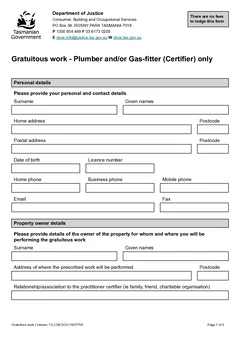
CBOS guidance describes gratuitous work as work done for no payment and says a certified plumber must complete a Gratuitous Work Form and lodge it with CBOS for assessment by email or post. The official PDF is titled Gratuitous work - Plumber and/or Gas-fitter (Certifier) only.
In practical terms, the form is for the licensed certifier and property owner to record unpaid prescribed work clearly before it is relied on.
Tradie Forms maps your entries onto the official PDF layout. It does not decide whether your job qualifies as gratuitous work, whether the prescribed work can proceed, or whether your insurance position is correct. Check current CBOS guidance and the official form before lodging.
When should you use it on site?
Use the form when the job fits the current CBOS gratuitous work process and the property owner needs to sign off on the prescribed work being performed without payment.
Common job moments include:
- A licensed plumber helping family with prescribed work
- A gas-fitter certifier doing unpaid work for a person they know
- Charitable work where the prescribed work still needs a clear record
- A job where owner relationship, work site and insurance answers need to be recorded before lodgement
Do not use the form to avoid the normal approval pathway. If you are not sure which process applies, check CBOS guidance before filling the PDF.
Because the work is unpaid, it can feel like something to handle with a handshake. The form is there to make the arrangement visible. It records the certifier, the owner, the work site, the relationship, the work description and the insurance answers in one place.
Details to gather before filling
The form is easiest when the certifier and owner are both available. Before you start, get the current licence details, owner name, site address and insurance information ready. If the owner is not on site, decide how you will get a proper review and signature before relying on the form.
Certifier details
The PDF captures surname, given names, residential and postal address, date of birth, licence number, phone, email and fax where used. Use current licence and contact details. This is not the place for an old business card address or a number you stopped using. Saved licence details can reduce repeat typing in Tradie Forms, but you still need to check them before download.
Property owner and work site
The owner section captures the property owner's surname and given names, the work site address, and the relationship or association between the certifier and owner. Be clear about the relationship. Do not write a vague note if the form asks for the association. The person reviewing the PDF should understand why the work is being treated as gratuitous.
For the work site, enter the actual Tasmanian address where the prescribed work will be performed. If the site is rural or hard to identify, add the detail the official form allows and keep supporting notes in the job record.
Prescribed work description
The work description should say what prescribed work will be performed. Keep it practical and specific.
Insurance section
The official gratuitous work form includes insurance questions. The PDF references liability insurance for personal injury and damage to property. Answer the questions against the current form wording and your real insurance position. Do not guess. If the insurance answer is unclear, check before lodging.
Owner sign-off
The owner signature and date should be captured when the owner has reviewed the details. Do not leave this until after the work is done and everyone has gone home. Ask the owner to read the certifier details, work site, relationship, work description and insurance answers before signing. If they spot a wrong address, spelling error or work description issue, fix it before download.
A simple gratuitous work workflow
- Confirm the job fits the current CBOS gratuitous work process.
- Open the form before the work details are forgotten.
- Add certifier details and licence number.
- Add property owner details and work site address.
- Describe the relationship or association.
- Describe the prescribed work.
- Answer the insurance questions against the current form.
- Capture owner signature and date.
- Preview the official PDF layout.
- Download and lodge or store the finished PDF using the current CBOS process.
Store the finished PDF with any emails to CBOS, owner notes, job photos, insurance checks and related plumbing or gas-fitting records. That habit matters because gratuitous work often happens outside normal invoicing. Without a bill to anchor the record, the PDF and lodgement note become the main paperwork trail.
Related Tasmanian forms
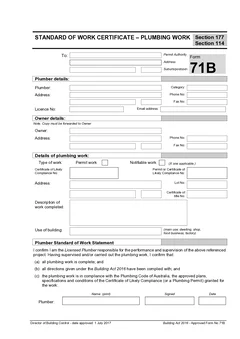
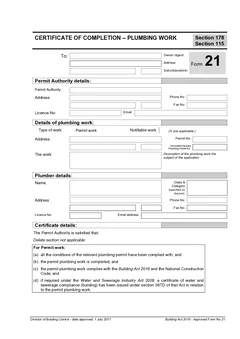
Gratuitous work is separate from the usual start and completion flow. Other Tasmanian plumbing paperwork in Tradie Forms includes TAS Form 60, TAS Form 71B and TAS Form 21. Use the TAS plumbing forms list to keep the form set visible as the platform grows, or browse TAS plumbing forms. The plumbing forms hub has the national set if you work across borders.
How Tradie Forms helps
Tradie Forms turns TAS Gratuitous Work into sections you work through one at a time for certifier, property owner, work, insurance and owner sign-off.
You can fill the form from a phone, tablet or laptop, reuse certifier licence and contact details, search Tasmanian addresses or type them manually, catch missing fields before download, preview the official PDF layout, and download the finished file for CBOS lodgement and your record.
The value is practical. The owner can review and sign while the work is being discussed, and the certifier can download a clean PDF instead of rebuilding details later. The certifier still checks the official requirements and lodges through the current CBOS pathway.
Why the relationship question matters
The form asks about the relationship because that is what makes the work gratuitous, and it is the field most often answered loosely.
A vague answer creates the question the form exists to settle. Describing the actual relationship, plainly, is what makes the rest of the document straightforward.
If the arrangement does not clearly fit the gratuitous work pathway, that is worth resolving before the form is completed rather than after. The pathway decides the paperwork, not the other way around.
Keeping a record of unpaid work
Work done for family or friends tends not to generate a job file, which is exactly why it causes problems later.
Give it the same job reference treatment as paid work: the form, any photos, and a note of what was done and when. The absence of an invoice is not a reason for the absence of a record, and the properties involved are often the ones you end up back at.
Next steps
Start the TAS Gratuitous Work template when the pathway is confirmed. Use the common mistakes guide as a final checklist, or return to the TAS plumbing forms list for start and completion forms on paid jobs.
Official references
Check the CBOS gratuitous work guidance, the official CBOS gratuitous work form PDF, the CBOS approved forms page, and the CBOS guide to approved plumbing forms.