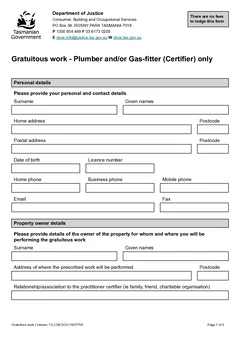
Tasmanian gratuitous work can feel casual because the job is unpaid. The paperwork should not be casual. The CBOS gratuitous work form records who is doing the prescribed work, who owns the property, where the work will happen, what relationship exists, what work is being performed, how the insurance questions are answered and when the owner signs.
This guide covers common mistakes plumbers and gas-fitters make when the form is left until late or treated like a favour note. Use it before you download the TAS Gratuitous Work form. For the field workflow, read the gratuitous work form guide, and browse TAS plumbing forms for related paperwork.
Mistake 1: treating no-payment work as no-paperwork work
CBOS guidance says a certified plumber must complete a Gratuitous Work Form and lodge it with CBOS for assessment by email or post. The official PDF is for Plumber and/or Gas-fitter (Certifier) only.
That means the form should be treated as part of the job setup, not something to remember after the work is done. Open it before the job details start to scatter. Confirm the current CBOS process, fill the owner and certifier details, answer the insurance questions and capture the owner signature while everyone is available.
For small jobs, do this before tools are packed away. For family or charity work, do it before the favour becomes a memory and nobody can remember the exact work description.
Mistake 2: certifier details are old or incomplete
The form asks for the certifier's personal and contact details, including licence number. Old saved details can create quiet errors if you do not review them.
Check full name, home and postal address, date of birth, licence number, phone numbers, email address and fax if used. Tradie Forms can save certifier details for reuse, but the final check matters. The finished PDF should reflect the current certifier, not whatever was in the last form.
Mistake 3: the owner relationship is vague
The form asks for the relationship or association between the certifier and property owner. This field is easy to rush because the certifier may know the person well.
Do not write "known to me" if a clearer answer is available. Be plain: parent, sibling, friend, community organisation contact, neighbour or charity contact. Use the wording that honestly describes the relationship. If the relationship does not fit the current CBOS process, check the guidance before continuing.
Mistake 4: the work site is not specific enough
The work site should identify where the prescribed work will be performed. For a standard suburban property, the street address may be straightforward. For rural properties, units, shared driveways or properties with multiple buildings, add enough detail to avoid confusion.
If the job is not easy to identify from the address alone, keep supporting notes with the job record. The form should not leave CBOS, the owner or your future self guessing where the work happened.
Mistake 5: the prescribed work description is too broad
The official form asks what type of prescribed work will be performed. Describe the actual work.
The description should match the unpaid work being done. Do not make it broader than the job. If the work changes, update the form before download.
Mistake 6: insurance answers are guessed
The official PDF includes insurance questions and references liability insurance for personal injury and property damage. Do not tick answers from habit.
Check the current form wording and your insurance position before download. If the property owner is answering part of the insurance section, make sure they understand what is being answered. Tradie Forms can make sure a field is not left blank. It cannot tell you what the correct insurance answer is.
Mistake 7: owner signature is left until later
The form includes property owner sign-off. If the owner does not sign while the details are fresh, someone will have to chase them later.
Capture the signature once the owner has reviewed certifier details, owner name, work site, relationship or association, description of prescribed work and insurance answers. Do not use a future date. The signature should reflect when the owner signs the form.
Mistake 8: the finished PDF is not lodged or stored
The job is not finished just because the PDF is downloaded. CBOS guidance refers to lodging the form with CBOS for assessment by email or post.
After download, record what happened, for example that the form was emailed or posted to CBOS, that the owner signed and you are waiting on an insurance check, or that the PDF is stored with the job record. Keep it with any lodgement email, owner communication, photos, insurance notes and related trade records.
If your business normally relies on invoices to find job files, create a job record anyway. Gratuitous work may not create an invoice, but it still needs a place for the form, owner signature and lodgement trail.
How do you avoid these mistakes on site?
Use a short rhythm that works on a Saturday favour job and still makes sense to the office later:
- Confirm the pathway fits current CBOS gratuitous work guidance.
- Enter certifier details and licence number.
- Confirm the owner and site.
- Describe the relationship and the prescribed work.
- Check the insurance answers against the form wording.
- Get the owner signature after review.
- Preview the PDF.
- Download and lodge or store it, then keep proof of what happened next.
Keep the language plain. Write names, addresses, relationship and work description in words the owner and CBOS can read without calling you. A clear PDF saves everyone time, especially when the job is unpaid and there is no normal invoice trail to explain the work.
Do not quietly overwrite a copy after it has been provided or lodged. Keep the original job evidence, identify what changed, and follow the current CBOS process for corrections. Tell the owner if their copy is affected. Give the corrected file a new version label and retain the original notes.
Related Tasmanian plumbing paperwork
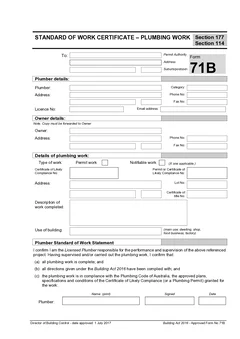
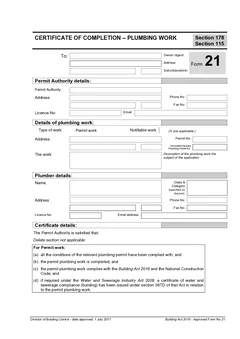
Gratuitous work is a separate pathway from normal start and completion paperwork. If the job is not gratuitous work, related Tasmanian templates include TAS Form 60 for start work notification, TAS Form 71B for standard of work certification and TAS Form 21 for certificate of completion records.
Use the TAS plumbing forms list to find the right template before filling a PDF, or browse TAS plumbing forms. Plumbing forms for every state sit on the plumbing forms hub.
How Tradie Forms helps
Tradie Forms turns TAS Gratuitous Work into sections you work through one at a time for certifier, property owner, work, insurance and owner sign-off.
You can fill the form on site from a phone, tablet or laptop, reuse certifier details where they still apply, use address search or manual address entry, catch missing fields before download, preview the official PDF layout, and download the finished form for CBOS and your job record.
The platform helps keep the paperwork in order. It does not replace checking the official requirements, deciding whether the work qualifies, or confirming insurance answers.
The relationship and insurance answers
Two fields account for a large share of the problems on this form, and both are about the arrangement rather than the plumbing.
The relationship answer is what establishes the work as gratuitous. A vague answer reopens the question the form exists to close. The insurance answer needs to reflect the actual position rather than the one that seems easiest, because it is the answer someone will rely on if anything goes wrong.
Neither takes long to get right, and both are difficult to correct afterwards without drawing attention to the correction.
Records for work with no invoice
Unpaid work rarely generates a job file, which is why these certificates so often sit alone.
Give the job a reference and keep the certificate with any photos and a short note of what was done. The absence of an invoice is not a reason for the absence of a record.
Next steps
Start the TAS gratuitous work form when the pathway is confirmed and the owner is available to review it. Read the full gratuitous work form guide for section-by-section detail, or return to the TAS plumbing forms list.
Official references
Check the CBOS gratuitous work guidance, the official CBOS gratuitous work form PDF, the CBOS approved forms page, and the CBOS guide to approved plumbing forms.