Tradie Forms: finish the QLD certificate of testing and compliance on the official PDF layout before you leave the job. This guide covers what belongs on the CoTC and how to avoid the rework that costs sparkies billable hours.
When a Queensland customer asks for the certificate of testing and compliance, they usually want it before you pack up the van. Leaving it until you are home means re-opening the job in your head, hunting licence numbers, checking old messages, and risking typos that slow payment or inspection.
The certificate is not the place to rely on memory. Fill it while the installation, test gear, switchboard labels, and customer details are still in front of you.
What the QLD CoTC is for
WorkSafe Queensland explains that an electrical contractor performing electrical installation work must provide a certificate of testing and compliance to the person the work was done for when an electrical installation is connected to a source of electricity. The same WorkSafe page distinguishes that from the certificate of testing and safety, which applies to electrical equipment work.
In plain job-site terms:
- Installation work generally needs a certificate of testing and compliance.
- Equipment work generally uses a certificate of testing and safety.
- The person receiving the work needs a copy.
- You should keep your own record in case the customer, builder, insurer, or regulator asks later.
Check WorkSafe Queensland's guidance on issuing certificates of compliance for the current requirements before relying on this guide for a specific job.
CoTC or certificate of testing and safety?
Queensland sparkies often talk about a "certificate of test", but the certificate type matters. If the job is electrical installation work, you are usually dealing with the certificate of testing and compliance. If the job is electrical equipment work, WorkSafe's guidance points to the certificate of testing and safety.
The practical check is: what did you work on, and what does the customer need evidence for? A switchboard, fixed wiring, new circuit, or altered installation usually needs installation-focused wording. Equipment repair or equipment work usually needs the equipment certificate path.
If the job has both installation and equipment parts, do not guess from habit. Check the WorkSafe guidance, your licence obligations, and your business process before issuing the paperwork.
What the certificate needs to prove
The certificate tells the customer that the electrical installation, to the extent affected by the electrical work, was tested and complies with the wiring rules and other applicable standards under the Queensland electrical safety regulations. That is a serious statement. The details you put on the certificate need to match the work you actually completed and tested.
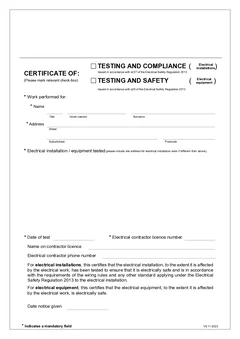
The WorkSafe certificate template includes the core blocks most sparkies expect:
- Customer or person for whom the work was done
- Location of the electrical installation
- Description of the electrical work
- Electrical contractor and licence details
- Test and compliance declaration
- Date notice was given
- Signature or authorised details
Tradie Forms maps your entries onto the Queensland certificate PDF layout. It does not decide whether the work is compliant. That call stays with the licensed person or contractor responsible for the work.
Collect these details before you leave site
The fastest CoTC is the one you finish while everything is still in reach. Before you jump in the ute, check you have the pieces that usually cause rework.
Customer and site details
Confirm the customer's name, business name where relevant, phone or email, and the exact installation address. Do not rely on the booking address if the job has a separate unit, tenancy, shed, lot, or pump room.
For strata, commercial, and rural jobs, add the detail someone else will need to find the installation later. "Back shed switchboard" is more useful than a vague property address when the customer calls in six months.
Description of work
Write the work description so a customer, inspector, or office admin can understand what was done without ringing you.
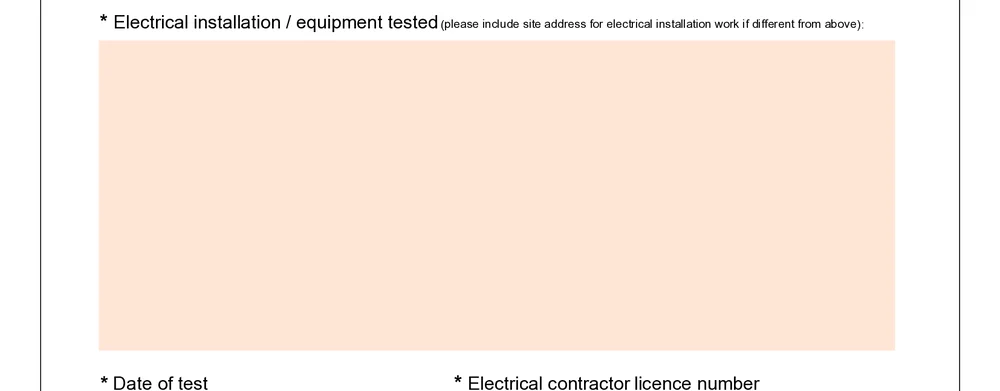
Match the wording to the job. A certificate for a new circuit, switchboard upgrade, solar-related electrical work, EV charger circuit, or repair after a fault should make the scope clear enough that the certificate does not look like it covers more than it should.
Contractor and licence details
Licence details are easy to copy wrong from a photo, old cert, or note in your phone. Check the electrical contractor licence and any worker or responsible person details against the business record you actually use for Queensland work.

If the business has multiple licensed people or crews, make sure the certificate names the right contractor and person connected to the job. Saved details are useful, but only if you keep them current after renewals or staff changes.
Test results and sign-off
Record the test details while the tester is still out. If a result looks odd, retest before you pack up. The certificate should reflect the testing you performed, not a best guess after the fact.
Where the job involves safety switches, earthing, polarity, insulation resistance, or fault loop checks, keep the supporting notes with the job record. The certificate is the completion record, but the supporting test detail is what helps if anyone asks how you reached the sign-off.
Why on-site completion wins
Finishing the CoTC at the switchboard keeps job details fresh. You have the test readings, labels, photos, and customer conversation in the same moment. That is when the certificate is easiest to complete accurately.
Waiting until later creates the usual paperwork mess:
- Re-reading photos to work out which board or circuit the note referred to
- Copying addresses from the job software into a PDF by hand
- Asking the office which customer name to put on the cert
- Finding licence details from an older certificate
- Sending a corrected PDF because a required field was missed
On-site completion also improves the completion. The customer can ask what the certificate means while you are there. The office can attach the finished PDF to the job before invoicing. You can move to the next call-out without carrying the form in your head.
Common CoTC mistakes to avoid
Wrong installation address
This is the classic one. The customer address, billing address, and installation address are often the same for a house job, but not always. Investment properties, strata sites, body corporate work, retail tenancies, sheds, farms, and industrial sites can all split those details.
If the address is wrong, the certificate may not line up with the job, the invoice, or the customer's records.
Vague work description
The work description needs to fit the certificate. Avoid wording that is so broad it suggests you certified more than you touched. Also avoid wording so vague that no one can tell what was tested.
Useful descriptions name the area, the equipment or circuit, and the type of work. Keep it short, but make it specific.
Old licence or business details
Many electricians copy licence blocks from an old PDF. That works until a licence renews, a trading name changes, or a supervisor leaves. Save the details, but review them regularly.
Date mismatch
The date on the certificate should make sense against the work performed, testing, completion, and notice given. A date copied from an old form is a small mistake that can make the whole certificate look sloppy.
Not keeping a copy
WorkSafe's 2023 certificate amendment guidance reminds contractors to keep copies of certificates. A clean digital record saves a painful search later, especially when the job was finished months ago and the customer asks for another copy.
How Tradie Forms helps
Tradie Forms turns the QLD certificate into an online form instead of a flat PDF you pinch and zoom around on your phone.
You can:
- Fill customer, site, contractor, and certification sections in order
- Reuse business and licence details from saved details
- Catch missing required fields before download
- Preview the finished PDF layout before you hand it over
- Download the completed certificate for the customer and your records
The important part is that the form fits the on-site moment. You do not need to wait until the laptop is open at home. Open the certificate, work through each section, check the preview, then complete the PDF when the job is ready.
Record-keeping habits that save headaches
The certificate is only one part of the job record. Keep the supporting material with it:
- Test readings or tester downloads
- Switchboard and installation photos where useful
- Customer approval or scope notes
- Any defect or remedial notes
- The completed PDF certificate
Use consistent file names if you download and store PDFs outside Tradie Forms. A simple pattern like date, customer, suburb, and form name makes it easier for the office to find the record without opening every file.
Next steps
Open the QLD CoTC form to start a certificate on site, or browse QLD electrician forms for other live templates.
Before download, use the common QLD CoTC mistakes guide as a final field check. After handover, the five-year CoTC record-keeping guide covers the customer copy and job file.
For official requirements, check WorkSafe Queensland's certificate guidance, the WorkSafe certificate of testing or compliance form, the 2023 certificate amendment guidance, and Business Queensland electrical contractor safety duties.