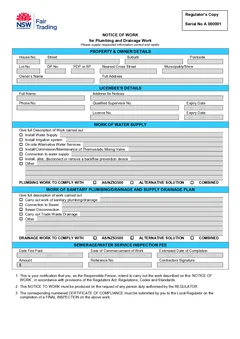
Most Combined Notice mistakes are not dramatic. They are small mismatches that make the job harder to inspect, close, or defend later.
The notice was filled after the trench was open. The certificate used last month's licence expiry. The owner copy and regulator copy do not match. The sewer service diagram was meant to be in the same pack and never left the camera roll. The work description says "bathroom" and nothing else.
NSW plumbing and drainage paperwork sits between the plumber or drainer, the person who arranged the work, Building Commission NSW or a local plumbing regulator, and later readers such as owners, buyers, and insurers. Clean details save a lot of after-hours chasing.
Use this checklist with the main Combined Notice on-site guide and the record keeping guide. Browse NSW plumbing forms for related templates.
Mistake 1: treating notice and certificate as the same moment
NSW Government guidance splits the job into two paperwork moments.
A Notice of Work outlines plumbing and drainage work to be carried out and the person carrying it out. Plumbers and drainers must submit a Notice of Work before starting work, using the pathway that applies to the site.
A Certificate of Compliance confirms the work complies with the Act, Regulation, Plumbing Code of Australia, and the Deemed-to-Satisfy requirements of AS/NZS 3500, and identifies the plumber or drainer as the responsible person. It is completed at the completion of plumbing and drainage work.
Part of why the two get conflated is that they look almost the same. The notice page and the certificate page carry an identical body: same property block, same licensee block, same work description sections. Only the title, the header colour, and the declaration underneath change.
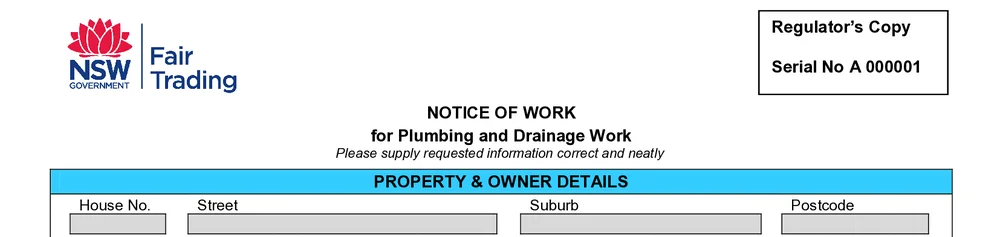
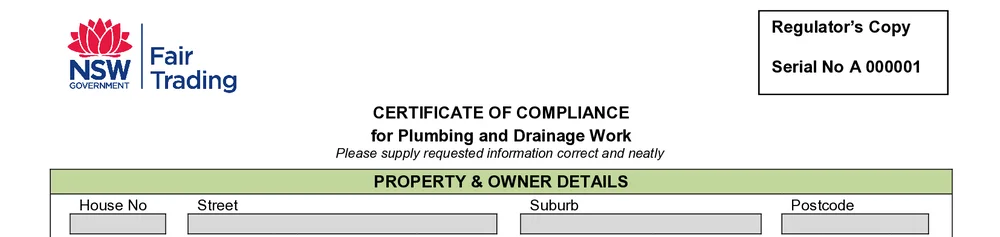
The Combined Notice form can hold both sides, but that does not mean you should leave the whole document until the final day. If the notice was required before work started, completing it after the job is already finished is late for that duty.
Better habit:
- Confirm the pathway for the site.
- Prepare and submit the notice side before starting where required.
- Keep the same job details ready for certificate closeout.
- Complete the certificate after testing and final checks.
See when to submit a NSW Combined Notice for the timing split in more detail.
Mistake 2: using the wrong regulator pathway
NSW is not one identical lodgement process for every postcode.
For work requiring inspection in Sydney, the Illawarra, Blue Mountains, Newcastle, and Hunter, NSW guidance points to Building Commission NSW via MyInspections.
For local plumbing regulator areas, guidance points to the Combined Notice of Work and Certificate of Compliance for the type of work the relevant local regulator requires to be inspected.
Regional inspection guidance also says Notice of Work goes to the local plumbing regulator before work begins, Certificate of Compliance goes on completion of the final inspection, and a Sewer Service Diagram goes to the local plumbing regulator and the owner or owner's agent.
The mistake is assuming the last job's process applies to this job. A metro process does not automatically fit a regional council job. A regional habit does not automatically fit a MyInspections job.
Before you send anything, check:
- Where the site sits
- Whether the work requires inspection
- Which body receives the notice
- Which body receives the certificate
- Whether an SSD is also due
Mistake 3: vague work descriptions
"Bathroom reno" is not enough for a future reader.

The Combined Notice needs water supply, sanitary plumbing, and drainage details that match the work actually carried out. A regulator, owner, or office admin should understand what was done without ringing the plumber after hours.
Keep it short, but make it specific. Do not turn the form into a novel, and do not leave it so broad that it looks like you certified the whole house when you only touched one wet area.
Mistake 4: wrong owner, agent, or person who arranged the work
The certificate copy goes to the person who arranged the work. That may be an owner, builder, or managing agent. The property owner fields and the person who arranged the work are not always the same human.
Common field mix-ups:
- Tenant site contact entered as owner
- Builder omitted when the builder arranged the work
- Strata scheme name missing on multi-unit sites
- Company owner entered as a personal name from the gate code list
- Billing email used while the legal owner details stay blank
Before download, match the form to the work order, approval documents, or engagement email. If the office invoices one party and the form names another without a reason, the closeout pack gets messy.
Mistake 5: stale licensee details
The licensee block is easy because it rarely changes, until it does.
Check:
- Full name
- Address for notices
- Phone number
- Qualified supervisor number
- Licence number
- Expiry dates
Saved details in job software help only if someone updates them after renewals, address changes, or supervisor changes. Copying an old PDF is how expired dates travel from job to job.
If multiple licensed people work for the business, make sure the certificate names the responsible plumber or drainer for that work, not whichever licence block was last used on the phone.
Mistake 6: date and fee fields left for the office
The combined form includes commencement, estimated completion, fee, date paid, amount, and reference number fields. Leaving them blank because "the office will know" often means nobody fills them cleanly.
Practical rule:
- Put known dates and reference numbers on the form while they are easy to find
- Do not invent dates you do not have
- Do not let bank receipts become the only source of the inspection reference weeks later
If the notice went in before work started, the commencement story should still make sense at certificate time. If the job ran long, keep the real completion date honest.
Mistake 7: certificate declaration treated as a rubber stamp
The certificate section is the serious part. It records the contractor's certification about authorised work, testing, relevant standards, and completion.

Rushing the declaration creates two problems:
- The form looks complete while the job checks are not finished.
- Pre-existing defective work that needed written notice gets ignored.
If the legislation required written notice of identified pre-existing defective plumbing or drainage work, do not skip that field because the customer wants the paperwork now. Finish the real checks, then complete the certificate.
The Combined Notice maps the declaration onto the official layout. It does not decide whether the work complies. That stays with the licensed person.
Mistake 8: forgetting the sewer service diagram
A Certificate of Compliance does not replace a Sewer Service Diagram.
NSW guidance lists SSDs as part of the inspection document set. Plumbers and drainers may need to provide a copy to the person who arranged the work and submit a copy through the relevant pathway for drainage work.
Common SSD failures:
- Certificate closed, SSD still only a phone photo
- SSD not on an accepted template where required
- Title block incomplete
- Existing drainage omitted when it should be shown
- One duplex SSD missing the second dwelling's drainage
- Photos uploaded instead of a proper scan where photos are not accepted
Keep the SSD in the same site pack as the Combined Notice. For the full split between the documents, read NSW Combined Notice vs sewer service diagram.
Mistake 9: copies do not match
The Combined Notice form includes copies for the licensee, owner, and regulator. If you correct one copy by hand or download twice with different edits, the record becomes unreliable.
Fill once. Preview the full official PDF. Confirm repeated details land correctly. Then distribute the finished download through the right channels.
Do not keep the only clean copy in one person's downloads folder. Attach it to the job record so the office can send owner or regulator copies without reconstructing the form.
Mistake 10: skipping the certificate because "no inspection"
NSW guidance says plumbers and drainers must complete a Certificate of Compliance at the completion of all plumbing and drainage work and provide a copy to the person that arranged the work.
For work not requiring an inspection, the Combined Notice form can still be used, and a copy may not need to go to Building Commission NSW or the local plumbing regulator. That is not the same as "no certificate needed."
The practical mistake is closing the invoice without any CoC because nobody booked an inspection. Check the current guidance for the job type, then complete the certificate duty that still applies.
Mistake 11: previewing only on a tiny phone crop
The official layout has repeated sections and dense fields. Pinch-zooming one corner is how missing dates and cut-off descriptions slip through.
Before download:
- Preview the full PDF layout
- Check property, owner, licensee, work type, dates, and certificate wording
- Confirm the repeated copies still match after any last edit
- Download once you are satisfied, then store that file
Preview on site so the field team can catch layout and missing-field issues before the customer or regulator sees the PDF.
Mistake 12: no link between form, photos, and job software
A perfect PDF that cannot be found is still a failure.
After download:
- Attach the PDF to the job in your system of record
- Keep inspection notes and photos with it
- Keep the SSD with it where required
- Use a file name that includes date, site, and form type
- Note who received which copy and when
The record keeping guide covers that closeout in more depth.
A one-minute pre-download check
Read the PDF like a stranger would:
- Is the pathway for this site clear to the office?
- Were notice details ready before work started where required?
- Are property and owner details complete enough to identify the site?
- Are licensee and licence expiry details current?
- Does the work description match the real water supply, sanitary, or drainage work?
- Are commencement, completion, fee, and reference fields honest and complete where known?
- Is the certificate declaration ready because the work and testing are finished?
- Is any required SSD ready in the same pack?
- Have owner, licensee, and regulator copies been planned?
- Is the finished PDF attached to the job record?
That minute is cheaper than a re-download after the customer has already received the wrong version.
Why these mistakes cost more than a reprint
A wrong Combined Notice is rarely just a reprint. It can delay inspection booking, force a return visit for covered work photos, delay the owner copy, or leave the office matching half-finished PDFs to bank references and SMS threads. The form is only one page stack, but it sits in the middle of the whole plumbing closeout.
Fix the process on the next job even if today's PDF already left the phone. Saved licensee details, a notice-before-start habit, and a same-day SSD checklist prevent the same mistakes from stacking across the week.
Related reading and next steps
Start the NSW Combined Notice of Work and Certificate of Compliance, or browse NSW plumbing forms. The plumbing forms hub has the national set if you work across borders.
Related articles:
- NSW Combined Notice on-site guide
- Record keeping and handover guide
- When to submit a NSW Combined Notice
- NSW Combined Notice vs sewer service diagram
Official references
For current requirements, check the NSW plumbing inspection documents guidance, the Combined Notice form page, the regional inspections guidance, and the NSW Plumbing and Drainage Regulation 2017.