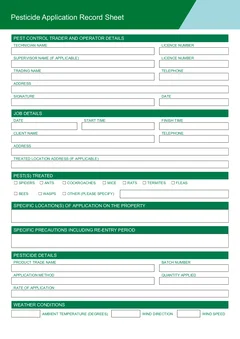
Tradie Forms: run Victorian pesticide application records digitally from the property. Fill it in one section at a time, reuse operator and client details, catch missing fields, preview the official PDF layout, and download a clean copy for the business record.
A digital pesticide record only helps if the finished file ends up somewhere the business can find it three years later. Filling the form on a phone is the easy half. The half that goes wrong is naming, storing and handing the record back to the office.
This guide covers the workflow around the record: what has to be captured, where the finished PDF lives, how repeat commercial sites are handled, and how the office answers a client question without ringing the technician. For the field-by-field detail, use the VIC pesticide application record on-site guide. For the slips that weaken a record, see the common VIC pesticide record mistakes.
Use the VIC pesticide application record to fill the official PDF layout online, or browse VIC pest control forms.
What does Victoria require you to keep, and for how long?
Health Victoria says pest control operators must keep records for every pesticide application for every job, and that records must be kept at the business address for a minimum of three years. The requirement sits under the Public Health and Wellbeing Regulations 2019 and the Public Health and Wellbeing Act 2008.
The official guidance lists the details to record: pesticide trade name, batch number, precautions and re-entry period, date and times, pests treated, location and specific location of application, method, quantity, rate information, outdoor weather details where applicable, supervising person details where applicable, business details, client details and signature.
Health Victoria also says records should be accurate, up to date, clear, consistent and in English. That last standard is really a filing standard as much as a writing one. A record nobody can locate is not much use to the client, the next technician or an inspector.
Build the record while doing the work
The record should follow the treatment rather than trail it. Confirm the client, site address and target pests before you start. Note product details, label rate, batch and method during setup. Record weather conditions before outdoor application where applicable. After application, complete start and finish times, quantity, specific locations, precautions, re-entry period and signature.
Step 1
Before you start
At the door
Client, site address and target pests confirmed.
Step 2
During setup
While the product is out
Product details, label rate, batch number and method.
Step 3
Before outdoor application
At the treatment area
Temperature, wind speed and wind direction.
Step 4
After application
Before packing up
Times, quantity, specific locations, precautions, re-entry period, signature.
Each step captures what is only visible at that moment. Nothing here is recoverable from the ute an hour later.
That order matters because the fields hardest to rebuild later - batch number, specific treated areas, weather - are all available at the moment they are needed and gone an hour afterwards.
Tradie Forms maps your entries onto the official PDF layout. It does not decide which product to use, what the label requires, or whether the treatment was appropriate. The licensed pest controller remains responsible for the application, the record and the finished PDF.
Naming and storing the finished PDF
Download the finished PDF after preview and attach it to the job the same day. The file name is doing real work here, because in three years nobody will remember the job number.
A pattern that survives:
- Date of application
- Client or site name
- Suburb
- Form name
Store the PDF beside the job booking or work order, the product label or SDS reference where your business keeps it, useful photos, the client communication, and any follow-up or next service date. If your business stores digital records, make sure the record system - not the technician's phone - is the place of record.
Where do digital workflows usually break?
In five predictable places, and all of them are fixable with a habit rather than a new system.
Product details are incomplete. Trade name and batch number should be captured while the container is in hand, not recalled later.
Precautions are too generic. The record should include specific precautions and the re-entry period, drawn from the product label and the job context.
Client details are copied from an old job. Saved details help repeat commercial sites, but the person arranging the work, the phone number or the treated location can change between visits.
Several products are squeezed into one record. The official template is built around pesticide application details. If the job used more than one pesticide, check how your business records each product so all the required details are captured.
The PDF never reaches the record system. Health Victoria says records must be kept at the business address. A finished PDF sitting in a downloads folder does not meet that in any practical sense.
Repeat commercial sites and saved details
Repeat commercial pest work is where a digital workflow pays for itself. Client details, trading name, business address and common treated locations often repeat, while the product, batch, pests, weather and application areas change every visit.
Use saved operator and client details for the stable blocks, then put your attention on the job-specific fields. That keeps repeat work fast without turning this month's record into a copy of last month's.
For schools, warehouses, food premises, strata sites and healthcare settings, be extra clear about specific application areas and precautions. The next person reading the record may not be the person who booked the job.
Supervising and trainee details
The official guidance includes the name and licence number of the supervising person where applicable, for example where a trainee licence holder applied the pesticide. If that applies on the job, record it on site rather than leaving it for the office to work out afterwards.
Saved operator details help, but the technician still needs to check the actual person and licence details for that application. The VIC pest control licence guide explains technician, trainee and authorisation checks in more detail.
Can the office answer client questions from the record?
That is the real test of the workflow. A client ringing about re-entry period, product name or treated area should be answerable from the stored PDF without calling the technician back.
The official requirement is about keeping records, but clients still ask what was applied. Before sharing a copy, check that the record is complete, plain enough to understand, and consistent with your business process for client communication. Keep a note of the sent copy with the job.
Avoid shorthand that only makes sense to the person who did the work. The record has to stand on its own once the job is closed.
End-of-job check
Before leaving the property, confirm the product trade name and batch number, the pests treated, the specific application areas, the method, quantity and rate details, the precautions and re-entry period, weather details for outdoor application where applicable, the operator, licence and signature, and the client details.
It is a short list, but it covers the fields that are hardest to rebuild later. If the technician can confirm them on site, the record is strong enough to file and forget.
Records that hold up months later
The value of a pesticide record shows up long after the treatment, usually when somebody asks a question nobody anticipated.
That might be a client querying a treatment near a vegetable garden, a neighbour raising a complaint, or a regulator reviewing a business. In each case the useful record is one that shows exactly what was applied, where, at what rate, and under what conditions, written at the time rather than reconstructed.
Records written on the day carry detail that memory does not, particularly weather and the specific treated locations. Those are the two fields most likely to be queried and the two most likely to be vague when written up later.
Making the file findable
A digital record only helps if someone can find it under pressure.
Name files so the property and date are readable without opening them, and store them under the client or property rather than in a dated dump folder. The question is almost never "what did we do on the fourth of March", it is "what have we been doing at this address".
Keep the retention period in mind when choosing where the files live. A folder on one technician's phone is not a record system, however well named.
Next steps
Start the VIC pesticide application record at the property, or browse VIC pest control forms for the live template library. Pest control forms for every state sit on the pest control forms hub.
Working in Western Australia as well? The WA pest management business inspection guide covers the premises and vehicle side of the same trade.
Official references
Check the Health Victoria record keeping for pest controllers page for what must be recorded and how long it is kept, the Health Victoria pest control legislation and licensing page for the framework behind it, the Health Victoria pest control forms page for the current record sheet, and Technical Note 3 Record Keeping for the detailed list of record details.