Most pesticide application record mistakes are not dramatic. They are ordinary job-site slips.
The batch number is in a photo but not on the record. The client address is copied from the billing contact, not the treated property. The weather is guessed after the ute has moved three suburbs away. The record says "outside perimeter", but nobody can tell which areas were treated.
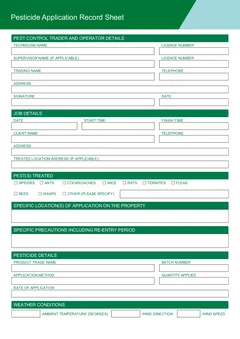
Those gaps matter because the record is meant to explain what happened on that job. Health Victoria says pest control operators must keep certain records for every pesticide application for every job. Its Technical Note 3 says records should include details such as product trade name, batch number, precautions, date and times, locations, pests, method, quantity, rate, weather for outdoor work, licence details, client details and signature.
Use the VIC pesticide application record to fill the official PDF layout online, or browse VIC pest control forms for the current pest control templates.
Why do most pesticide record mistakes happen?
Almost all of them come from the same cause: the record is written after the work instead of during it. By the end of the day similar jobs blend together, so the details that only existed in the technician's head get approximated. Health Victoria's record keeping guidance says records should be accurate, up to date, clear, consistent and in English. Writing from memory works against every one of those.
The fix is not more admin discipline at night. It is moving the record into the job itself, which is what the on-site completion guide walks through field by field.
Mistake 1: completing the record after the run
Was the batch number from the morning unit block or the afternoon townhouse? Was the wind light and steady at the factory job or the school job? Which rooms did the tenant ask you to avoid? Those answers fade fast.
Practical fix:
- Start the record before or during the treatment
- Capture product and batch while the container is in hand
- Record treated locations as you move through the property
- Add weather before you leave the site
- Preview the PDF before you close the job
Tradie Forms keeps the form one section at a time, so the record can be finished on a phone at the property instead of a flat PDF later.
Mistake 2: the property address stands in for the treated location
The property address tells someone where the job happened. It does not tell them where the pesticide was applied.
Technical Note 3 lists both the location of the pesticide application and the specific location within the property. A later reader needs to know whether you treated the kitchen skirting, roof void, garage, subfloor, external fence line, bins area, loading dock or commercial kitchen cracks and crevices.
The goal is not long writing. It is enough detail for the client, your office or an inspector to understand the application.
Mistake 3: product, batch, method and rate go missing
Product details are easy to overlook when the job is busy. The trade name might be obvious to the technician, but the record needs the detail, not the memory.
Technical Note 3 lists trade name and batch number among the records to keep. It also lists method, quantity, and application rate or enough information to determine the rate from the label. Record all of it while the equipment is still out and the label is still readable.
Health Victoria's record keeping page says pest control businesses using their own record sheet must make sure it contains all sections covered by the template for each pesticide used. If the job involved more than one product, do not squeeze them into a single vague note.

Mistake 4: precautions and re-entry advice left blank
Specific precautions, including the re-entry period, are part of the record details listed in Technical Note 3. This is not just a box for the file. It is information the client may rely on after you leave.
Common gaps include a blank re-entry field, precautions copied from a previous job without checking the product, advice that does not match the treated areas, and no note about pets, children, food areas, sensitive equipment or access restrictions where they are relevant.
Check the product label and the job conditions, write the precautions in plain language, and make the re-entry advice clear enough for the client or site contact to act on. Tradie Forms maps that wording onto the official PDF layout, but the licensed pest controller still checks it before the record is handed over.
Mistake 5: weather written from memory
Outdoor pesticide work needs weather details. Technical Note 3 lists ambient temperature, wind direction, wind speed and other relevant weather conditions where pesticide is applied outdoors.
The same technical note says monitoring wind speed, wind direction and temperature should be part of the job-site process for outdoor applications, and that if conditions change significantly during application, the time and nature of the changes should be noted. The mistake is waiting until later and writing "fine" or "calm".
Practical fix:
- Record temperature, wind direction and wind speed during the job
- Use the Beaufort Wind Scale as a guide if you do not have a wind-measuring instrument and it suits the job
- Note changes in conditions during application
- If wind is blowing toward sensitive areas or drift is noticed, follow the official guidance and your business process

Mistake 6: client and pest details that do not match the job
The person at the property is not always the client. On rental, strata, body corporate, commercial and facility management jobs, the site contact, billing contact, tenant, owner and managing agent can all be different people. Technical Note 3 includes the name, phone number and address of the person for whom the application was carried out, so check the job booking rather than the invoice header.
The pest fields have the same problem in miniature. The Health Victoria PDF includes pest selection fields and an option for other pests. If you use "other", describe what was treated. An untitled "other" entry is a dead end for the next person reading the record, and broad wording can make the record look like it covers pests you did not treat.
Where should the finished record be stored?
Wherever your business can produce it on request. Health Victoria says records completed on a smartphone or other electronic device must be kept securely and available for inspection when required. A PDF in a downloads folder, a text message thread or a camera roll is not a filing system.
Download the finished PDF after preview, attach it to the job in your job software or business filing system, and use consistent file names - date, client, suburb and form name works for most small teams. The digital record-keeping workflow covers naming, storage and office handback in more detail.
Does an online form check the job for you?
No. An online form can catch a missing field, but it cannot check whether the application suited the pest, site, product label, weather or client instructions. Tradie Forms gives you a section-by-section fill in PDF order, saved operator and client details, address search, missing-field checks, a preview of the official PDF layout, and a download on site.
The licensed pest controller remains responsible for the work and the finished PDF. Read the preview before handing it over or filing it. For licence status, supervision and authorisation checks, read the VIC pest control licence guide.
A close-out habit that catches all of this
At the property, before the ute moves:
- Confirm the client and the treated property
- Record the product trade name and batch
- Add pests treated and specific locations
- Add method, quantity and rate details
- Add precautions and re-entry advice
- Add weather where outdoor application is involved
- Sign, preview, download and store the PDF with the job
That turns the record into part of finishing the job, not an evening admin chore.
Next steps
Start the VIC pesticide application record at the property while the details are fresh, or browse VIC pest control forms for the rest of the Victorian pest control templates. Pest control forms for every state sit on the pest control forms hub.
Official references
Check the Health Victoria pest control forms page for the current record sheet, the Health Victoria record keeping for pest controllers page for what must be recorded and how it is stored, Technical Note 3 Record Keeping for the detailed list and weather guidance, and the Health Victoria pest control legislation and licensing page for the licensing framework behind the record.