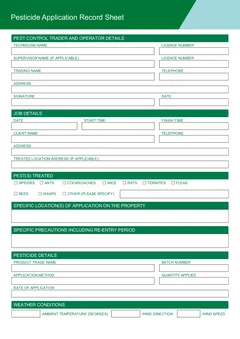
Tradie Forms: complete the Victorian pesticide application record on the official Health Victoria PDF layout while you are still at the property. Capture operator, client, pesticide, pest, location, weather, and sign-off details before the job record goes cold.
Pesticide records are easiest to complete while the work is still happening. The product is still in front of you. The client details are still open on the job. The treated areas, weather, precautions, and re-entry advice are not buried under the next booking.
For Victorian pest controllers, the pesticide application record is not just office filing. Health Victoria says pest control operators must keep certain records for every pesticide application for every job. The record should be clear enough that the job can be understood later by your business, the client, or an inspector.
That is hard to do from memory at 7pm.
Use the VIC pesticide application record to fill the official PDF layout online, or browse VIC pest control forms for the full library.
What is the VIC pesticide application record for?
Health Victoria's record keeping guidance says pest control operators must keep certain records for every pesticide application for every job, and it provides a Pesticide Application Record Sheet for pest control traders and operators.
Health Victoria's Technical Note 3 on record keeping says pest control operators are required under Regulation 89 to make and keep certain records for each pesticide used at a job. It also says the records should be kept for the required period and should not be false.
In practical terms, the record connects the treatment to:
- The person who applied the pesticide
- The business responsible for the work
- The client and property
- The pesticide product and batch
- The pest or pests treated
- The treated locations
- The application method, quantity, and rate
- The precautions and re-entry advice
- The weather where outdoor application is involved
- The signature of the person completing the record
Tradie Forms maps your entries onto the Health Victoria PDF layout. It does not decide whether the application was appropriate, whether the product label was followed, or whether the record is enough for a particular job. The licensed pest controller remains responsible for checking the work, the record, and the downloaded PDF.
Why does on-site completion matter?
Pest jobs move quickly. You might treat a roof void, kitchen, fence line, garage, subfloor, office tenancy, or commercial loading bay, then jump straight to the next address.
The longer you wait to fill the record, the more you rely on fragments:
- A product photo in your camera roll
- A half-written note about the batch number
- A customer name from the booking system
- A memory of wind direction from two suburbs ago
- A guess about the treated room or outdoor area
On-site completion avoids that. You can fill the record while the product label, site notes, client, and treated areas are still in reach. If something is missing, you can check it before leaving.
Details to collect before download
The official record sheet is simple, but it asks for details that can be painful to chase later. Treat the record as part of finishing the treatment, not as a separate office task.
Operator details
Record the technician name, licence number, trading name, business address, phone, and signature details as required by the form. If you need to confirm the operator's status or authorisation first, use the VIC pest control licence guide.
Saved operator details are useful for repeat jobs. You should not have to type the same licence and trading name every afternoon. But saved details still need review when a licence renews, a trading name changes, or a technician works under a different arrangement.
If the application is supervised, check the official record keeping guidance for supervisor details. Technical Note 3 includes name and licence number of the person supervising the application where applicable, such as when a trainee licence holder is involved.
Job date, time, and client
The record should show when the application happened and who it was for. Technical Note 3 lists date of application, start and finish times, and client name, phone number, and address among the record details.
Do not assume the site contact is the client. On commercial work, real estate jobs, strata jobs, and rental properties, the person who opens the door may not be the person for whom the application was carried out.
Property and specific application location
Health Victoria's record guidance includes the location of the pesticide application, including street address where applicable, and the specific location within the property.
Specific locations are where the record becomes useful later. "House" is weak. "Kitchen skirting, laundry wet area, garage perimeter, and external southern fence line" gives the next person a much clearer record.
If you treated outdoor areas, name them. If you treated internal rooms, name the rooms. If it was a multi-tenancy site, identify the tenancy, level, room, plant area, kitchen, store, or loading dock.
Pests treated
The record needs to say which pests were treated. The Health Victoria PDF uses pest selection fields and an "other" option. Use the pest names that match the job and product label.
If you select "other", describe the pest clearly. Do not leave it for the office to decode from photos.

Product trade name and batch
Technical Note 3 lists trade name and batch number as details to record. Capture these while the product is still out. A blurry product photo can help, but the record itself should carry the detail.
If more than one pesticide is used at a job, do not squash separate applications into one vague entry. Health Victoria's record keeping page says businesses using their own sheet must make sure it contains all sections covered by the template for each pesticide used. Keep the record tied to the pesticide actually applied.
Method, quantity, and rate
The technical note lists method of application, quantity applied, and rate of application or enough information to determine the rate from the label.
This is another reason to fill the record before packing up. The method and quantity are clear when the application has just happened. They get fuzzy later, especially on repeat maintenance jobs.

Precautions and re-entry advice
The record needs specific precautions, including the re-entry period. This is customer-facing information as much as record keeping. If the client, site manager, or tenant needs to know when they can re-enter an area, the record should not be vague.
Use plain wording that matches the product label and the job. If the site has pets, children, food areas, sensitive equipment, gardens, or neighbouring properties, make sure the advice is clear and kept with the job record.
Weather for outdoor applications
Technical Note 3 lists ambient temperature, wind direction, wind speed, and other relevant weather conditions for outdoor applications. It also gives guidance on weather, spray drift, and the use of the Beaufort Wind Scale where a wind-measuring instrument is not used.
Weather is hard to reconstruct accurately after the run. Record it during the job. If conditions change significantly during application, note the time and nature of the change.

How Tradie Forms helps
Tradie Forms turns the Victorian pesticide application record into sections you work through one at a time instead of a flat PDF.
You can:
- Fill operator, client, pest, product, weather, and sign-off details in order
- Reuse operator and client details where appropriate
- Search addresses instead of retyping suburb and postcode
- Catch missing required fields before download
- Preview the official PDF layout
- Download the finished PDF and attach it to your job record
That last step matters. A completed PDF is only useful if your business can find it later. Keep the downloaded record with the invoice, service report, photos, label notes, and any risk or job-site analysis your business uses.
Simple on-site workflow
Use the same rhythm every job:
Step 1
Product and batch
Off the label, before application
The batch number is unreadable once the container is back on the truck.
Step 2
Pests and locations
As you treat each area
Specific location within the property, not the street address again.
Step 3
Rate, method, weather
Before packing away
Plus precautions and re-entry advice, ready for the client conversation.
Step 4
Preview and attach
Before you drive off
Fix gaps on the official layout, then file it against the job.
Weather and batch details are the two that never survive a rebuild from memory.
The workflow is not about adding admin. It is about finishing the job once, while the facts are still fresh.
Record keeping after the job
Health Victoria's record keeping page says all records must be kept at the business address for a minimum of three years and should be accurate, up to date, clear, consistent, and in English.
Technical Note 3 also says that if records are completed on a smartphone or other electronic device, the pest control operator must make sure the records are kept securely and available for inspection when required.
That means your download and storage process matters. A PDF sitting in a phone downloads folder is easy to lose. Attach it to the job record, save it in the business filing system, or use whatever system your office relies on for repeat access.
File names help too. Use the date, client, suburb, and form name. That is enough for most small pest businesses to find the record without opening twenty PDFs.
Next steps
Start the VIC pesticide application record when you need to complete the official PDF layout at the property, or browse VIC pest control forms for the live pest control library. See the pest control forms hub for the rest of the Australian set.
You can also read the companion guide on common VIC pesticide application record mistakes.
For official requirements, check the Health Victoria pest control forms page, the Health Victoria record keeping for pest controllers page, Technical Note 3 Record Keeping, and the Health Victoria pest control legislation and licensing page.