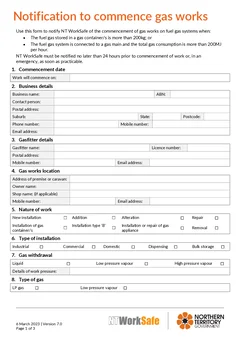
Tradie Forms: complete the NT Notification of Commencement of Gas Works on the official PDF layout before the work starts. Capture the business, gasfitter, site, gas system, technical details, site plan and declaration without fighting a flat PDF.
Gas work notifications are timing-sensitive. If the job needs NT WorkSafe notice, the form should not be a last-minute scramble while the crew is already on the way.
The details are technical enough that guessing from memory is risky. You need the location, licence details, type of gas, gas source, withdrawal details, system purpose, storage or container details, compliance checklist and site plan information. Those pieces often live across plans, photos, supplier notes and the gasfitter's head.
The best time to finish the notification is before the job moves from planning to work. That gives you time to check the threshold, complete the PDF and keep a clean record with the job. Use the NT Gas Works Notification template, browse NT gasfitter forms, and keep the common mistakes guide handy.
What is the NT gas works notification for?
NT WorkSafe says the notification form applies when the fuel gas stored in gas containers is more than 200kg, or when the fuel gas system is connected to a gas main and the total gas consumption is more than 200MJ per hour.
NT WorkSafe's gas work notification guidance also refers to Regulation 176 of the Dangerous Goods Regulations 1985. It says a licence holder must notify the Competent Authority before commencing gas works for installation of a fuel gas system, connection of a gas appliance, or repair other than minor repair, alteration, or removal of an existing fuel gas system.
Use the official NT WorkSafe gas work notification guidance and the Notification of commencement of gas works form page as the current references.
What is the 24-hour timing rule?
NT WorkSafe says it must be notified no later than 24 hours before the commencement of work, or in an emergency as soon as practicable.
That means this paperwork belongs in the job planning rhythm, not after the gasfitter has started. For scheduled work, finish the notification early enough that the 24-hour requirement is not squeezed by travel, supplier delays, customer access or crew changes.
For emergency situations, keep the record clear. If you notify as soon as practicable, the form and job notes should still explain what work was involved and why the timing was different.
When may this form not be required?
NT WorkSafe guidance says a notification is not required when the quantity of fuel gas connected to the system will not exceed 200kg, or the fuel gas system is connected to a gas main with total energy consumption of no more than 200MJ per hour.
Those thresholds are important, but do not rely on a rough guess when a job is close. Check the current guidance, the system design, the connected load, the container quantity and your licence obligations.
Also note the separate gas mains pathway. NT WorkSafe says Regulation 178 applies to work in respect of gas mains, with written notification required at least 7 days before construction or repair of the gas main, except for emergency repairs, minor repairs or routine maintenance. Do not use the 24-hour commencement form as a substitute for the separate gas mains notice where that pathway applies. See the construction or repair of gas main notification page.
Details to collect before you start the form
The NT gas works notification is easiest when the job record is ready. Pull the plans, customer details, licence details, gas load information and site information together before you sit down to finish the PDF.
Commencement date. The form needs the date the work will commence, lined up with the 24-hour notice requirement for scheduled work.
Business details. Add the business name, ABN, address, phone and email details accurately. Saved business details are useful for repeat jobs, but still check them after any licence, address or contact change.
Gasfitter details. Include the gasfitter's name, licence number, address, phone and email. Do not assume the person preparing the notification is the same person carrying out the work.
Location of gas works. Identify the premises or caravan where the gas work will be carried out. A remote property, mining camp, caravan park, commercial kitchen, workshop or multi-building site may need more than a street address. Add building names, bay numbers, tenancy names, compound references or site notes where useful.
Nature of work. Show what type of gas work is being started, such as new installation, appliance connection, repair, alteration or removal. Match the section to the actual scope. If it is a repair, decide whether it is minor repair or a type of work that needs notice under the current guidance.
Installation type, gas withdrawal, gas type and source. Capture whether the installation is domestic, commercial, industrial, caravan, marine or another type, plus gas withdrawal and work pressure details from the system design or measured job information. Record the gas type and source clearly, because they connect directly to the threshold question.
System purpose, piping, storage and containers. Explain what the gas system serves in plain words. Check piping sizing details, gas usage, storage tank information and gas container details before signing off. If supplier details are still being finalised, do not guess.
Compliance checklist and site plan. Treat these as part of the job record, not as a nuisance at the end. The site plan should help identify the installation and its relationship to the premises.
What should you keep with the notification?
Keep the notification with the records that explain the job:
- Completed notification PDF
- Plans, marked-up site plans or site plan images
- Gas container, storage tank or gas main load details
- Licence and business details used for the notification
- Customer approval, scope or work order
- Any NT WorkSafe submission or acknowledgement record
- Photos of the installation area where useful
That record helps the office, the gasfitter and the next person who picks up the job understand exactly what was notified. For the traps that cause follow-up, read common NT gas works notification mistakes.
How Tradie Forms helps
Tradie Forms turns the NT gas works notification into sections you work through one at a time. You can move through commencement, business, gasfitter, location, nature of work, installation type, gas withdrawal, gas type, gas source, system purpose, piping sizing, storage tanks, gas containers, compliance checklist, site plan and declaration.
You can save business and gasfitter details for repeat notifications, fill technical sections from the job record without editing a flat PDF, add site plan details before download, catch missing required fields, and preview the official PDF layout before submitting or storing the record.
Tradie Forms maps your entries onto the NT WorkSafe PDF layout. It is not affiliated with NT WorkSafe, and it does not decide whether the job is notifiable. Always check the current NT WorkSafe requirements and review the finished PDF before using it. It does not lodge the form for you.
Planning the notification around the job
The notification has a timing requirement, which means it has to be planned rather than remembered.
The practical approach is to lodge it when the job is booked rather than when the work is about to start. Booking is when the site details, the scope, and the dates are being settled anyway, and it removes the risk of a notification going in late because a job moved forward.
Where a job date shifts, check whether the notification still holds rather than assuming it does.
Keeping the record after the work
The notification is part of the job record, not a step that disappears once lodged.
Keep a copy with the job, along with anything the notification referenced. If a question arises later about whether the work was notified and when, that copy is the answer, and it is much easier to keep at the time than to retrieve afterwards.
Next steps
Start the NT Gas Works Notification before work begins, or browse NT gasfitter forms for Northern Territory trade paperwork. Use the common mistakes guide as a pre-send checklist. The gasfitting forms hub covers the other states.
Official references
Check NT WorkSafe's gas work notification guidance, the Notification of commencement of gas works form page, the NT WorkSafe gas safety page, and the construction or repair of gas main notification page.