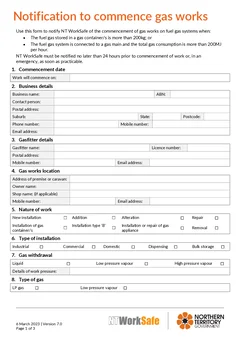
Tradie Forms: complete the NT Gas Works Notification one section at a time before work starts. Save gasfitter and business details, catch missing fields, preview the official PDF layout, and download a finished copy for NT WorkSafe and the job record.
Northern Territory gas work can be ready on site before the notification record is tidy. The job is booked, the appliance or system details are known, the crew is moving, and the gasfitter still needs to make sure NT WorkSafe has the correct commencement details where notification is required.
The common mistakes are not fancy. They are practical: wrong threshold, late timing, unclear site details, missing gasfitter information, or no copy kept with the job. Each one creates avoidable follow-up.
Use the NT Gas Works Notification template when you want a section-by-section fill, saved gasfitter details, missing-field checks, official PDF preview and a clean download. Browse NT gasfitter forms, and use the NT gas works notification guide for the full field list.
What the notification is for
NT WorkSafe's official notification of commencement of gas works page says the form is used to notify NT WorkSafe of commencement of gas works on fuel gas systems when the fuel gas stored in gas containers is more than 200 kilograms, or the fuel gas system is connected to a gas main and total gas consumption is more than 200 megajoules per hour.
The same page says NT WorkSafe must be notified no later than 24 hours before commencement of work, or in an emergency as soon as practicable.
NT WorkSafe also has separate gas mains notification guidance. Under Regulation 178, it says a licence holder must notify the Competent Authority before commencing work on gas mains, and written notification is required at least 7 days before construction or repair of a gas main unless the work is an emergency repair, minor repair or routine maintenance.
This guide focuses on avoidable mistakes around the fuel gas system commencement notification. Check the current NT WorkSafe pages before relying on any form for a specific job.
Mistake 1: treating every gas job the same
Not every gas job uses the same notification pathway. The fuel gas system commencement form has its own triggers. Gas mains work has separate guidance and timing.
Before filling the form, ask:
- Is this fuel gas system work that meets the storage or consumption threshold?
- Is this gas mains construction or repair?
- Is it emergency work?
- Is another gas compliance certificate or plate process involved?
- What record does the job file need after notification?
Tradie Forms helps you fill the official PDF layout. It does not decide whether notification is required or which NT WorkSafe pathway applies.
Mistake 2: leaving notification until the job starts
The official commencement page says NT WorkSafe must be notified no later than 24 hours before commencement, except emergency situations where notification is as soon as practicable.
That means the notification should be part of scheduling, not an afterthought. When the job is booked, gather the system details, commencement date, site address and licence details. If the job moves, check whether the notification record still matches the work.
Mistake 3: thresholds are guessed
The difference between more than 200kg and not more than 200kg matters. So does total gas consumption when connected to a gas main. Check the numbers against the system and current guidance. Commercial kitchens, industrial plant, temporary installations and storage-heavy sites can all vary quickly.
Mistake 4: vague site and system details
The person receiving the notice needs to know where the work is and what system is involved. A vague site description can cause follow-up and confusion.
For commercial, remote, industrial or multi-building sites, include enough detail to identify the work location. Add site name, building, area, access notes or other references where the form and job record allow.
Keep the finished PDF with the work order, quote, photos and any appliance or system notes. If a question comes back later, the office should not need to ring the gasfitter to remember which part of the site the notice covered.
Mistake 5: stale gasfitter details
Saved details are useful, especially for repeat work, but they still need checking. Licence numbers, business details, phone numbers and emails can change.
Before download, confirm gasfitter name, licence details, business name, contact phone and email, postal or business address where required, and signature and date. Tradie Forms can reuse the block, but the licensed gasfitter remains responsible for checking it before the PDF goes out.
Mistake 6: gas mains work is treated like normal commencement
Gas mains work has separate timing and notification guidance. If the job involves construction or repair of a gas main, check the gas mains section of NT WorkSafe's guidance and the construction or repair of gas main notification page before relying on the commencement form.
Mistake 7: no copy in the job record
The notification is not finished just because the PDF was sent. Keep a copy with the job record, along with any email receipt, portal reference or submission note.
A tidy record should include the finished notification PDF, NT WorkSafe submission or email record, work order, site contact, system or appliance details, photos or notes, and follow-up certificates or compliance records where applicable. When the owner, facility manager or regulator asks a question later, the record should be findable.
Emergency work still needs a record
The NT WorkSafe commencement page recognises emergency timing, but that does not mean the paperwork disappears. If the job is an emergency, record why the timing differed, when NT WorkSafe was notified, and who made the notification. Keep that note with the finished PDF.
When to start a fresh notification
If the work changes materially before commencement, do not assume the old PDF still describes the job. Check whether the notification needs to be corrected or replaced if the date, site, system, scope or gasfitter details change. Use speed to keep the record accurate, not to rush a stale form out the door.
A better notification habit
Step 1
Check the threshold
Fuel gas system
Whether the notification threshold applies at all for this job.
Step 2
Check gas mains guidance
Instead, or as well
Two pathways can apply to one job. Confirm which before filling anything.
Step 3
Gather site and system details
Including commencement
Saved gasfitter details still need checking against current registration.
Step 4
Preview, then submit
Accepted NT WorkSafe pathway
Download the official layout and send it the way NT WorkSafe accepts.
Most rework here comes from the first two steps, not the form itself.
- Store the PDF and submission record with the job.
Use the site name and commencement date in the file name. Attach any NT WorkSafe receipt or email. Add a note if the job changed after notification. Keep later compliance paperwork beside the notification.
How Tradie Forms helps
Tradie Forms turns the NT Gas Works Notification into sections you work through one at a time. You can enter who is notifying, where the work is, the system details and commencement information without fighting a flat PDF on site.
Saved gasfitter and business details reduce repeat typing. Missing-field checks flag gaps before download. The official PDF preview lets you check that the notice reads correctly before submission. After download, attach the PDF to the job record.
The product is not affiliated with NT WorkSafe. It does not lodge the form for you. It helps you fill and download the official layout cleanly. For the full field walkthrough, use the NT gas works notification guide.
Next steps
Start the NT Gas Works Notification when the work details are ready and the job pathway has been checked. Browse NT gasfitter forms for other Northern Territory trade paperwork, or return to the notification guide. Gasfitting forms for every state sit on the gasfitting forms hub.
Official references
For current requirements, check the NT WorkSafe notification of commencement of gas works page, the NT WorkSafe gas work notification guidance, the NT WorkSafe gas safety page, and the NT WorkSafe construction or repair of gas main notification page.