Skip to content
Tradie Forms
Features
Pricing
  • Electrical in QLD
  • Electrical in NT
  • Plumbing in NSW
  • Plumbing in QLD
  • Plumbing in SA
  • Plumbing in TAS
  • Gasfitting in TAS
  • Gasfitting in NT
  • Building in NSW
  • Building in VIC
  • Building in QLD
  • Fire Safety in NSW
  • Fire Safety in QLD
  • Pest Control in VIC
  • Pest Control in WA
  • QLD CoTC
  • NSW WHS SWMS
  • NSW Fire Safety Statement
  • NSW Combined Notice
  • QLD Form 9
  • Browse all forms
  • AI assistant
  • PDF tools
  • Integrations
  • Guides
  • Documentation
Log inCreate form
Form title
Form title
Form description and authority line
Form title
Form title
Form description and authority line
Create form
Create form
Tradie Forms

Fill Australian trade forms on your phone at the job, with gaps flagged before you download clean PDFs on the official layout. Built for sparkies, plumbers, builders, and crews.

Theme

Product

  • Features
  • Pricing
  • AI assistant
  • PDF tools
  • Integrations
  • Custom forms

Trades

  • Electrical
  • Plumbing
  • Gasfitting
  • Building
  • Fire Safety
  • Pest Control

Explore

  • Forms
  • Guides
  • Documentation
  • About
  • Contact

Account

  • Log in
  • Sign up

Legal

  • Terms of service
  • Privacy policy

© 2026 Tradie Forms Australia. All rights reserved.

Commission the system, hand over the record, get off the roof

Record the PV system, string readings, checks, and customer handover on your phone. Download one signed commissioning PDF before you leave.

Create Solar Commissioning3 free PDF downloads a month

Your forms

Solar Commissioning

Draft · today

Site checklist

Completed · 10 May

Site pack

Completed · 8 May

9:41

Solar Commissioning

Tradie Forms

Draft

Import from job

ServiceM8 logoFergus logoXero logo

Customer

18 London Cct

Canberra ACT 2601

Business

Saved detail

J. Smith & Co.

Licence no.EC 18472-

Tests & results

Polarity correctPass-
Earth continuityPass-
RCD trip time28 ms-

Fix before download

1 required field incomplete

All changes saved

Download PDFAttached to job

PDF tools

Merge

Combine job PDFs

Sign

Draw or upload signature

Organise

Reorder & rotate pages

Saved details prefilled

Business and licence

AI assistant

Helps you fill the form

Free to complete
Download 3 finished PDFs a month.No account needed to begin.
Template source
Created by Tradie Forms.
Template version
2026.1Current
Check the details
Read the form guide

Is this the right Solar Commissioning?

Solar Commissioning at a glance

A Tradie Forms designed record for documenting solar PV installation checks, test readings, and customer handover.

  • Aligned with common AS/NZS 5033 and AS/NZS 4777 commissioning evidence.
  • This is not STC assignment paperwork or network approval.

What you need to know

Who has to complete the Solar Commissioning?
Electricians and accredited solar installers commissioning a new or altered PV system.
When is it required?
Use it as job commissioning evidence. It does not replace the electrical compliance certificate required in your state or territory.
Where does the completed form go?
Give the PDF to the customer and keep a copy with the job, warranty, and network paperwork.
Can I fill it on my phone?
Yes. Tradie Forms guides you through each section on mobile and exports the official PDF layout when you are ready to complete.
Will this PDF be accepted?
Tradie Forms exports onto the official PDF layout where supported. Always preview and check the completed PDF before sending, lodging, or handing it over. Tradie Forms does not lodge or certify the form for you.

One commissioning record for the whole system

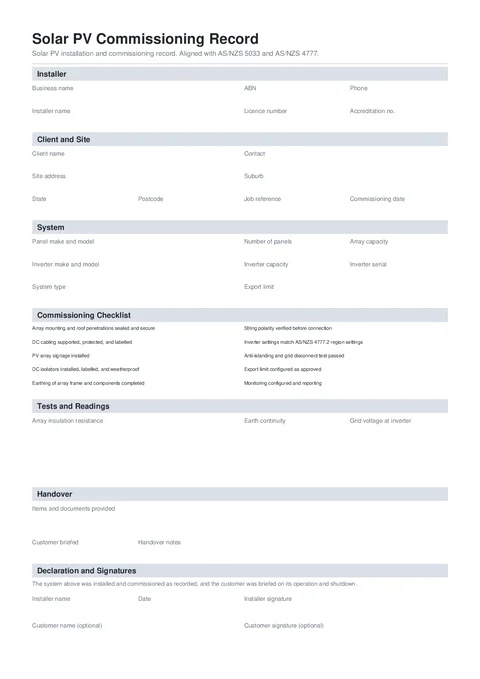
Preview the finished PDF with checklist notes and a string table that continues when needed.

  • String readings stay in a clear table
  • No results carry their notes into the PDF
  • Long string lists continue onto extra pages
Create Solar Commissioning
Solar Commissioning form preview
Preview of the Solar PV Commissioning Record PDF.

Keep the commissioning evidence with the job

Stop hunting through apps, photos, and handwritten notes when a client or supplier asks what was tested.

  • Readings scattered across the job

    Keep string readings, inverter details, and commissioning checks in the same record.

  • Handover details forgotten

    Tick off manuals, shutdown steps, monitoring, and network status while you are with the customer.

  • No clean record for a warranty call

    Download a signed PDF showing the system identity and readings taken at commissioning.

1,086
Tradies signed up
13,144
Completed forms
2,786,528
Fields validated

System details, test readings, handover evidence, and signatures stay together.

From final test to signed handover

Record the system, check it, add readings, and sign on site.

Demo: pick a template from the catalog, fill the form on site using shortcuts like job import and address search, then download the finished PDF.

Form templates

Pick a template or resume a draft

Pick up a draft

Resume work you already started

  • Solar CommissioningDraft · today
  • ACMA TCA1Draft · yesterday
  • NSW CCEWDraft · 3 days ago

Start fresh

Browse the full template library

Resume: Solar Commissioning
NSW CCEW form preview

NSW CCEW

NSW WHS SWMS form preview

NSW WHS SWMS

Solar Commissioning form preview

Solar Commissioning

QLD CoTC form preview

QLD CoTC

NT Gas Works Notification form preview

NT Gas Works Notification

QLD Form 21 form preview

QLD Form 21

NSW Fire Safety Statement form preview

NSW Fire Safety Statement

SA Backflow Report form preview

SA Backflow Report

VIC Asbestos Removal Notification form preview

VIC Asbestos Removal Notification

Resume a draft or pick a fresh template from the library.

What you fill in

Installer, site, system, checklist, string readings, handover, and signatures.

  1. 1

    Installer and Site

    Business, installer, client, job, and site details.

  2. 2

    System and Checklist

    Equipment identity and 10 guided commissioning checks.

  3. 3

    Tests and Readings

    Measured commissioning results.

  4. 4

    Handover and Signatures

    Customer briefing, installer sign-off, and customer signature.

What gets checked before export

Tradie Forms checks these requirements against the Tradie Forms template before the PDF is ready to complete.

Job and identity details

Customer, site, licence, contractor, and date fields.

Client name, commissioning date, and system identity are required.
Confirm whether the customer was briefed.

Work and test details

The technical details that prove what was completed or checked.

Answer all 10 checklist items and add a note for every No result.
Complete every required test and reading.

Declaration and sign-off

Signatures, declarations, authorised people, and review steps.

Installer name, date, and signature are required before download.
The customer signature is optional.

Frequently asked questions

No. It is a commissioning record. Complete the electrical compliance certificate required in the state or territory where the work was done.

No. Keep using the network, retailer, and registered-agent paperwork required for the job.

Use this record for the PV side, then complete the Battery Storage Commissioning Record for the battery installation.

No. The customer signature is optional. Capture it on site or send the PDF with a share link for later signing.

No. You fill and download the finished PDF here, then submit or hand it over the way the job, customer, or regulator requires.

Yes after you upgrade. Save once and apply them on the next form so you are not retyping the same block every time.

Finish the solar handover on site

Record the readings, tick off the handover, and download the signed PDF.

Create Solar CommissioningBrowse electrical forms
  • No credit card required
  • 3 free PDF downloads a month

Related forms

Nearby templates for the same state, trade, or paperwork type.

Battery Commissioning form preview

Battery Commissioning

National · Safety

Create form →
Emergency Lighting Register form preview

Emergency Lighting Register

National · Safety

Create form →
EV Charger Commissioning form preview

EV Charger Commissioning

National · Safety

Create form →

Keep exploring

Open the guide, browse the catalogue, or send a PDF we can map.

  • Read the form guideStep-by-step guidance for Solar Commissioning.
  • Browse all templatesSearch the public library by state, trade, and type.
  • Request custom templateSend a PDF and get a private guided form for your crew.