Skip to content
Tradie Forms
Contact supportOpen app
Tradie Forms
IntroductionQuick startFAQ

Using the app

Form typesWorkspaceJobsStarting a formCompleting a formAI assistantPDF downloadsShare links
Presets
PDF toolsTeamsCustom forms

Form guides

Overview
Defect NoticeEmergency Lighting Test RegisterRCD Test RecordSmoke Alarm Service RecordSwitchboard ReportTest and Tag RegisterBattery Storage Commissioning RecordEV Charger Commissioning RecordSolar PV Commissioning Record

Account and billing

Managing your accountBilling

Support

TroubleshootingFeedback
Section
Section
Page title
Page title
Short description for the help article
Description continues on a second line
Short description for the help article
Description continues on a second line
Intro paragraph
Intro paragraph
Intro paragraph
Intro paragraph
Intro paragraph
Intro paragraph
Section heading
Section heading
Body paragraph
Body paragraph
Body paragraph
Body paragraph
Body paragraph
Body paragraph
Note
Callout title
Callout body
Callout body
Note
Callout title
Callout body
Callout body
Another heading
Another heading
Body paragraph
Body paragraph
Body paragraph
Body paragraph
Body paragraph
Body paragraph
List item one
List item two
List item three
List item one
List item two
List item three
Was this page helpful?
Yes
Yes
No
No

Loading documentation page

On this page
On this page
TOC item
TOC item
TOC item
TOC item
TOC item
TOC item
TOC item
TOC item
TOC item
TOC item

Form guides

Solar PV Commissioning Record

Help for electricians completing a solar PV commissioning record in Tradie Forms.

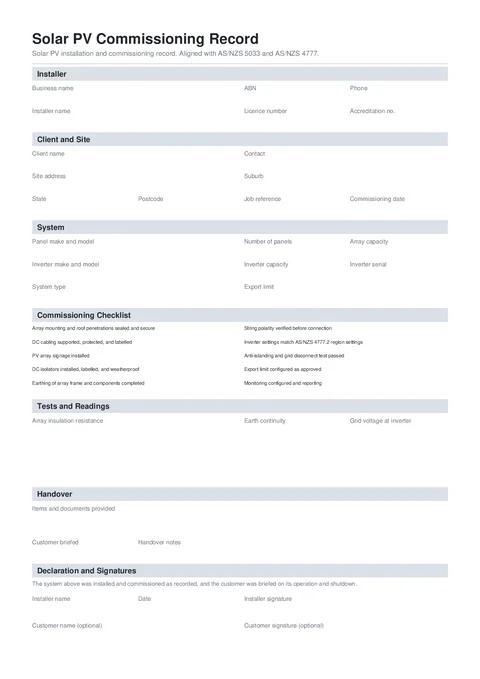
Solar Commissioning PDF preview
NationalElectrical

Tradie Forms

Commission a solar PV system, record per-string readings, complete the handover, and download a signed PDF aligned with AS/NZS 5033 and AS/NZS 4777.

Open this form

The Solar PV Commissioning Record keeps the installed system, commissioning checks, string readings, customer handover, and signatures in one PDF.

This is a Tradie Forms designed record. It is not a certificate of electrical safety, network approval, or STC assignment form.

Open the Solar PV Commissioning Record when the system is ready for final testing.

Complete the electrical compliance, network, retailer, and scheme paperwork required for the job separately.

Before you start

  • Have the panel and inverter make, model, serial, and ratings ready.
  • Confirm the network-approved export limit, if one applies.
  • Have your test equipment ready for insulation resistance, earth continuity, grid voltage, Voc, and Isc readings.
  • Confirm which manuals, warranty documents, shutdown steps, and monitoring access must be handed over.

Installer

Add the business and installer details shown at the top of the record.

  • Business Name and Installer Name are required.
  • Add the ABN, electrical licence, accreditation number, and phone where they identify the installer.
  • The optional logo appears at the top right of the PDF.

Save this section on Solo or Team to prefill it on the next job.

Client and Site

Enter the client and commissioning date. Add a contact and job reference to keep the record with the right installation.

Search the Site Address to fill the address, suburb, state, and postcode together.

System

Record the panel and inverter details exactly as installed.

  • Add the panel make and model, quantity, and array capacity.
  • Add the inverter make and model, capacity, and serial.
  • Choose Grid-connect, Grid-connect with battery, or Off-grid.
  • Add the export limit approved for the site. Leave it blank when the system is not limited.

For a hybrid installation, use the Battery Storage Commissioning Record for the battery side.

Commissioning Checklist

Answer all 10 checks with Yes, No, or N/A.

  • Use Yes when the item was completed and verified.
  • Use No when the item was not met. Add a short note explaining the result.
  • Use N/A only when the item genuinely does not apply, such as an unlimited export setup.

The app records documented deviations. It does not decide whether the installation complies.

Tests and Readings

Add the array insulation resistance, earth continuity, and grid voltage at the inverter.

Add one row per PV string:

  • String identifies the string.
  • Voc is the measured open-circuit voltage.
  • Isc is the measured short-circuit current.
  • Expected Voc is optional.

At least one string row is required. Long string lists continue onto extra PDF pages.

Handover

Tick the documents and instructions provided to the customer. Confirm whether the customer was briefed and add notes for anything that needs follow-up.

The checklist covers manuals, warranty documents, shutdown and isolation, monitoring, and the network or meter application status.

Declaration and Signatures

Add the installer name, date, and signature. These are required before download.

The customer name and signature are optional. Capture the signature on site, or send the PDF with a share link for later signing.

Before download

  • Check the client, site, commissioning date, panel, inverter, and serial details.
  • Answer all 10 checks and add a note for every No.
  • Confirm each string row has Voc and Isc readings.
  • Check the handover answers match what the customer received.
  • Add the installer name, date, and signature.
  • Preview the finished PDF before issuing it.

After download

Give the PDF to the customer and keep a copy with the job, warranty records, network paperwork, and the electrical compliance certificate required where the work was done.

Was this page helpful?

EV Charger Commissioning Record

Help for electricians completing an EV charger commissioning record in Tradie Forms.

QLD CoTC

How to complete the WorkSafe Queensland electrical testing certificate in Tradie Forms.

On this page

Before you startInstallerClient and SiteSystemCommissioning ChecklistTests and ReadingsHandoverDeclaration and SignaturesBefore downloadAfter download