Job Handover
National · Completion
Add the work, prices and optional bank details. Download a tidy PDF with GST totals worked out.
Invoice
Tradie Forms
Import from job
Customer
Business
Saved detailTests & results
Fix before download
1 required field incomplete
All changes saved
Saved details prefilled
Business and licence
AI assistant
Helps you fill the form
Invoice at a glance
A practical invoice document for Australian trade businesses.
The PDF compacts around the information you entered.

Create the useful document without adding payment or accounting features.
Unused optional details disappear from the PDF.
Line totals and GST are calculated consistently.
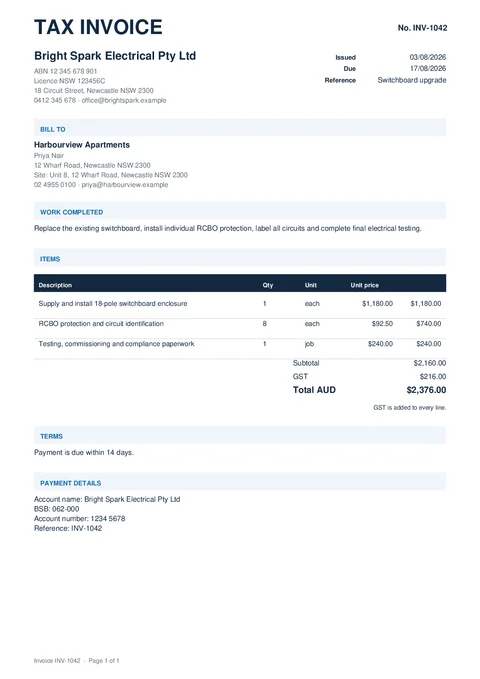
Work, pricing and payment details land in one readable document.
Only the sections you use appear on the finished invoice.
Fill it in, preview it, then download or email the PDF.
Demo: pick a template from the catalog, fill the form on site using shortcuts like job import and address search, then download the finished PDF.
Resume a draft or pick a fresh template from the library.
Business, customer, invoice details, items and any payment details you need.
Details shown at the top of the invoice.
Who the invoice is for. Empty optional details stay off the PDF.
Document dates, number, reference and GST settings.
Add labour, materials and other charges.
Optional blocks only appear when you use them.
Optional bank details printed on the invoice. No payment link or payment tracking.
Tradie Forms checks these requirements against the Tradie Forms template before the PDF is ready to complete.
Customer, site, licence, contractor, and date fields.
Anything else that should be checked before downloading the PDF.
Add the work and pricing, check the PDF, then send it on.
Nearby templates for the same state, trade, or paperwork type.
Open the guide, browse the catalogue, or send a PDF we can map.