Skip to content
Tradie Forms
Contact supportOpen app
Tradie Forms
Overview
Job Safety AnalysisService ReportTake 5 Safety CheckSite DiaryJob HandoverHot Works PermitPermit to WorkInvoiceQuote
Section
Section
Page title
Page title
Short description for the help article
Description continues on a second line
Short description for the help article
Description continues on a second line
Intro paragraph
Intro paragraph
Intro paragraph
Intro paragraph
Intro paragraph
Intro paragraph
Section heading
Section heading
Body paragraph
Body paragraph
Body paragraph
Body paragraph
Body paragraph
Body paragraph
Note
Callout title
Callout body
Callout body
Note
Callout title
Callout body
Callout body
Another heading
Another heading
Body paragraph
Body paragraph
Body paragraph
Body paragraph
Body paragraph
Body paragraph
List item one
List item two
List item three
List item one
List item two
List item three
Was this page helpful?
Yes
Yes
No
No

Documentation page
On this page
On this page
TOC item
TOC item
TOC item
TOC item
TOC item
TOC item
TOC item
TOC item
TOC item
TOC item
  1. Form guides
  2. Building
  3. National

Invoice

Reviewed 3 August 2026

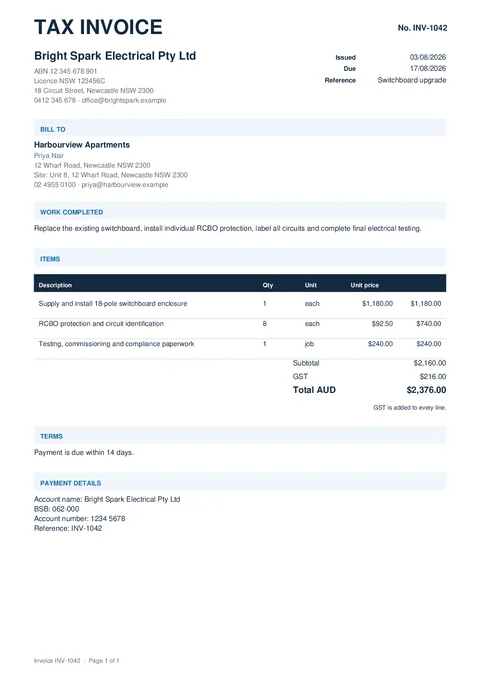
Create an itemised invoice PDF with automatic GST totals and optional payment details.

Invoice PDF preview
State
National
Trade
All trades
Authority
Tradie Forms
Form version
2026.1
Open this form

Use this template to invoice a customer for completed trade work. It creates a PDF only. It does not collect payment, track overdue invoices or send reminders.

Your business

Add the business name and the contact details you want printed. Add your ABN when you are registered for GST. A logo is optional.

Customer

Add the customer name. Billing, contact and job site details are optional and stay off the PDF when empty.

Invoice details

Enter your invoice number and issue date. Add a due date or job reference when useful.

Items and pricing

Add labour, materials and other charges. Choose GST or GST-free for each line. The preview and PDF calculate totals from the entered prices.

Job notes and terms

Describe the completed work. Turn on exclusions or terms only when you need those sections.

Payment details

Turn this section on to print bank account details and a payment reference. Tradie Forms does not process or track the payment.

Permit to Work

Help issuing and closing a Permit to Work in Tradie Forms.

Quote

Create an itemised quote PDF with automatic GST totals and optional sections.

Was this page helpful?

On this page

Your businessCustomerInvoice detailsItems and pricingJob notes and termsPayment details