Skip to content
Tradie Forms
Features
Pricing
  • Electrical in NSW
  • Electrical in VIC
  • Electrical in QLD
  • Electrical in WA
  • Electrical in SA
  • Electrical in TAS
  • Electrical in ACT
  • Electrical in NT
  • Plumbing in NSW
  • Plumbing in QLD
  • Plumbing in SA
  • Plumbing in TAS
  • Gasfitting in TAS
  • Gasfitting in NT
  • Building in NSW
  • Building in VIC
  • Building in QLD
  • Fire Safety in NSW
  • Fire Safety in QLD
  • Pest Control in VIC
  • Pest Control in WA
  • ACMA TCA1
  • NSW Fire Safety Statement
  • NSW Combined Notice
  • QLD CoTC
  • QLD Form 9
  • Browse all forms
  • AI assistant
  • PDF tools
  • Integrations
  • Guides
  • Documentation
Log inCreate form
Form title and outcome
Form subtitle and product promise
Start form
Start form
Free PDF downloads
Free PDF downloads
Form title and outcome
Form subtitle and product promise
Start form
Start form
Free PDF downloads
Free PDF downloads
Label
Detail
Label
Detail
Label
Detail
Label
Detail
Label
Detail
Label
Detail
Label
Detail
Label
Detail
Finished output
Finished output
Bullet
Bullet
Bullet
Start form
Start form
Finished output
Finished output
Bullet
Bullet
Bullet
Start form
Start form
Tradie Forms

Fill Australian trade forms on your phone at the job, with gaps flagged before you download clean PDFs on the official layout. Built for sparkies, plumbers, builders, and crews.

Theme

Product

  • Features
  • Pricing
  • AI assistant
  • PDF tools
  • Integrations
  • Custom forms

Trades

  • Electrical
  • Plumbing
  • Gasfitting
  • Building
  • Fire Safety
  • Pest Control

Explore

  • Forms
  • Guides
  • Documentation
  • About
  • Contact

Account

  • Log in
  • Sign up

Legal

  • Terms of service
  • Privacy policy

© 2026 Tradie Forms Australia. All rights reserved.

Your Battery Commissioning done in minutes

Record the battery, location assessment, tests, backup behaviour, and customer handover on your phone. Download one signed PDF.

Location decisions, commissioning results, and handover evidence stay together.

Create Battery Commissioning3 PDF downloads a month, freePhone, tablet or laptop
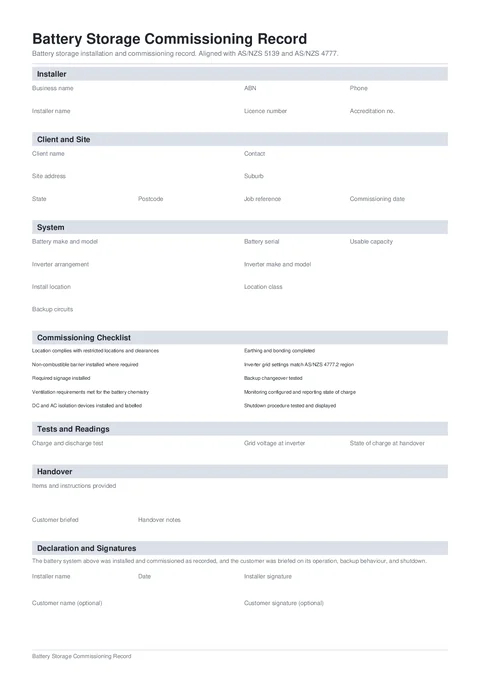
Battery Commissioning form preview
Preview of the Battery Storage Commissioning Record PDF.
Free to complete
3 finished PDFs a month on the free plan.No account needed to begin.
Template source
Created by Tradie Forms.
Template version
2026.1Current
Check the details
Read the form guide

Is this the right Battery Commissioning?

A Tradie Forms designed record for documenting battery storage installation checks, tests, and customer handover.

  • Aligned with common AS/NZS 5139 and AS/NZS 4777 commissioning evidence.
  • The form records the installer's location assessment. It does not validate compliance.
Who has to complete the Battery Commissioning?
Licensed electricians and accredited battery installers commissioning a residential or small commercial battery system.
When is it required?
Use it as job commissioning evidence. It does not replace the electrical compliance certificate required in your state or territory.
Where does the completed form go?
Give the PDF to the customer and keep a copy with the job, warranty, network, and compliance paperwork.
Can I fill it on my phone?
Yes. Tradie Forms walks you through each section on your phone and downloads the official PDF layout when you are ready.
Will this PDF be accepted?
Tradie Forms downloads your answers in the official PDF layout where supported. Always preview and check the completed PDF before sending, lodging, or handing it over. Tradie Forms does not lodge or certify the form for you.

Keep the battery decisions with the installation

Make it clear what was installed, where it sits, what was tested, and what the customer was shown.

  • Location assessment not recorded

    Keep the location class, clearances checklist, barrier decision, and install location with the battery serial.

  • Backup behaviour misunderstood

    Record the backup circuits and tick off the customer briefing before the first outage.

  • Warranty evidence split across systems

    Keep charge testing, state of charge, monitoring, and handover in one signed PDF.

From location check to signed handover

Identify, check, test, brief, and sign before you leave.

Start a fresh one from the library or pick up a draft where you left off.

What you fill in

Installer, site, battery, checklist, readings, handover, and signatures.

  1. 1

    Installer and Site

    Business, installer, client, job, and site details.

  2. 2

    System and Checklist

    Equipment identity and 10 commissioning checks.

  3. 3

    Tests and Readings

    Measured commissioning results.

  4. 4

    Handover and Signatures

    Customer briefing, installer sign-off, and customer signature.

A clear record of the battery installation

Preview the finished PDF with location details, checklist notes, tests, and customer handover.

Job and identity details

Customer, site, licence, contractor, and date fields.

Client name, commissioning date, and system identity are required.
Confirm whether the customer was briefed.

Work and test details

The technical details that prove what was completed or checked.

Answer all 10 checklist items and add a note for every No result.
Complete every required test and reading.

Declaration and sign-off

Signatures, declarations, authorised people, and review steps.

Installer name, date, and signature are required before download.
The customer signature is optional.
Create Battery Commissioning

Frequently asked questions

No. The installer assesses the location and records the decision. The form keeps that evidence with the job.

No. It is a commissioning record. Complete the electrical compliance certificate required where the work was done.

No. Keep using the network, retailer, and scheme paperwork required for the installation.

No. The customer signature is optional. Capture it on site or send the PDF with a share link for later signing.

No. You fill and download the finished PDF here, then submit or hand it over the way the job, customer, or regulator requires.

Yes after you upgrade. Save once and apply them on the next form so you are not retyping the same block every time.

Finish the battery handover in minutes

Record the checks, test the system, brief the customer, and download the signed PDF.

Create Battery CommissioningBrowse electrical forms
  • No credit card required
  • 3 PDF downloads a month

Related forms

Nearby templates for the same state, trade, or paperwork type.

Emergency Lighting Register form preview

Emergency Lighting Register

National · Safety

Create form →
EV Charger Commissioning form preview

EV Charger Commissioning

National · Safety

Create form →
Hot Works Permit form preview

Hot Works Permit

National · Safety

Create form →

Keep exploring

Open the guide, browse the catalogue, or send a PDF we can map.

  • Read the form guideStep-by-step guidance for Battery Commissioning.
  • Browse all templatesSearch the public library by state, trade, and type.
  • Request custom templateSend a PDF and get a private online form for your crew.