Loading documentation page
Form guides
Overview and section help for Queensland Form 9 backflow test reports

Queensland Government
Fill Queensland Form 9 backflow inspection and testing reports on site, then download the finished PDF for council and owner copies.
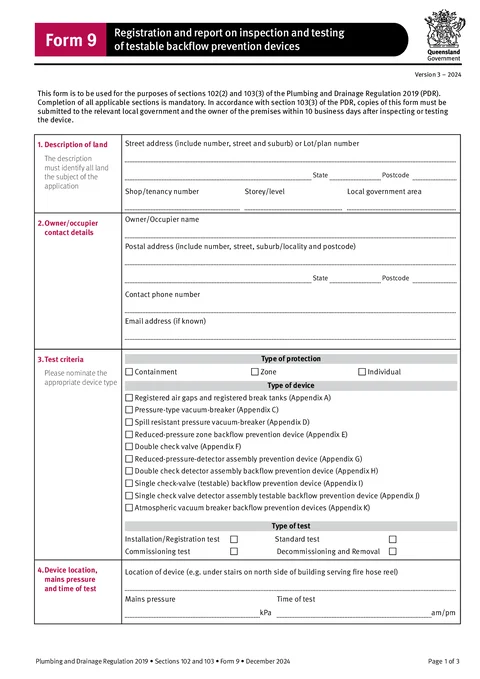
Open this formQLD Form 9 is used for registration and reporting on inspection and testing of testable backflow prevention devices.
Open the form with the device, test kit and test record in front of you.
Have these ready:
Copies of the current form must be given to the relevant local government and the owner of the premises within 10 business days after inspecting or testing the device.
Identify the property where the device is installed.
Use address search on Solo or Team, then check the manual fields. Device reports often need enough location detail to identify a specific site or tenancy.
Check the address against the device tag, asset record, council record, or job paperwork.
Enter the contact details for the owner or occupier.
The owner, occupier, site contact, and person who booked the job can be different. Use the details required for the report and local government process.
Check contact details against the booking, property records, or owner correspondence.
Record what was tested and why.
Select the protection category that matches the installation, such as containment, zone, or individual protection.
Select the device type, such as reduced pressure zone device, double check valve assembly, pressure vacuum breaker, air gap, or break tank.
Select the test type, such as initial, annual, after repair, after relocation, or other applicable test.
Check the criteria against the device label, asset record, and test procedure.
Use this section to identify the device on site and record test conditions.
Be specific enough for the owner or local government to find the device later.
Check mains pressure and time against your test record.
Enter the details and readings for the main backflow prevention device.
Use the device plate and test kit record. If the device fails, make sure the result section and comments match the readings.
Check numbers carefully. Transposed serial numbers or readings are common mistakes on backflow reports.
Complete this section only when a bypass device is fitted.
Leave this section blank when no bypass device is fitted. Do not copy main device readings into bypass fields unless they genuinely belong there.
Check the bypass readings against your test sheet.
Use this section when the tested device is a pressure type vacuum breaker.
Only complete the PVB fields that match the device and test performed.
Check values against the test kit record and device details.
Use this section for a registered air gap or break tank.
Use measured values, not estimated values. Add enough context so the device can be identified later.
Check measurements against your site record.
Enter the test kit used for the report.
Use the exact serial number from the kit or calibration certificate. Check that the verification date is current for the test.
Confirm the kit details match the readings used in the report.
Enter the authorised tester who carried out the test.
Save authorised tester details for repeat Form 9 work. Prefilling saved details requires Solo or Team.
Check the tester name, licence details, and test date against the test record.
Record the overall result of the test.
If the device fails, make sure the comments explain what happened clearly enough for the owner or local government to act on.
Check the result matches the readings in the device sections.
Complete this section when the responsible person is not the contractor for the work.
Leave it blank when it does not apply. If your business process requires contractor details anyway, make sure the details match the licence holder responsible for the work.
Check the contractor licence number before issuing the report.
Complete the declaration after the report is checked.
Check site details, device details, readings, test kit details, tester details, and pass/fail result before signing.